AstrBot is an open-source, all-in-one Agentic personal and group chat assistant that can be deployed on dozens of mainstream instant messaging platforms such as QQ, Telegram, WeCom, Lark, DingTalk, Slack, and more. It also features a built-in lightweight ChatUI similar to OpenWebUI, creating a reliable and scalable conversational AI infrastructure for individuals, developers, and teams. Whether it's a personal AI companion, smart customer service, automated assistant, or enterprise knowledge base, AstrBot enables you to quickly build AI applications within the workflow of your instant messaging platforms.

## Key Features
1. 💯 Free & Open Source.
2. ✨ Large Language Model (LLM) dialogue, Multimodal, Agent, MCP, Skills, Knowledge Base, Persona settings, automatic dialogue compression.
3. 🤖 Supports integration with agent platforms such as Dify, Alibaba Bailian, Coze, etc.
4. 🌐 Multi-platform support: QQ, WeCom, Lark, DingTalk, WeChat Official Account, Telegram, Slack, and [more](#supported-message-platforms).
5. 📦 Plugin extension: 1000+ plugins available for one-click installation.
6. 🛡️ [Agent Sandbox](https://docs.astrbot.app/use/astrbot-agent-sandbox.html): Isolated environment for safely executing any code, calling Shell commands, and reusing session-level resources.
7. 💻 WebUI support.
8. 🌈 Web ChatUI support: Built-in proxy sandbox, web search, etc. within ChatUI.
9. 🌐 Internationalization (i18n) support.
| 💙 Roleplay & Companionship |
✨ Proactive Agent |
🚀 General Agentic Capabilities |
🧩 1000+ Community Plugins |

|

|

|

|
## Quick Start
### One-Click Deployment
For users who want to experience AstrBot quickly, are familiar with the command line, and can install the `uv` environment themselves, we recommend using `uv` for one-click deployment ⚡️.
```bash
uv tool install astrbot
astrbot init # Execute this command only for the first time to initialize the environment
astrbot run # astrbot run --backend-only starts only the backend service
# Install development version (more fixes and new features, but less stable; suitable for developers)
uv tool install git+https://github.com/AstrBotDevs/AstrBot@dev
```
> Requires [uv](https://docs.astral.sh/uv/) installed.
> [!NOTE]
> For macOS users: Due to macOS security checks, the first execution of the `astrbot` command may take a longer time (about 10-20 seconds).
Update `astrbot`:
```bash
uv tool upgrade astrbot
```
### Docker Deployment
For users familiar with containers who prefer a more stable deployment suitable for production environments, we recommend using Docker / Docker Compose to deploy AstrBot.
Please refer to the official documentation [Deploy AstrBot with Docker](https://astrbot.app/deploy/astrbot/docker.html).
### Deploy on RainYun
For users who want to deploy AstrBot with one click and do not want to manage servers themselves, we recommend RainYun's one-click cloud deployment service ☁️:
[](https://app.rainyun.com/apps/rca/store/5994?ref=NjU1ODg0)
### Desktop Client Deployment
For users who wish to use AstrBot on the desktop with ChatUI as the main interface, we recommend using the AstrBot App.
Go to [AstrBot-desktop](https://github.com/AstrBotDevs/AstrBot-desktop) to download and install; this method is intended for desktop use and is not recommended for server scenarios.
### Launcher Deployment
Also for desktop, users who want quick deployment and isolated environments for multiple instances can use the AstrBot Launcher.
Go to [AstrBot Launcher](https://github.com/Raven95676/astrbot-launcher) to download and install.
### Deploy on Replit
Replit deployment is maintained by the community, suitable for online demos and lightweight trials.
[](https://repl.it/github/AstrBotDevs/AstrBot)
### AUR
The AUR method is for Arch Linux users who wish to install AstrBot via the system package manager.
Execute the following command in the terminal to install the `astrbot-git` package. You can start using it after installation completes.
```bash
yay -S astrbot-git
```
**More Deployment Methods**
If you need panel-based or highly customized deployment, you can refer to [BT Panel](https://astrbot.app/deploy/astrbot/btpanel.html) (BT Panel App Store), [1Panel](https://astrbot.app/deploy/astrbot/1panel.html) (1Panel App Store), [CasaOS](https://astrbot.app/deploy/astrbot/casaos.html) (NAS / Home Server visual deployment), and [Manual Deployment](https://astrbot.app/deploy/astrbot/cli.html) (Full custom installation based on source code and `uv`).
## Supported Message Platforms
Connect AstrBot to your favorite chat platforms.
| Platform | Maintainer |
|---------|---------------|
| **QQ** | Official |
| **OneBot v11** | Official |
| **Telegram** | Official |
| **WeCom App & Bot** | Official |
| **WeChat Customer Service & Official Account** | Official |
| **Lark (Feishu)** | Official |
| **DingTalk** | Official |
| **Slack** | Official |
| **Discord** | Official |
| **LINE** | Official |
| **Satori** | Official |
| **Misskey** | Official |
| **Whatsapp (Coming Soon)** | Official |
| [**Matrix**](https://github.com/stevessr/astrbot_plugin_matrix_adapter) | Community |
| [**KOOK**](https://github.com/wuyan1003/astrbot_plugin_kook_adapter) | Community |
| [**VoceChat**](https://github.com/HikariFroya/astrbot_plugin_vocechat) | Community |
## Supported Model Providers
| Provider | Type |
|---------|---------------|
| Custom | Any OpenAI API compatible service |
| OpenAI | LLM |
| Anthropic | LLM |
| Google Gemini | LLM |
| Moonshot AI | LLM |
| Zhipu AI | LLM |
| DeepSeek | LLM |
| Ollama (Local) | LLM |
| LM Studio (Local) | LLM |
| [AIHubMix](https://aihubmix.com/?aff=4bfH) | LLM (API Gateway, supports all models) |
| [Compshare](https://www.compshare.cn/?ytag=GPU_YY-gh_astrbot&referral_code=FV7DcGowN4hB5UuXKgpE74) | LLM (API Gateway, supports all models) |
| [SiliconFlow](https://docs.siliconflow.cn/cn/usercases/use-siliconcloud-in-astrbot) | LLM (API Gateway, supports all models) |
| [PPIO](https://ppio.com/user/register?invited_by=AIOONE) | LLM (API Gateway, supports all models) |
| [302.AI](https://share.302.ai/rr1M3l) | LLM (API Gateway, supports all models)|
| [TokenPony](https://www.tokenpony.cn/3YPyf) | LLM (API Gateway, supports all models)|
| ModelScope | LLM |
| OneAPI | LLM |
| Dify | LLMOps Platform |
| Alibaba Bailian | LLMOps Platform |
| Coze | LLMOps Platform |
| OpenAI Whisper | Speech-to-Text |
| SenseVoice | Speech-to-Text |
| OpenAI TTS | Text-to-Speech |
| Gemini TTS | Text-to-Speech |
| GPT-Sovits-Inference | Text-to-Speech |
| GPT-Sovits | Text-to-Speech |
| FishAudio | Text-to-Speech |
| Edge TTS | Text-to-Speech |
| Alibaba Bailian TTS | Text-to-Speech |
| Azure TTS | Text-to-Speech |
| Minimax TTS | Text-to-Speech |
| Volcano Engine TTS | Text-to-Speech |
## ❤️ Contribution
Welcome any Issues/Pull Requests! Just submit your changes to this project :)
### How to Contribute
You can contribute by viewing issues or helping to review PRs (Pull Requests). Any issues or PRs are welcome to promote community contribution. Of course, these are just suggestions; you can contribute in any way. For new feature additions, please discuss via Issue first.
It is recommended to merge functional PRs into the `dev` branch, which will be merged into the main branch and released as a new version after testing.
To reduce conflicts, we suggest:
1. Create your working branch based on the `dev` branch, avoid working directly on the `main` branch.
2. When submitting a PR, select the `dev` branch as the target.
3. Regularly sync the `dev` branch to your local environment; use `git pull` frequently.
### Development Environment
AstrBot uses `ruff` for code formatting and checking.
```bash
git clone https://github.com/AstrBotDevs/AstrBot
git switch dev # Switch to dev branch
pip install pre-commit # or uv tool install pre-commit
pre-commit install
```
We recommend using `uv` for local installation and testing:
```bash
uv tool install -e . --force
astrbot init
astrbot run
```
Frontend Debugging:
```bash
astrbot run --backend-only
cd dashboard
bun install # or pnpm, etc.
bun dev
```
### QQ Groups
- Group 9: 1076659624 (New)
- Group 10: 1078079676 (New)
- Group 1: 322154837
- Group 3: 630166526
- Group 5: 822130018
- Group 6: 753075035
- Group 7: 743746109
- Group 8: 1030353265
- Developer Group (Casual): 975206796
- Developer Group (Official): 1039761811
### Discord Channel
- [Discord](https://discord.gg/hAVk6tgV36)
## ❤️ Special Thanks
Special thanks to all Contributors and plugin developers for their contributions to AstrBot ❤️
 In addition, the birth of this project cannot be separated from the help of the following open-source projects:
- [NapNeko/NapCatQQ](https://github.com/NapNeko/NapCatQQ) - Great Cat Framework
Open Source Project Friendly Links:
- [NoneBot2](https://github.com/nonebot/nonebot2) - Excellent Python Asynchronous ChatBot Framework
- [Koishi](https://github.com/koishijs/koishi) - Excellent Node.js ChatBot Framework
- [MaiBot](https://github.com/Mai-with-u/MaiBot) - Excellent Anthropomorphic AI ChatBot
- [nekro-agent](https://github.com/KroMiose/nekro-agent) - Excellent Agent ChatBot
- [LangBot](https://github.com/langbot-app/LangBot) - Excellent Multi-platform AI ChatBot
- [ChatLuna](https://github.com/ChatLunaLab/chatluna) - Excellent Multi-platform AI ChatBot Koishi Plugin
- [Operit AI](https://github.com/AAswordman/Operit) - Excellent AI Assistant Android APP
## ⭐ Star History
> [!TIP]
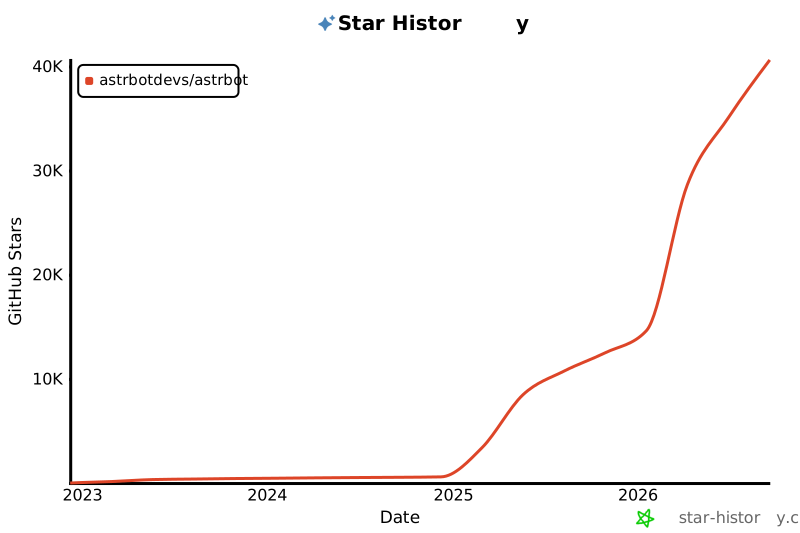
> If this project helps your life/work, or you are concerned about the future development of this project, please Star the project. This is our motivation to maintain this open-source project <3
In addition, the birth of this project cannot be separated from the help of the following open-source projects:
- [NapNeko/NapCatQQ](https://github.com/NapNeko/NapCatQQ) - Great Cat Framework
Open Source Project Friendly Links:
- [NoneBot2](https://github.com/nonebot/nonebot2) - Excellent Python Asynchronous ChatBot Framework
- [Koishi](https://github.com/koishijs/koishi) - Excellent Node.js ChatBot Framework
- [MaiBot](https://github.com/Mai-with-u/MaiBot) - Excellent Anthropomorphic AI ChatBot
- [nekro-agent](https://github.com/KroMiose/nekro-agent) - Excellent Agent ChatBot
- [LangBot](https://github.com/langbot-app/LangBot) - Excellent Multi-platform AI ChatBot
- [ChatLuna](https://github.com/ChatLunaLab/chatluna) - Excellent Multi-platform AI ChatBot Koishi Plugin
- [Operit AI](https://github.com/AAswordman/Operit) - Excellent AI Assistant Android APP
## ⭐ Star History
> [!TIP]
> If this project helps your life/work, or you are concerned about the future development of this project, please Star the project. This is our motivation to maintain this open-source project <3
[](https://star-history.com/#astrbotdevs/astrbot&Date)
_Companionship and capability should never be opposites. We hope to create a robot that can both understand emotions, provide companionship, and reliably complete tasks._
_私は、高性能ですから!_