 Soulter
fc33b3eb68
Soulter
fc33b3eb68
* docs: transfer AstrBotDevs/AstrBot-docs to AstrBotDevs/AstrBot
* refactor: reorder imports and improve type hints in sync_docs_to_wiki.py and upload_doc_images_to_r2.py
* feat: add GitHub Actions workflow to sync wiki with documentation

Co-authored-by: Soulter <37870767+Soulter@users.noreply.github.com>
Co-authored-by: anka-afk <110004162+anka-afk@users.noreply.github.com>
Co-authored-by: zouyonghe <62183434+zouyonghe@users.noreply.github.com>
Co-authored-by: shuiping233 <49360196+shuiping233@users.noreply.github.com>
Co-authored-by: LIghtJUNction <106986785+LIghtJUNction@users.noreply.github.com>
Co-authored-by: Sjshi763 <179909421+Sjshi763@users.noreply.github.com>
Co-authored-by: xiewoc <70128845+xiewoc@users.noreply.github.com>
Co-authored-by: QingFeng-awa <151742581+QingFeng-awa@users.noreply.github.com>
Co-authored-by: PaloMiku <96452465+PaloMiku@users.noreply.github.com>
Co-authored-by: shangxueink <138397030+shangxueink@users.noreply.github.com>
Co-authored-by: IGCrystal-A <244300990+IGCrystal-A@users.noreply.github.com>
Co-authored-by: RC-CHN <67079377+RC-CHN@users.noreply.github.com>
Co-authored-by: MC090610 <113341105+MC090610@users.noreply.github.com>
Co-authored-by: Waterwzy <196913419+Waterwzy@users.noreply.github.com>
Co-authored-by: Lanhuace-Wan <186303160+Lanhuace-Wan@users.noreply.github.com>
Co-authored-by: LiAlH4qwq <61769640+LiAlH4qwq@users.noreply.github.com>
Co-authored-by: HSOS6 <209910899+HSOS6@users.noreply.github.com>
Co-authored-by: th-dd <162813557+th-dd@users.noreply.github.com>
Co-authored-by: miaoxutao123 <81676466+miaoxutao123@users.noreply.github.com>
Co-authored-by: nuomicici <143102889+nuomicici@users.noreply.github.com>
Co-authored-by: nasyt233 <210103278+nasyt233@users.noreply.github.com>
Co-authored-by: jlugjb <7426462+jlugjb@users.noreply.github.com>
Co-authored-by: Raven95676 <176760093+Raven95676@users.noreply.github.com>
Co-authored-by: Futureppo <180109455+Futureppo@users.noreply.github.com>
Co-authored-by: MliKiowa <61873808+MliKiowa@users.noreply.github.com>
Co-authored-by: Fridemn <150212937+Fridemn@users.noreply.github.com>
Co-authored-by: BakaCookie520 <138355736+BakaCookie520@users.noreply.github.com>
Co-authored-by: YumeYuka <125112916+YumeYuka@users.noreply.github.com>
Co-authored-by: xming521 <32786500+xming521@users.noreply.github.com>
Co-authored-by: ywh555hhh <121592812+ywh555hhh@users.noreply.github.com>
Co-authored-by: stevessr <89645372+stevessr@users.noreply.github.com>
Co-authored-by: roeseth <41995115+roeseth@users.noreply.github.com>
Co-authored-by: ikun-1145141 <265925499+ikun-1145141@users.noreply.github.com>
Co-authored-by: evpeople <54983536+evpeople@users.noreply.github.com>
Co-authored-by: Yue-bin <60509781+Yue-bin@users.noreply.github.com>
Co-authored-by: W1ndys <109416673+W1ndys@users.noreply.github.com>
Co-authored-by: TheFurina <218887821+TheFurina@users.noreply.github.com>
Co-authored-by: Seayon <12275933+Seayon@users.noreply.github.com>
Co-authored-by: OnlyblackTea <38585636+OnlyblackTea@users.noreply.github.com>
Co-authored-by: ocetars <74854972+ocetars@users.noreply.github.com>
Co-authored-by: railgun19457 <117180744+railgun19457@users.noreply.github.com>
Co-authored-by: JunieXD <107397009+JunieXD@users.noreply.github.com>
Co-authored-by: advent259141 <197440256+advent259141@users.noreply.github.com>
Co-authored-by: Doge2077 <91442300+Doge2077@users.noreply.github.com>
Co-authored-by: Bocity <23430545+Bocity@users.noreply.github.com>
Co-authored-by: Aurora-xk <192227833+Aurora-xk@users.noreply.github.com>
4.5 KiB
使用 AstrBot 启动器部署 AstrBot
AstrBot 一键启动器
AstrBot 一键启动器支持 Windows、MacOS、Linux 等多端部署。
- 打开 AstrBotDevs/astrbot-launcher
- (可选但推荐) 给本项目点个 Star ⭐,你的支持是作者更新和维护的动力!
- 找到右边的 Releases,点击最新版本的 Release,在新的页面的 Assets 中下载对应你系统的安装器。
如,Windows X86 的用户应该下载 AstrBot.Launcher_0.2.1_x64-setup.exe,Windows on Arm 的用户应该下载 AstrBot.Launcher_0.2.1_arm64-setup.exe,MacOS M 芯片的用户下载 AstrBot.Launcher_0.2.1_aarch64.dmg。
MacOS 用户下载安装好后,可能会遇到 "已损坏,无法打开" 的提示。这是因为 MacOS 的安全机制阻止了未认证的应用运行。解决方法如下:
- 打开终端
- 输入以下命令并回车:
xattr -dr com.apple.quarantine /Applications/AstrBot\ Launcher.app - 重新尝试打开 AstrBot Launcher 应用
旧版本 Windows 安装器(不推荐)
Warning
需要您的电脑上预先安装好 Python 环境(3.10 - 3.13),并且将 Python 添加到环境变量中,否则安装器将无法正常工作。
推荐使用上面提到的 AstrBot 一键启动器来部署 AstrBot,因为它更简单、更自动化、更现代化,适合大多数用户。
安装器是一个使用 Powershell 编写的脚本,体积小巧,<20KB。需要您的电脑上安装有 Powershell,一般 Windows 10 及以上版本的设备都会自带这个工具。
下载安装器
打开 https://github.com/AstrBotDevs/AstrBotLauncher/releases/latest
下载 Source code (zip) 并解压到您的电脑。
运行安装器
视频和此处不一致,请参考此处!!!如果部署不了,请参阅其他两个部署方式:Docker 部署和 手动部署。
解压后,打开文件夹,
地址栏输入 Powershell 并打开:
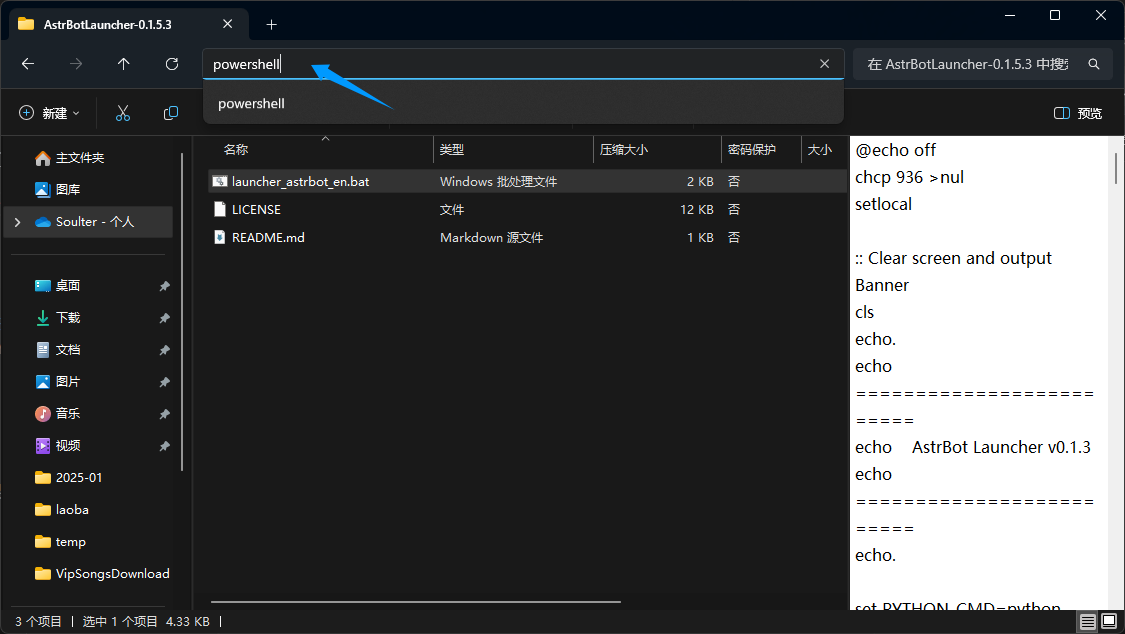
将 launcher_astrbot_en.bat 批处理文件拖进去回车运行。
Warning
这个脚本没有病毒。如果提示
Windows 已保护您的电脑,请点击更多信息,然后点击仍要运行。脚本默认使用
python指令来执行代码,如果你想指定 Python 解释器器路径或者指令,请修改launcher_astrbot_en.bat文件。找到set PYTHON_CMD=python这一行,将python改为你的 Python 解释器路径或指令。
如果没有检测到 Python 环境,脚本将会提示并退出。
脚本将自动检测目录下是否有 AstrBot 文件夹,如果没有,将会从 GitHub 自动下载最新的 AstrBot 源码。下载好后,会自动安装 AstrBot 的依赖并运行。
🎉 大功告成!
如果一切顺利,你会看到 AstrBot 打印出的日志。
如果没有报错,你会看到一条日志显示类似 🌈 管理面板已启动,可访问 并附带了几条链接。打开其中一个链接即可访问 AstrBot 管理面板。
Tip
默认用户名和密码是
astrbot和astrbot。当管理面板打开时遇到 404 错误: 在 release 页面下载dist.zip,解压拖到 AstrBot/data 下。还不行请重启电脑(来自群里的反馈)
接下来,你需要部署任何一个消息平台,才能够实现在消息平台上使用 AstrBot。
Tip
如果部署不了,请参阅其他两个部署方式:Docker 部署和 手动部署。
报错:Python is not installed
如果提示 Python is not installed,并且已经安装 Python,并且也已经重启并仍报这个错误,说明环境变量不对,有两个方法解决:
方法 1:
windows 搜索 Python,打开文件位置:
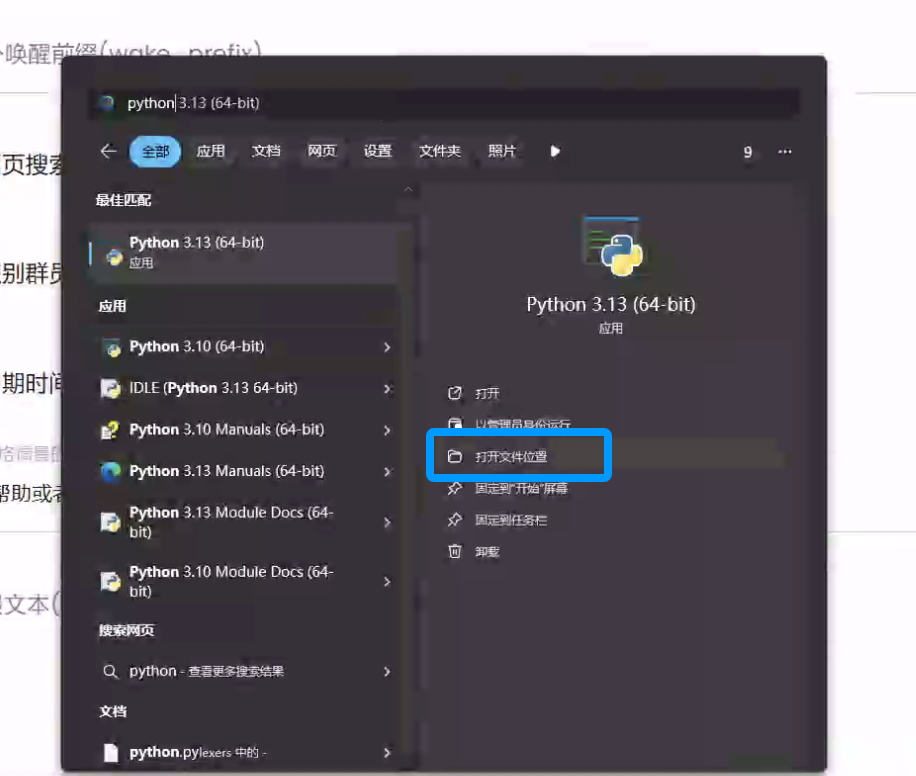
右键下面这个快捷方式,打开文件所在位置:
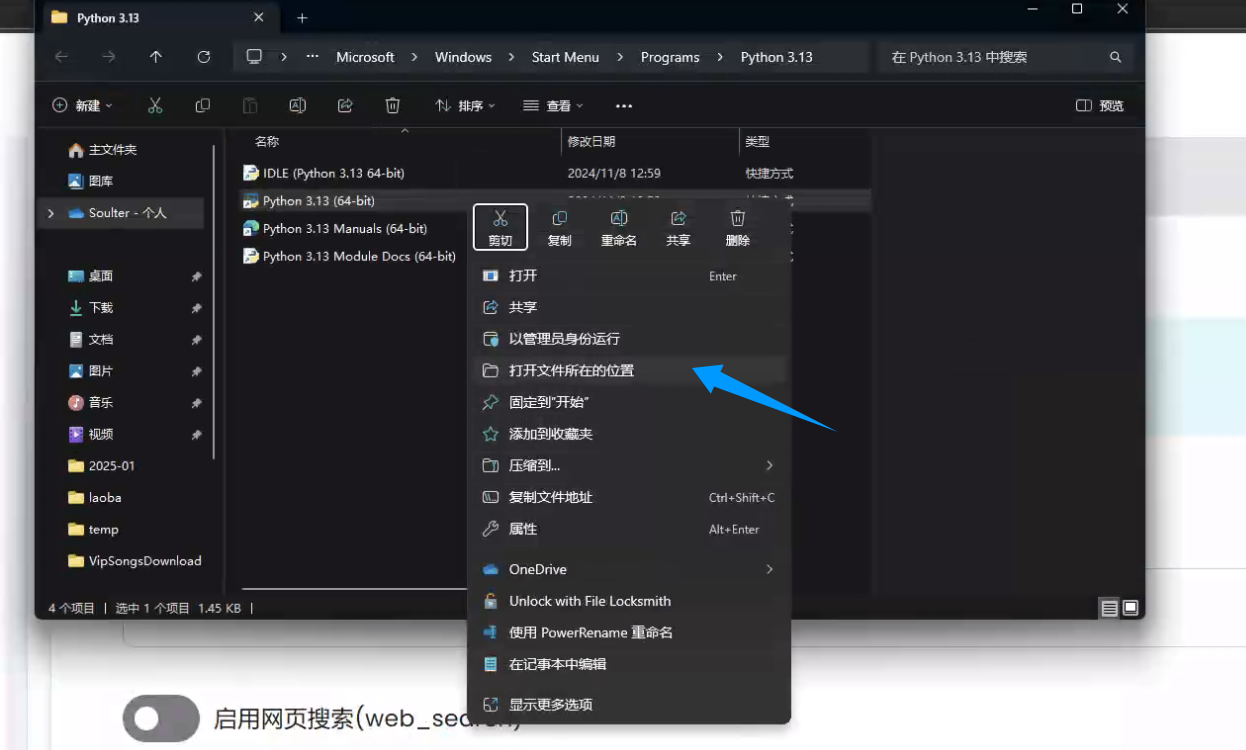
复制文件地址:
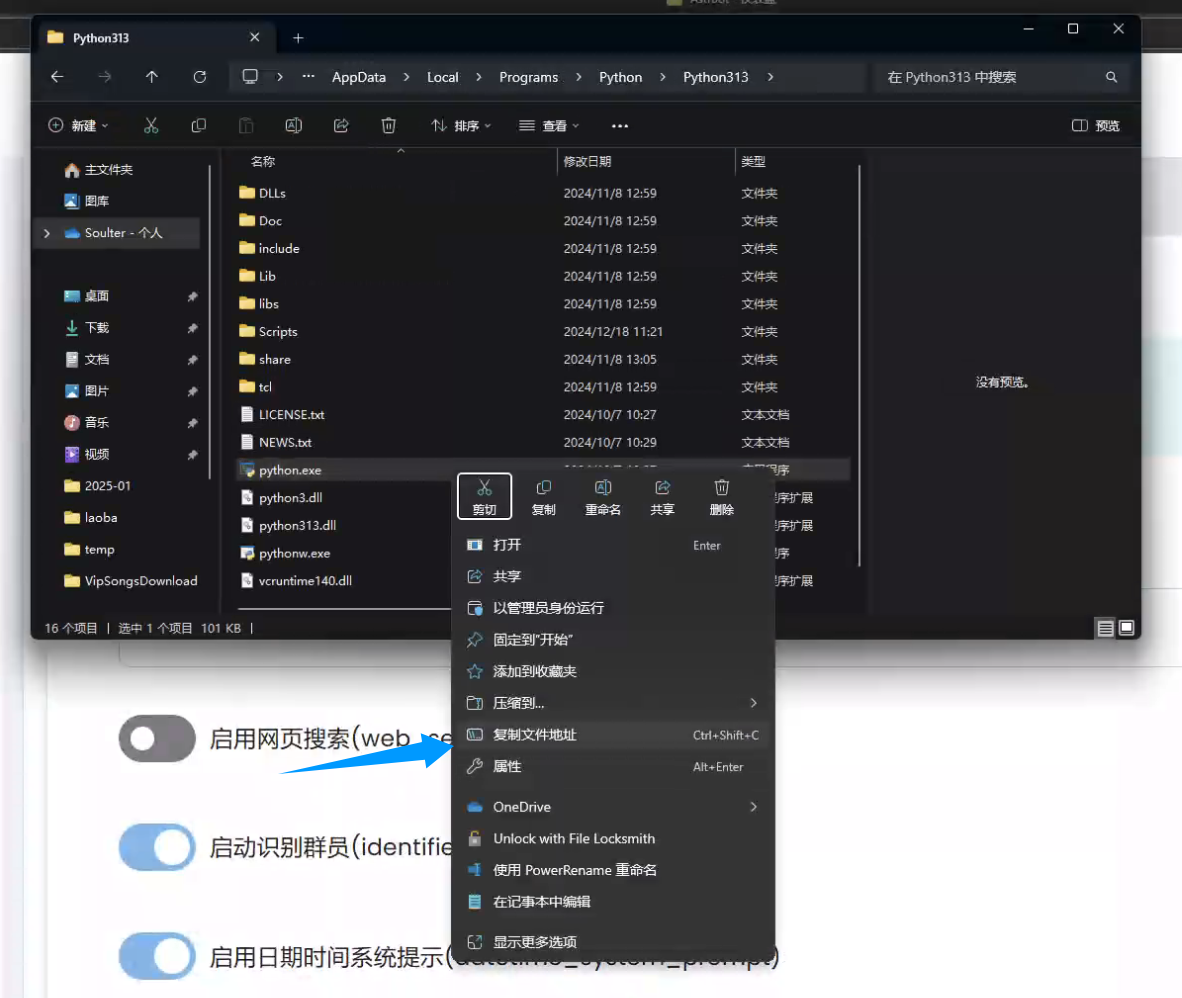
回到 launcher_astrbot_en.bat 文件,右键点击 在记事本中编辑,找到 set PYTHON_CMD=python 这一行,将 python 改为你的 Python 解释器路径或指令,路径两端的双引号不要删。
方法 2:
重装 python,并且在安装时勾选 Add Python to PATH,然后重启电脑。