 Soulter
fc33b3eb68
Soulter
fc33b3eb68
* docs: transfer AstrBotDevs/AstrBot-docs to AstrBotDevs/AstrBot
* refactor: reorder imports and improve type hints in sync_docs_to_wiki.py and upload_doc_images_to_r2.py
* feat: add GitHub Actions workflow to sync wiki with documentation

Co-authored-by: Soulter <37870767+Soulter@users.noreply.github.com>
Co-authored-by: anka-afk <110004162+anka-afk@users.noreply.github.com>
Co-authored-by: zouyonghe <62183434+zouyonghe@users.noreply.github.com>
Co-authored-by: shuiping233 <49360196+shuiping233@users.noreply.github.com>
Co-authored-by: LIghtJUNction <106986785+LIghtJUNction@users.noreply.github.com>
Co-authored-by: Sjshi763 <179909421+Sjshi763@users.noreply.github.com>
Co-authored-by: xiewoc <70128845+xiewoc@users.noreply.github.com>
Co-authored-by: QingFeng-awa <151742581+QingFeng-awa@users.noreply.github.com>
Co-authored-by: PaloMiku <96452465+PaloMiku@users.noreply.github.com>
Co-authored-by: shangxueink <138397030+shangxueink@users.noreply.github.com>
Co-authored-by: IGCrystal-A <244300990+IGCrystal-A@users.noreply.github.com>
Co-authored-by: RC-CHN <67079377+RC-CHN@users.noreply.github.com>
Co-authored-by: MC090610 <113341105+MC090610@users.noreply.github.com>
Co-authored-by: Waterwzy <196913419+Waterwzy@users.noreply.github.com>
Co-authored-by: Lanhuace-Wan <186303160+Lanhuace-Wan@users.noreply.github.com>
Co-authored-by: LiAlH4qwq <61769640+LiAlH4qwq@users.noreply.github.com>
Co-authored-by: HSOS6 <209910899+HSOS6@users.noreply.github.com>
Co-authored-by: th-dd <162813557+th-dd@users.noreply.github.com>
Co-authored-by: miaoxutao123 <81676466+miaoxutao123@users.noreply.github.com>
Co-authored-by: nuomicici <143102889+nuomicici@users.noreply.github.com>
Co-authored-by: nasyt233 <210103278+nasyt233@users.noreply.github.com>
Co-authored-by: jlugjb <7426462+jlugjb@users.noreply.github.com>
Co-authored-by: Raven95676 <176760093+Raven95676@users.noreply.github.com>
Co-authored-by: Futureppo <180109455+Futureppo@users.noreply.github.com>
Co-authored-by: MliKiowa <61873808+MliKiowa@users.noreply.github.com>
Co-authored-by: Fridemn <150212937+Fridemn@users.noreply.github.com>
Co-authored-by: BakaCookie520 <138355736+BakaCookie520@users.noreply.github.com>
Co-authored-by: YumeYuka <125112916+YumeYuka@users.noreply.github.com>
Co-authored-by: xming521 <32786500+xming521@users.noreply.github.com>
Co-authored-by: ywh555hhh <121592812+ywh555hhh@users.noreply.github.com>
Co-authored-by: stevessr <89645372+stevessr@users.noreply.github.com>
Co-authored-by: roeseth <41995115+roeseth@users.noreply.github.com>
Co-authored-by: ikun-1145141 <265925499+ikun-1145141@users.noreply.github.com>
Co-authored-by: evpeople <54983536+evpeople@users.noreply.github.com>
Co-authored-by: Yue-bin <60509781+Yue-bin@users.noreply.github.com>
Co-authored-by: W1ndys <109416673+W1ndys@users.noreply.github.com>
Co-authored-by: TheFurina <218887821+TheFurina@users.noreply.github.com>
Co-authored-by: Seayon <12275933+Seayon@users.noreply.github.com>
Co-authored-by: OnlyblackTea <38585636+OnlyblackTea@users.noreply.github.com>
Co-authored-by: ocetars <74854972+ocetars@users.noreply.github.com>
Co-authored-by: railgun19457 <117180744+railgun19457@users.noreply.github.com>
Co-authored-by: JunieXD <107397009+JunieXD@users.noreply.github.com>
Co-authored-by: advent259141 <197440256+advent259141@users.noreply.github.com>
Co-authored-by: Doge2077 <91442300+Doge2077@users.noreply.github.com>
Co-authored-by: Bocity <23430545+Bocity@users.noreply.github.com>
Co-authored-by: Aurora-xk <192227833+Aurora-xk@users.noreply.github.com>
7.2 KiB
7.2 KiB
outline
| outline |
|---|
| deep |
开发一个平台适配器
AstrBot 支持以插件的形式接入平台适配器,你可以自行接入 AstrBot 没有的平台。如飞书、钉钉甚至是哔哩哔哩私信、Minecraft。
我们以一个平台 FakePlatform 为例展开讲解。
首先,在插件目录下新增 fake_platform_adapter.py 和 fake_platform_event.py 文件。前者主要是平台适配器的实现,后者是平台事件的定义。
平台适配器
假设 FakePlatform 的客户端 SDK 是这样:
import asyncio

class FakeClient():
    '''模拟一个消息平台,这里 5 秒钟下发一个消息'''
    def __init__(self, token: str, username: str):
        self.token = token
        self.username = username
        # ...

    async def start_polling(self):
        while True:
            await asyncio.sleep(5)
            await getattr(self, 'on_message_received')({
                'bot_id': '123',
                'content': '新消息',
                'username': 'zhangsan',
                'userid': '123',
                'message_id': 'asdhoashd',
                'group_id': 'group123',
            })

    async def send_text(self, to: str, message: str):
        print('发了消息:', to, message)

    async def send_image(self, to: str, image_path: str):
        print('发了消息:', to, image_path)
我们创建 fake_platform_adapter.py:
import asyncio

from astrbot.api.platform import Platform, AstrBotMessage, MessageMember, PlatformMetadata, MessageType
from astrbot.api.event import MessageChain
from astrbot.api.message_components import Plain, Image, Record # 消息链中的组件,可以根据需要导入
from astrbot.core.platform.astr_message_event import MessageSesion
from astrbot.api.platform import register_platform_adapter
from astrbot import logger
from .client import FakeClient
from .fake_platform_event import FakePlatformEvent

# 注册平台适配器。第一个参数为平台名,第二个为描述。第三个为默认配置。
@register_platform_adapter("fake", "fake 适配器", default_config_tmpl={
    "token": "your_token",
    "username": "bot_username"
})
class FakePlatformAdapter(Platform):

    def __init__(self, platform_config: dict, platform_settings: dict, event_queue: asyncio.Queue) -> None:
        super().__init__(event_queue)
        self.config = platform_config # 上面的默认配置,用户填写后会传到这里
        self.settings = platform_settings # platform_settings 平台设置。

    async def send_by_session(self, session: MessageSesion, message_chain: MessageChain):
        # 必须实现
        await super().send_by_session(session, message_chain)

    def meta(self) -> PlatformMetadata:
        # 必须实现,直接像下面一样返回即可。
        return PlatformMetadata(
            "fake",
            "fake 适配器",
        )

    async def run(self):
        # 必须实现,这里是主要逻辑。

        # FakeClient 是我们自己定义的,这里只是示例。这个是其回调函数
        async def on_received(data):
            logger.info(data)
            abm = await self.convert_message(data=data) # 转换成 AstrBotMessage
            await self.handle_msg(abm)

        # 初始化 FakeClient
        self.client = FakeClient(self.config['token'], self.config['username'])
        self.client.on_message_received = on_received
        await self.client.start_polling() # 持续监听消息,这是个堵塞方法。

    async def convert_message(self, data: dict) -> AstrBotMessage:
        # 将平台消息转换成 AstrBotMessage
        # 这里就体现了适配程度,不同平台的消息结构不一样,这里需要根据实际情况进行转换。
        abm = AstrBotMessage()
        abm.type = MessageType.GROUP_MESSAGE # 还有 friend_message,对应私聊。具体平台具体分析。重要!
        abm.group_id = data['group_id'] # 如果是私聊,这里可以不填
        abm.message_str = data['content'] # 纯文本消息。重要!
        abm.sender = MessageMember(user_id=data['userid'], nickname=data['username']) # 发送者。重要!
        abm.message = [Plain(text=data['content'])] # 消息链。如果有其他类型的消息,直接 append 即可。重要!
        abm.raw_message = data # 原始消息。
        abm.self_id = data['bot_id']
        abm.session_id = data['userid'] # 会话 ID。重要!
        abm.message_id = data['message_id'] # 消息 ID。

        return abm

    async def handle_msg(self, message: AstrBotMessage):
        # 处理消息
        message_event = FakePlatformEvent(
            message_str=message.message_str,
            message_obj=message,
            platform_meta=self.meta(),
            session_id=message.session_id,
            client=self.client
        )
        self.commit_event(message_event) # 提交事件到事件队列。不要忘记!
fake_platform_event.py:
from astrbot.api.event import AstrMessageEvent, MessageChain
from astrbot.api.platform import AstrBotMessage, PlatformMetadata
from astrbot.api.message_components import Plain, Image
from .client import FakeClient
from astrbot.core.utils.io import download_image_by_url

class FakePlatformEvent(AstrMessageEvent):
    def __init__(self, message_str: str, message_obj: AstrBotMessage, platform_meta: PlatformMetadata, session_id: str, client: FakeClient):
        super().__init__(message_str, message_obj, platform_meta, session_id)
        self.client = client

    async def send(self, message: MessageChain):
        for i in message.chain: # 遍历消息链
            if isinstance(i, Plain): # 如果是文字类型的
                await self.client.send_text(to=self.get_sender_id(), message=i.text)
            elif isinstance(i, Image): # 如果是图片类型的
                img_url = i.file
                img_path = ""
                # 下面的三个条件可以直接参考一下。
                if img_url.startswith("file:///"):
                    img_path = img_url[8:]
                elif i.file and i.file.startswith("http"):
                    img_path = await download_image_by_url(i.file)
                else:
                    img_path = img_url

                # 请善于 Debug!

                await self.client.send_image(to=self.get_sender_id(), image_path=img_path)

        await super().send(message) # 需要最后加上这一段,执行父类的 send 方法。
最后,main.py 只需这样,在初始化的时候导入 fake_platform_adapter 模块。装饰器会自动注册。
from astrbot.api.star import Context, Star

class MyPlugin(Star):
    def __init__(self, context: Context):
        from .fake_platform_adapter import FakePlatformAdapter # noqa
搞好后,运行 AstrBot:
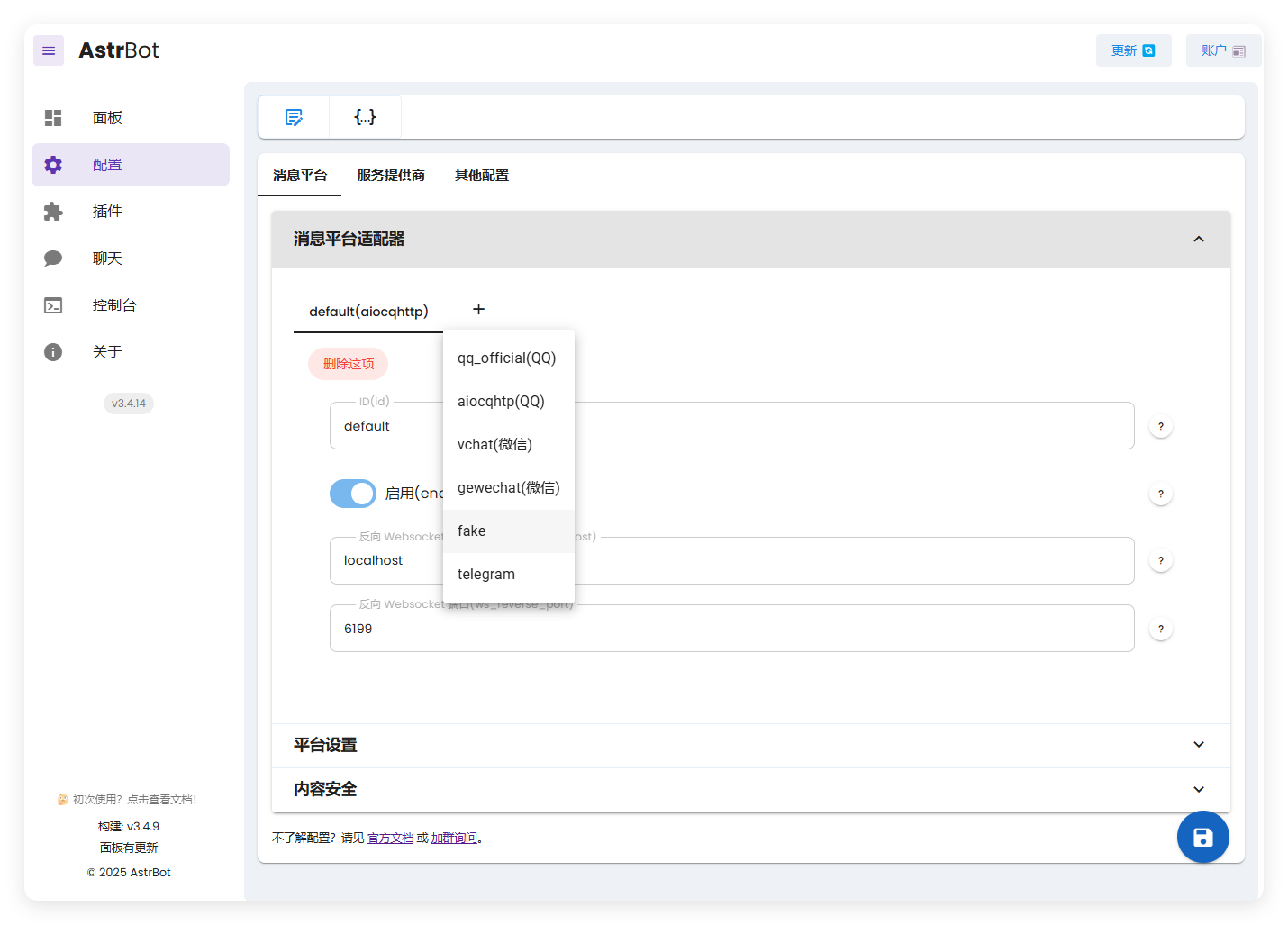
这里出现了我们创建的 fake。
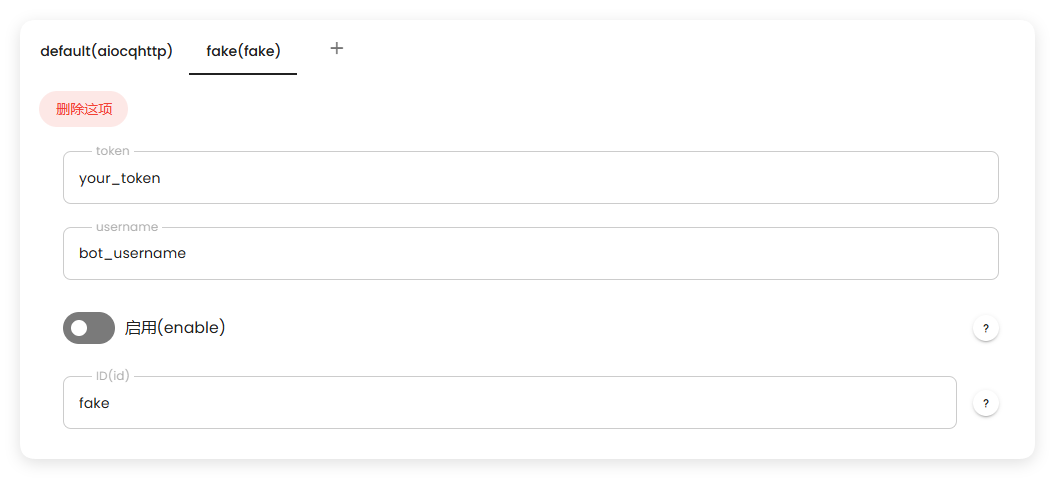
启动后,可以看到正常工作:

有任何疑问欢迎加群询问~