Compare commits
17 Commits
| Author | SHA1 | Date | |
|---|---|---|---|
 Soulter Soulter
|
414f98fb5e | ||
|
Soulter
|
420d82df11 | ||
 Yufeng He Yufeng He
|
d87cf897da | ||
 時壹 時壹
|
2f51916a73 | ||
 Rin Rin
|
b0e10cf479 | ||
 Simon Simon
|
20efaa5320 | ||
 洛薇Lovie 洛薇Lovie
|
3ccd70cd4e | ||
 xwsjjctz xwsjjctz
|
da520e573a | ||
 Trainingcqy Trainingcqy
|
6d055e81e9 | ||
 Xial Xial
|
d41ccb70c5 | ||
 qingyun qingyun
|
18a99a25c2 | ||
 LIghtJUNction LIghtJUNction
|
96cafe001d | ||
|
LIghtJUNction
|
29d100dd83 | ||
|
Soulter
|
14f3701c4a | ||
 Stable Genius Stable Genius
|
1044fc48ca | ||
 Soulter Soulter
|
693c2ca818 | ||
|
Soulter
|
b1c486ba98 |
@@ -188,7 +188,12 @@ class KnowledgeBaseQueryTool(FunctionTool[AstrAgentContext]):
|
||||
@dataclass
|
||||
class SendMessageToUserTool(FunctionTool[AstrAgentContext]):
|
||||
name: str = "send_message_to_user"
|
||||
description: str = "Directly send message to the user. Only use this tool when you need to proactively message the user. Otherwise you can directly output the reply in the conversation."
|
||||
description: str = (
|
||||
"Send message to the user. "
|
||||
"Supports various message types including `plain`, `image`, `record`, `video`, `file`, and `mention_user`. "
|
||||
"Use this tool to send media files (`image`, `record`, `video`, `file`), "
|
||||
"or when you need to proactively message the user(such as cron job). For normal text replies, you can output directly."
|
||||
)
|
||||
|
||||
parameters: dict = Field(
|
||||
default_factory=lambda: {
|
||||
|
||||
@@ -164,7 +164,10 @@ class CreateSkillPayloadTool(NeoSkillToolBase):
|
||||
"type": "object",
|
||||
"properties": {
|
||||
"payload": {
|
||||
"anyOf": [{"type": "object"}, {"type": "array"}],
|
||||
"anyOf": [
|
||||
{"type": "object"},
|
||||
{"type": "array", "items": {"type": "object"}},
|
||||
],
|
||||
"description": (
|
||||
"Skill payload JSON. Typical schema: {skill_markdown, inputs, outputs, meta}. "
|
||||
"This only stores content and returns payload_ref; it does not create a candidate or release."
|
||||
|
||||
@@ -1132,6 +1132,18 @@ CONFIG_METADATA_2 = {
|
||||
"proxy": "",
|
||||
"custom_headers": {},
|
||||
},
|
||||
"MiniMax": {
|
||||
"id": "minimax",
|
||||
"provider": "minimax",
|
||||
"type": "openai_chat_completion",
|
||||
"provider_type": "chat_completion",
|
||||
"enable": True,
|
||||
"key": [],
|
||||
"api_base": "https://api.minimaxi.com/v1",
|
||||
"timeout": 120,
|
||||
"proxy": "",
|
||||
"custom_headers": {},
|
||||
},
|
||||
"xAI": {
|
||||
"id": "xai",
|
||||
"provider": "xai",
|
||||
|
||||
@@ -391,6 +391,47 @@ class QQOfficialPlatformAdapter(Platform):
|
||||
else:
|
||||
msg.append(File(name=filename, file=url, url=url))
|
||||
|
||||
@staticmethod
|
||||
def _parse_face_message(content: str) -> str:
|
||||
"""Parse QQ official face message format and convert to readable text.
|
||||
|
||||
QQ official face message format:
|
||||
<faceType=4,faceId="",ext="eyJ0ZXh0IjoiW+a7oeWktOmXruWPt10ifQ==">
|
||||
|
||||
The ext field contains base64-encoded JSON with a 'text' field
|
||||
describing the emoji (e.g., '[满头问号]').
|
||||
|
||||
Args:
|
||||
content: The message content that may contain face tags.
|
||||
|
||||
Returns:
|
||||
Content with face tags replaced by readable emoji descriptions.
|
||||
"""
|
||||
import base64
|
||||
import json
|
||||
import re
|
||||
|
||||
def replace_face(match):
|
||||
face_tag = match.group(0)
|
||||
# Extract ext field from the face tag
|
||||
ext_match = re.search(r'ext="([^"]*)"', face_tag)
|
||||
if ext_match:
|
||||
try:
|
||||
ext_encoded = ext_match.group(1)
|
||||
# Decode base64 and parse JSON
|
||||
ext_decoded = base64.b64decode(ext_encoded).decode("utf-8")
|
||||
ext_data = json.loads(ext_decoded)
|
||||
emoji_text = ext_data.get("text", "")
|
||||
if emoji_text:
|
||||
return f"[表情:{emoji_text}]"
|
||||
except Exception:
|
||||
pass
|
||||
# Fallback if parsing fails
|
||||
return "[表情]"
|
||||
|
||||
# Match face tags: <faceType=...>
|
||||
return re.sub(r"<faceType=\d+[^>]*>", replace_face, content)
|
||||
|
||||
@staticmethod
|
||||
def _parse_from_qqofficial(
|
||||
message: botpy.message.Message
|
||||
@@ -416,7 +457,10 @@ class QQOfficialPlatformAdapter(Platform):
|
||||
abm.group_id = message.group_openid
|
||||
else:
|
||||
abm.sender = MessageMember(message.author.user_openid, "")
|
||||
abm.message_str = message.content.strip()
|
||||
# Parse face messages to readable text
|
||||
abm.message_str = QQOfficialPlatformAdapter._parse_face_message(
|
||||
message.content.strip()
|
||||
)
|
||||
abm.self_id = "unknown_selfid"
|
||||
msg.append(At(qq="qq_official"))
|
||||
msg.append(Plain(abm.message_str))
|
||||
@@ -432,10 +476,12 @@ class QQOfficialPlatformAdapter(Platform):
|
||||
else:
|
||||
abm.self_id = ""
|
||||
|
||||
plain_content = message.content.replace(
|
||||
"<@!" + str(abm.self_id) + ">",
|
||||
"",
|
||||
).strip()
|
||||
plain_content = QQOfficialPlatformAdapter._parse_face_message(
|
||||
message.content.replace(
|
||||
"<@!" + str(abm.self_id) + ">",
|
||||
"",
|
||||
).strip()
|
||||
)
|
||||
|
||||
QQOfficialPlatformAdapter._append_attachments(msg, message.attachments)
|
||||
abm.message = msg
|
||||
|
||||
@@ -1,5 +1,6 @@
|
||||
import asyncio
|
||||
import logging
|
||||
import time
|
||||
from typing import cast
|
||||
|
||||
import quart
|
||||
@@ -39,6 +40,9 @@ class QQOfficialWebhook:
|
||||
self.client = botpy_client
|
||||
self.event_queue = event_queue
|
||||
self.shutdown_event = asyncio.Event()
|
||||
# Deduplication cache for webhook retry callbacks.
|
||||
self._seen_event_ids: dict[str, float] = {}
|
||||
self._dedup_ttl: int = 60 # seconds
|
||||
|
||||
async def initialize(self) -> None:
|
||||
logger.info("正在登录到 QQ 官方机器人...")
|
||||
@@ -106,6 +110,22 @@ class QQOfficialWebhook:
|
||||
print(signed)
|
||||
return signed
|
||||
|
||||
event_id = msg.get("id")
|
||||
if event_id:
|
||||
now = time.monotonic()
|
||||
# Lazily evict expired entries to prevent unbounded growth.
|
||||
expired = [
|
||||
k
|
||||
for k, ts in self._seen_event_ids.items()
|
||||
if now - ts > self._dedup_ttl
|
||||
]
|
||||
for k in expired:
|
||||
del self._seen_event_ids[k]
|
||||
if event_id in self._seen_event_ids:
|
||||
logger.debug(f"Duplicate webhook event {event_id!r}, skipping.")
|
||||
return {"opcode": 12}
|
||||
self._seen_event_ids[event_id] = now
|
||||
|
||||
if event and opcode == BotWebSocket.WS_DISPATCH_EVENT:
|
||||
event = msg["t"].lower()
|
||||
try:
|
||||
|
||||
@@ -25,6 +25,16 @@ from astrbot.api.platform import AstrBotMessage, MessageType, PlatformMetadata
|
||||
from astrbot.core.utils.metrics import Metric
|
||||
|
||||
|
||||
def _is_gif(path: str) -> bool:
|
||||
if path.lower().endswith(".gif"):
|
||||
return True
|
||||
try:
|
||||
with open(path, "rb") as f:
|
||||
return f.read(6) in (b"GIF87a", b"GIF89a")
|
||||
except OSError:
|
||||
return False
|
||||
|
||||
|
||||
class TelegramPlatformEvent(AstrMessageEvent):
|
||||
# Telegram 的最大消息长度限制
|
||||
MAX_MESSAGE_LENGTH = 4096
|
||||
@@ -291,7 +301,13 @@ class TelegramPlatformEvent(AstrMessageEvent):
|
||||
await client.send_message(text=chunk, **cast(Any, payload))
|
||||
elif isinstance(i, Image):
|
||||
image_path = await i.convert_to_file_path()
|
||||
await client.send_photo(photo=image_path, **cast(Any, payload))
|
||||
if _is_gif(image_path):
|
||||
send_coro = client.send_animation
|
||||
media_kwarg = {"animation": image_path}
|
||||
else:
|
||||
send_coro = client.send_photo
|
||||
media_kwarg = {"photo": image_path}
|
||||
await send_coro(**media_kwarg, **cast(Any, payload))
|
||||
elif isinstance(i, File):
|
||||
path = await i.get_file()
|
||||
name = i.name or os.path.basename(path)
|
||||
@@ -406,12 +422,20 @@ class TelegramPlatformEvent(AstrMessageEvent):
|
||||
on_text(i.text)
|
||||
elif isinstance(i, Image):
|
||||
image_path = await i.convert_to_file_path()
|
||||
if _is_gif(image_path):
|
||||
action = ChatAction.UPLOAD_VIDEO
|
||||
send_coro = self.client.send_animation
|
||||
media_kwarg = {"animation": image_path}
|
||||
else:
|
||||
action = ChatAction.UPLOAD_PHOTO
|
||||
send_coro = self.client.send_photo
|
||||
media_kwarg = {"photo": image_path}
|
||||
await self._send_media_with_action(
|
||||
self.client,
|
||||
ChatAction.UPLOAD_PHOTO,
|
||||
self.client.send_photo,
|
||||
action,
|
||||
send_coro,
|
||||
user_name=user_name,
|
||||
photo=image_path,
|
||||
**media_kwarg,
|
||||
**cast(Any, payload),
|
||||
)
|
||||
elif isinstance(i, File):
|
||||
|
||||
@@ -311,7 +311,7 @@ class ProviderOpenAIOfficial(Provider):
|
||||
state.handle_chunk(chunk)
|
||||
except Exception as e:
|
||||
logger.warning("Saving chunk state error: " + str(e))
|
||||
if len(chunk.choices) == 0:
|
||||
if not chunk.choices:
|
||||
continue
|
||||
delta = chunk.choices[0].delta
|
||||
# logger.debug(f"chunk delta: {delta}")
|
||||
@@ -322,7 +322,7 @@ class ProviderOpenAIOfficial(Provider):
|
||||
if reasoning:
|
||||
llm_response.reasoning_content = reasoning
|
||||
_y = True
|
||||
if delta.content:
|
||||
if delta and delta.content:
|
||||
# Don't strip streaming chunks to preserve spaces between words
|
||||
completion_text = self._normalize_content(delta.content, strip=False)
|
||||
llm_response.result_chain = MessageChain(
|
||||
@@ -345,7 +345,7 @@ class ProviderOpenAIOfficial(Provider):
|
||||
) -> str:
|
||||
"""Extract reasoning content from OpenAI ChatCompletion if available."""
|
||||
reasoning_text = ""
|
||||
if len(completion.choices) == 0:
|
||||
if not completion.choices:
|
||||
return reasoning_text
|
||||
if isinstance(completion, ChatCompletion):
|
||||
choice = completion.choices[0]
|
||||
@@ -468,7 +468,7 @@ class ProviderOpenAIOfficial(Provider):
|
||||
"""Parse OpenAI ChatCompletion into LLMResponse"""
|
||||
llm_response = LLMResponse("assistant")
|
||||
|
||||
if len(completion.choices) == 0:
|
||||
if not completion.choices:
|
||||
raise Exception("API 返回的 completion 为空。")
|
||||
choice = completion.choices[0]
|
||||
|
||||
|
||||
@@ -36,6 +36,20 @@ async def track_conversation(convs: dict, conv_id: str):
|
||||
convs.pop(conv_id, None)
|
||||
|
||||
|
||||
async def _poll_webchat_stream_result(back_queue, username: str):
|
||||
try:
|
||||
result = await asyncio.wait_for(back_queue.get(), timeout=1)
|
||||
except asyncio.TimeoutError:
|
||||
return None, False
|
||||
except asyncio.CancelledError:
|
||||
logger.debug(f"[WebChat] 用户 {username} 断开聊天长连接。")
|
||||
return None, True
|
||||
except Exception as e:
|
||||
logger.error(f"WebChat stream error: {e}")
|
||||
return None, False
|
||||
return result, False
|
||||
|
||||
|
||||
class ChatRoute(Route):
|
||||
def __init__(
|
||||
self,
|
||||
@@ -343,16 +357,12 @@ class ChatRoute(Route):
|
||||
|
||||
async with track_conversation(self.running_convs, webchat_conv_id):
|
||||
while True:
|
||||
try:
|
||||
result = await asyncio.wait_for(back_queue.get(), timeout=1)
|
||||
except asyncio.TimeoutError:
|
||||
continue
|
||||
except asyncio.CancelledError:
|
||||
logger.debug(f"[WebChat] 用户 {username} 断开聊天长连接。")
|
||||
result, should_break = await _poll_webchat_stream_result(
|
||||
back_queue, username
|
||||
)
|
||||
if should_break:
|
||||
client_disconnected = True
|
||||
except Exception as e:
|
||||
logger.error(f"WebChat stream error: {e}")
|
||||
|
||||
break
|
||||
if not result:
|
||||
continue
|
||||
|
||||
|
||||
@@ -36,7 +36,6 @@
|
||||
"remixicon": "3.5.0",
|
||||
"shiki": "^3.20.0",
|
||||
"stream-markdown": "^0.0.13",
|
||||
"stream-monaco": "^0.0.17",
|
||||
"vee-validate": "4.11.3",
|
||||
"vite-plugin-vuetify": "2.1.3",
|
||||
"vue": "3.3.4",
|
||||
|
||||
Generated
+4
-4
@@ -81,9 +81,6 @@ importers:
|
||||
stream-markdown:
|
||||
specifier: ^0.0.13
|
||||
version: 0.0.13(shiki@3.22.0)
|
||||
stream-monaco:
|
||||
specifier: ^0.0.17
|
||||
version: 0.0.17(monaco-editor@0.52.2)
|
||||
vee-validate:
|
||||
specifier: 4.11.3
|
||||
version: 4.11.3(vue@3.3.4)
|
||||
@@ -3300,6 +3297,7 @@ snapshots:
|
||||
'@shikijs/core': 3.22.0
|
||||
'@shikijs/types': 3.22.0
|
||||
'@shikijs/vscode-textmate': 10.0.2
|
||||
optional: true
|
||||
|
||||
'@shikijs/themes@3.22.0':
|
||||
dependencies:
|
||||
@@ -3992,7 +3990,8 @@ snapshots:
|
||||
json-schema-traverse: 1.0.0
|
||||
require-from-string: 2.0.2
|
||||
|
||||
alien-signals@2.0.8: {}
|
||||
alien-signals@2.0.8:
|
||||
optional: true
|
||||
|
||||
ansi-regex@5.0.1: {}
|
||||
|
||||
@@ -5443,6 +5442,7 @@ snapshots:
|
||||
alien-signals: 2.0.8
|
||||
monaco-editor: 0.52.2
|
||||
shiki: 3.22.0
|
||||
optional: true
|
||||
|
||||
stringify-entities@4.0.4:
|
||||
dependencies:
|
||||
|
||||
@@ -11,6 +11,7 @@
|
||||
:currSessionId="currSessionId"
|
||||
:selectedProjectId="selectedProjectId"
|
||||
:transportMode="transportMode"
|
||||
:sendShortcut="sendShortcut"
|
||||
:isDark="isDark"
|
||||
:chatboxMode="chatboxMode"
|
||||
:isMobile="isMobile"
|
||||
@@ -29,6 +30,7 @@
|
||||
@editProject="showEditProjectDialog"
|
||||
@deleteProject="handleDeleteProject"
|
||||
@updateTransportMode="setTransportMode"
|
||||
@updateSendShortcut="setSendShortcut"
|
||||
/>
|
||||
|
||||
<!-- 右侧聊天内容区域 -->
|
||||
@@ -72,13 +74,14 @@
|
||||
:stagedImagesUrl="stagedImagesUrl"
|
||||
:stagedAudioUrl="stagedAudioUrl"
|
||||
:stagedFiles="stagedNonImageFiles"
|
||||
:disabled="isStreaming"
|
||||
:disabled="false"
|
||||
:is-running="isStreaming || isConvRunning"
|
||||
:enableStreaming="enableStreaming"
|
||||
:isRecording="isRecording"
|
||||
:session-id="currSessionId || null"
|
||||
:current-session="getCurrentSession"
|
||||
:replyTo="replyTo"
|
||||
:send-shortcut="sendShortcut"
|
||||
@send="handleSendMessage"
|
||||
@stop="handleStopMessage"
|
||||
@toggleStreaming="toggleStreaming"
|
||||
@@ -103,13 +106,14 @@
|
||||
:stagedImagesUrl="stagedImagesUrl"
|
||||
:stagedAudioUrl="stagedAudioUrl"
|
||||
:stagedFiles="stagedNonImageFiles"
|
||||
:disabled="isStreaming"
|
||||
:disabled="false"
|
||||
:is-running="isStreaming || isConvRunning"
|
||||
:enableStreaming="enableStreaming"
|
||||
:isRecording="isRecording"
|
||||
:session-id="currSessionId || null"
|
||||
:current-session="getCurrentSession"
|
||||
:replyTo="replyTo"
|
||||
:send-shortcut="sendShortcut"
|
||||
@send="handleSendMessage"
|
||||
@stop="handleStopMessage"
|
||||
@toggleStreaming="toggleStreaming"
|
||||
@@ -133,13 +137,14 @@
|
||||
:stagedImagesUrl="stagedImagesUrl"
|
||||
:stagedAudioUrl="stagedAudioUrl"
|
||||
:stagedFiles="stagedNonImageFiles"
|
||||
:disabled="isStreaming"
|
||||
:disabled="false"
|
||||
:is-running="isStreaming || isConvRunning"
|
||||
:enableStreaming="enableStreaming"
|
||||
:isRecording="isRecording"
|
||||
:session-id="currSessionId || null"
|
||||
:current-session="getCurrentSession"
|
||||
:replyTo="replyTo"
|
||||
:send-shortcut="sendShortcut"
|
||||
@send="handleSendMessage"
|
||||
@stop="handleStopMessage"
|
||||
@toggleStreaming="toggleStreaming"
|
||||
@@ -226,6 +231,8 @@ import { useToast } from '@/utils/toast';
|
||||
interface Props {
|
||||
chatboxMode?: boolean;
|
||||
}
|
||||
type SendShortcut = 'enter' | 'shift_enter';
|
||||
const SEND_SHORTCUT_STORAGE_KEY = 'chat_send_shortcut';
|
||||
|
||||
const props = withDefaults(defineProps<Props>(), {
|
||||
chatboxMode: false
|
||||
@@ -334,6 +341,18 @@ interface ReplyInfo {
|
||||
const replyTo = ref<ReplyInfo | null>(null);
|
||||
|
||||
const isDark = computed(() => useCustomizerStore().uiTheme === 'PurpleThemeDark');
|
||||
const sendShortcut = ref<SendShortcut>('shift_enter');
|
||||
|
||||
function setSendShortcut(mode: SendShortcut) {
|
||||
sendShortcut.value = mode;
|
||||
localStorage.setItem(SEND_SHORTCUT_STORAGE_KEY, mode);
|
||||
}
|
||||
|
||||
function focusChatInput() {
|
||||
nextTick(() => {
|
||||
chatInputRef.value?.focusInput?.();
|
||||
});
|
||||
}
|
||||
|
||||
// 检测是否为手机端
|
||||
function checkMobile() {
|
||||
@@ -492,6 +511,7 @@ async function handleSelectConversation(sessionIds: string[]) {
|
||||
nextTick(() => {
|
||||
messageList.value?.scrollToBottom();
|
||||
});
|
||||
focusChatInput();
|
||||
}
|
||||
|
||||
function handleNewChat() {
|
||||
@@ -501,6 +521,7 @@ function handleNewChat() {
|
||||
// 退出项目视图
|
||||
selectedProjectId.value = null;
|
||||
projectSessions.value = [];
|
||||
focusChatInput();
|
||||
}
|
||||
|
||||
async function handleDeleteConversation(sessionId: string) {
|
||||
@@ -658,6 +679,11 @@ async function handleSendMessage() {
|
||||
const selectedProviderId = selection?.providerId || '';
|
||||
const selectedModelName = selection?.modelName || '';
|
||||
|
||||
// 点击发送后立即将消息区滚到底部,确保用户看到最新消息
|
||||
nextTick(() => {
|
||||
messageList.value?.scrollToBottom();
|
||||
});
|
||||
|
||||
await sendMsg(
|
||||
promptToSend,
|
||||
filesToSend,
|
||||
@@ -667,6 +693,11 @@ async function handleSendMessage() {
|
||||
replyToSend
|
||||
);
|
||||
|
||||
// 发送流程结束后再兜底一次,处理异步渲染场景
|
||||
nextTick(() => {
|
||||
messageList.value?.scrollToBottom();
|
||||
});
|
||||
|
||||
// 如果在项目中创建了新会话,将其添加到项目
|
||||
if (isCreatingNewSession && currentProjectId && currSessionId.value) {
|
||||
await addSessionToProject(currSessionId.value, currentProjectId);
|
||||
@@ -725,6 +756,10 @@ watch(sessions, (newSessions) => {
|
||||
});
|
||||
|
||||
onMounted(() => {
|
||||
const storedShortcut = localStorage.getItem(SEND_SHORTCUT_STORAGE_KEY);
|
||||
if (storedShortcut === 'enter' || storedShortcut === 'shift_enter') {
|
||||
sendShortcut.value = storedShortcut;
|
||||
}
|
||||
checkMobile();
|
||||
window.addEventListener('resize', checkMobile);
|
||||
getSessions();
|
||||
|
||||
@@ -95,7 +95,7 @@
|
||||
{{ isRecording ? tm('voice.speaking') : tm('voice.startRecording') }}
|
||||
</v-tooltip>
|
||||
</v-btn>
|
||||
<v-btn icon v-if="isRunning" @click="$emit('stop')" variant="tonal" color="primary" class="send-btn">
|
||||
<v-btn icon v-if="isRunning && !canSend" @click="$emit('stop')" variant="tonal" color="primary" class="send-btn">
|
||||
<v-icon icon="mdi-stop" variant="text" plain></v-icon>
|
||||
<v-tooltip activator="parent" location="top">
|
||||
{{ tm('input.stopGenerating') }}
|
||||
@@ -173,6 +173,7 @@ interface Props {
|
||||
currentSession?: Session | null;
|
||||
configId?: string | null;
|
||||
replyTo?: ReplyInfo | null;
|
||||
sendShortcut?: 'enter' | 'shift_enter';
|
||||
}
|
||||
|
||||
const props = withDefaults(defineProps<Props>(), {
|
||||
@@ -180,7 +181,8 @@ const props = withDefaults(defineProps<Props>(), {
|
||||
currentSession: null,
|
||||
configId: null,
|
||||
stagedFiles: () => [],
|
||||
replyTo: null
|
||||
replyTo: null,
|
||||
sendShortcut: 'shift_enter'
|
||||
});
|
||||
|
||||
const emit = defineEmits<{
|
||||
@@ -253,9 +255,29 @@ watch(localPrompt, () => {
|
||||
});
|
||||
|
||||
function handleKeyDown(e: KeyboardEvent) {
|
||||
// Enter 插入换行(桌面和手机端均如此,发送通过右下角发送按鈕)
|
||||
// Shift+Enter 发送(Ctrl+Enter / Cmd+Enter 也保留)
|
||||
if (e.keyCode === 13 && (e.shiftKey || e.ctrlKey || e.metaKey)) {
|
||||
const isEnter = e.key === 'Enter';
|
||||
if (!isEnter) {
|
||||
// Ctrl+B 录音
|
||||
if (e.ctrlKey && e.keyCode === 66) {
|
||||
e.preventDefault();
|
||||
if (ctrlKeyDown.value) return;
|
||||
|
||||
ctrlKeyDown.value = true;
|
||||
ctrlKeyTimer.value = window.setTimeout(() => {
|
||||
if (ctrlKeyDown.value && !props.isRecording) {
|
||||
emit('startRecording');
|
||||
}
|
||||
}, ctrlKeyLongPressThreshold);
|
||||
}
|
||||
return;
|
||||
}
|
||||
|
||||
const isSendHotkey =
|
||||
e.ctrlKey ||
|
||||
e.metaKey ||
|
||||
(props.sendShortcut === 'enter' ? !e.shiftKey : e.shiftKey);
|
||||
|
||||
if (isSendHotkey) {
|
||||
e.preventDefault();
|
||||
if (localPrompt.value.trim() === '/astr_live_dev') {
|
||||
emit('openLiveMode');
|
||||
@@ -267,19 +289,6 @@ function handleKeyDown(e: KeyboardEvent) {
|
||||
}
|
||||
return;
|
||||
}
|
||||
|
||||
// Ctrl+B 录音
|
||||
if (e.ctrlKey && e.keyCode === 66) {
|
||||
e.preventDefault();
|
||||
if (ctrlKeyDown.value) return;
|
||||
|
||||
ctrlKeyDown.value = true;
|
||||
ctrlKeyTimer.value = window.setTimeout(() => {
|
||||
if (ctrlKeyDown.value && !props.isRecording) {
|
||||
emit('startRecording');
|
||||
}
|
||||
}, ctrlKeyLongPressThreshold);
|
||||
}
|
||||
}
|
||||
|
||||
function handleKeyUp(e: KeyboardEvent) {
|
||||
@@ -364,6 +373,11 @@ function getCurrentSelection() {
|
||||
return providerModelMenuRef.value?.getCurrentSelection();
|
||||
}
|
||||
|
||||
function focusInput() {
|
||||
if (!inputField.value) return;
|
||||
inputField.value.focus();
|
||||
}
|
||||
|
||||
onMounted(() => {
|
||||
if (inputField.value) {
|
||||
inputField.value.addEventListener('paste', handlePaste);
|
||||
@@ -379,7 +393,8 @@ onBeforeUnmount(() => {
|
||||
});
|
||||
|
||||
defineExpose({
|
||||
getCurrentSelection
|
||||
getCurrentSelection,
|
||||
focusInput
|
||||
});
|
||||
</script>
|
||||
|
||||
|
||||
@@ -231,6 +231,50 @@
|
||||
</v-card>
|
||||
</v-menu>
|
||||
|
||||
<!-- 发送快捷键(分组) -->
|
||||
<v-menu
|
||||
:open-on-hover="!isMobile"
|
||||
:open-on-click="isMobile"
|
||||
:open-delay="!isMobile ? 60 : 0"
|
||||
:close-delay="!isMobile ? 120 : 0"
|
||||
:location="isMobile ? 'bottom' : 'end center'"
|
||||
offset="8"
|
||||
close-on-content-click
|
||||
>
|
||||
<template v-slot:activator="{ props: sendShortcutMenuProps }">
|
||||
<v-list-item
|
||||
v-bind="sendShortcutMenuProps"
|
||||
class="styled-menu-item chat-settings-group-trigger"
|
||||
rounded="md"
|
||||
>
|
||||
<template v-slot:prepend>
|
||||
<v-icon>mdi-keyboard-outline</v-icon>
|
||||
</template>
|
||||
<v-list-item-title>{{ tm('shortcuts.sendKey.title') }}</v-list-item-title>
|
||||
<template v-slot:append>
|
||||
<span class="chat-settings-group-current chat-settings-transport-current">{{ currentSendShortcutLabel }}</span>
|
||||
<v-icon size="18" class="chat-settings-group-arrow">mdi-chevron-right</v-icon>
|
||||
</template>
|
||||
</v-list-item>
|
||||
</template>
|
||||
|
||||
<v-card class="styled-menu-card" style="min-width: 220px;" elevation="8" rounded="lg">
|
||||
<v-list density="compact" class="styled-menu-list pa-1">
|
||||
<v-list-item
|
||||
v-for="opt in sendShortcutOptions"
|
||||
:key="opt.value"
|
||||
:value="opt.value"
|
||||
@click="handleSendShortcutChange(opt.value)"
|
||||
:class="{ 'styled-menu-item-active': props.sendShortcut === opt.value }"
|
||||
class="styled-menu-item"
|
||||
rounded="md"
|
||||
>
|
||||
<v-list-item-title>{{ opt.label }}</v-list-item-title>
|
||||
</v-list-item>
|
||||
</v-list>
|
||||
</v-card>
|
||||
</v-menu>
|
||||
|
||||
<!-- 全屏/退出全屏 -->
|
||||
<v-list-item class="styled-menu-item" @click="$emit('toggleFullscreen')">
|
||||
<template v-slot:prepend>
|
||||
@@ -277,6 +321,7 @@ interface Props {
|
||||
isMobile: boolean;
|
||||
mobileMenuOpen: boolean;
|
||||
projects?: Project[];
|
||||
sendShortcut: 'enter' | 'shift_enter';
|
||||
}
|
||||
|
||||
const props = withDefaults(defineProps<Props>(), {
|
||||
@@ -297,6 +342,7 @@ const emit = defineEmits<{
|
||||
editProject: [project: Project];
|
||||
deleteProject: [projectId: string];
|
||||
updateTransportMode: [mode: 'sse' | 'websocket'];
|
||||
updateSendShortcut: [mode: 'enter' | 'shift_enter'];
|
||||
}>();
|
||||
|
||||
const { t } = useI18n();
|
||||
@@ -357,6 +403,10 @@ const transportOptions = [
|
||||
{ label: tm('transport.sse'), value: 'sse' as const },
|
||||
{ label: tm('transport.websocket'), value: 'websocket' as const }
|
||||
];
|
||||
const sendShortcutOptions = [
|
||||
{ label: tm('shortcuts.sendKey.enterToSend'), value: 'enter' as const },
|
||||
{ label: tm('shortcuts.sendKey.shiftEnterToSend'), value: 'shift_enter' as const }
|
||||
];
|
||||
|
||||
// Language switcher
|
||||
const { languageOptions, currentLanguage, switchLanguage, locale } = useLanguageSwitcher();
|
||||
@@ -376,6 +426,10 @@ const currentTransportLabel = computed(() => {
|
||||
const found = transportOptions.find(opt => opt.value === props.transportMode);
|
||||
return found?.label ?? '';
|
||||
});
|
||||
const currentSendShortcutLabel = computed(() => {
|
||||
const found = sendShortcutOptions.find(opt => opt.value === props.sendShortcut);
|
||||
return found?.label ?? '';
|
||||
});
|
||||
|
||||
// 从 localStorage 读取侧边栏折叠状态
|
||||
const savedCollapsedState = localStorage.getItem('sidebarCollapsed');
|
||||
@@ -403,6 +457,12 @@ function handleTransportModeChange(mode: string | null) {
|
||||
emit('updateTransportMode', mode);
|
||||
}
|
||||
}
|
||||
|
||||
function handleSendShortcutChange(mode: string | null) {
|
||||
if (mode === 'enter' || mode === 'shift_enter') {
|
||||
emit('updateSendShortcut', mode);
|
||||
}
|
||||
}
|
||||
</script>
|
||||
|
||||
<style scoped>
|
||||
|
||||
@@ -180,7 +180,7 @@
|
||||
|
||||
<script>
|
||||
import { useI18n, useModuleI18n } from '@/i18n/composables';
|
||||
import { enableKatex, enableMermaid, setCustomComponents } from 'markstream-vue'
|
||||
import { enableKatex, enableMermaid, MarkdownCodeBlockNode, setCustomComponents } from 'markstream-vue'
|
||||
import 'markstream-vue/index.css'
|
||||
import 'katex/dist/katex.min.css'
|
||||
import 'highlight.js/styles/github.css';
|
||||
@@ -194,8 +194,11 @@ import ActionRef from './message_list_comps/ActionRef.vue';
|
||||
enableKatex();
|
||||
enableMermaid();
|
||||
|
||||
// 注册自定义 ref 组件
|
||||
setCustomComponents('message-list', { ref: RefNode });
|
||||
// 注册 message-list 专用组件:引用节点 + Shiki 代码块渲染
|
||||
setCustomComponents('message-list', {
|
||||
ref: RefNode,
|
||||
code_block: MarkdownCodeBlockNode
|
||||
});
|
||||
|
||||
export default {
|
||||
name: 'MessageList',
|
||||
|
||||
@@ -22,7 +22,7 @@
|
||||
v-model:prompt="prompt"
|
||||
:stagedImagesUrl="stagedImagesUrl"
|
||||
:stagedAudioUrl="stagedAudioUrl"
|
||||
:disabled="isStreaming"
|
||||
:disabled="false"
|
||||
:is-running="isStreaming || isConvRunning"
|
||||
:enableStreaming="enableStreaming"
|
||||
:isRecording="isRecording"
|
||||
|
||||
@@ -63,8 +63,9 @@
|
||||
<!-- Text (Markdown) -->
|
||||
<MarkdownRender
|
||||
v-else-if="renderPart.part.type === 'plain' && renderPart.part.text && renderPart.part.text.trim()"
|
||||
:key="`${renderPart.key}-${isDark ? 'dark' : 'light'}`"
|
||||
custom-id="message-list" :custom-html-tags="['ref']" :content="renderPart.part.text" :typewriter="false"
|
||||
class="markdown-content" :is-dark="isDark" :monacoOptions="{ theme: isDark ? 'vs-dark' : 'vs-light' }" />
|
||||
class="markdown-content" :is-dark="isDark" />
|
||||
|
||||
<!-- Image -->
|
||||
<div v-else-if="renderPart.part.type === 'image' && renderPart.part.embedded_url" class="embedded-images">
|
||||
|
||||
@@ -9,7 +9,7 @@
|
||||
</span>
|
||||
</div>
|
||||
<div v-if="isExpanded" class="reasoning-content animate-fade-in">
|
||||
<MarkdownRender :content="reasoning" class="reasoning-text markdown-content"
|
||||
<MarkdownRender :key="`reasoning-${isDark ? 'dark' : 'light'}`" :content="reasoning" class="reasoning-text markdown-content"
|
||||
:typewriter="false" :is-dark="isDark" :style="isDark ? { opacity: '0.85' } : {}" />
|
||||
</div>
|
||||
</div>
|
||||
|
||||
@@ -71,10 +71,16 @@
|
||||
"modes": {
|
||||
"darkMode": "Switch to Dark Mode",
|
||||
"lightMode": "Switch to Light Mode"
|
||||
}, "shortcuts": {
|
||||
},
|
||||
"shortcuts": {
|
||||
"help": "Get Help",
|
||||
"voiceRecord": "Record Voice",
|
||||
"pasteImage": "Paste Image"
|
||||
"pasteImage": "Paste Image",
|
||||
"sendKey": {
|
||||
"title": "Send Shortcut",
|
||||
"enterToSend": "Enter to send",
|
||||
"shiftEnterToSend": "Shift+Enter to send"
|
||||
}
|
||||
},
|
||||
"streaming": {
|
||||
"enabled": "Streaming enabled",
|
||||
|
||||
@@ -75,7 +75,12 @@
|
||||
"shortcuts": {
|
||||
"help": "Справка",
|
||||
"voiceRecord": "Запись голоса",
|
||||
"pasteImage": "Вставить изображение"
|
||||
"pasteImage": "Вставить изображение",
|
||||
"sendKey": {
|
||||
"title": "Клавиша отправки",
|
||||
"enterToSend": "Enter для отправки",
|
||||
"shiftEnterToSend": "Shift+Enter для отправки"
|
||||
}
|
||||
},
|
||||
"streaming": {
|
||||
"enabled": "Потоковый ответ включен",
|
||||
@@ -143,4 +148,4 @@
|
||||
"sendMessageFailed": "Ошибка отправки сообщения, попробуйте еще раз",
|
||||
"createSessionFailed": "Ошибка создания сессии, обновите страницу"
|
||||
}
|
||||
}
|
||||
}
|
||||
|
||||
@@ -71,10 +71,16 @@
|
||||
"modes": {
|
||||
"darkMode": "切换到夜间模式",
|
||||
"lightMode": "切换到日间模式"
|
||||
}, "shortcuts": {
|
||||
},
|
||||
"shortcuts": {
|
||||
"help": "获取帮助",
|
||||
"voiceRecord": "录制语音",
|
||||
"pasteImage": "粘贴图片"
|
||||
"pasteImage": "粘贴图片",
|
||||
"sendKey": {
|
||||
"title": "发送快捷键",
|
||||
"enterToSend": "Enter 发送",
|
||||
"shiftEnterToSend": "Shift+Enter 发送"
|
||||
}
|
||||
},
|
||||
"streaming": {
|
||||
"enabled": "流式响应已开启",
|
||||
|
||||
@@ -9,33 +9,33 @@
|
||||
*/
|
||||
export function getProviderIcon(type) {
|
||||
const icons = {
|
||||
'openai': 'https://registry.npmmirror.com/@lobehub/icons-static-svg/latest/files/icons/openai.svg',
|
||||
'azure': 'https://registry.npmmirror.com/@lobehub/icons-static-svg/latest/files/icons/azure.svg',
|
||||
'xai': 'https://registry.npmmirror.com/@lobehub/icons-static-svg/latest/files/icons/xai.svg',
|
||||
'anthropic': 'https://registry.npmmirror.com/@lobehub/icons-static-svg/latest/files/icons/anthropic.svg',
|
||||
'ollama': 'https://registry.npmmirror.com/@lobehub/icons-static-svg/latest/files/icons/ollama.svg',
|
||||
'google': 'https://registry.npmmirror.com/@lobehub/icons-static-svg/latest/files/icons/gemini-color.svg',
|
||||
'deepseek': 'https://registry.npmmirror.com/@lobehub/icons-static-svg/latest/files/icons/deepseek.svg',
|
||||
'modelscope': 'https://registry.npmmirror.com/@lobehub/icons-static-svg/latest/files/icons/modelscope.svg',
|
||||
'zhipu': 'https://registry.npmmirror.com/@lobehub/icons-static-svg/latest/files/icons/zhipu.svg',
|
||||
'nvidia': 'https://registry.npmmirror.com/@lobehub/icons-static-svg/latest/files/icons/nvidia-color.svg',
|
||||
'siliconflow': 'https://registry.npmmirror.com/@lobehub/icons-static-svg/latest/files/icons/siliconcloud.svg',
|
||||
'moonshot': 'https://registry.npmmirror.com/@lobehub/icons-static-svg/latest/files/icons/kimi.svg',
|
||||
'ppio': 'https://registry.npmmirror.com/@lobehub/icons-static-svg/latest/files/icons/ppio.svg',
|
||||
'dify': 'https://registry.npmmirror.com/@lobehub/icons-static-svg/latest/files/icons/dify-color.svg',
|
||||
"coze": "https://registry.npmmirror.com/@lobehub/icons-static-svg/1.66.0/files/icons/coze.svg",
|
||||
'dashscope': 'https://registry.npmmirror.com/@lobehub/icons-static-svg/latest/files/icons/alibabacloud-color.svg',
|
||||
'openai': 'https://cdn.jsdelivr.net/npm/@lobehub/icons-static-svg@latest/icons/openai.svg',
|
||||
'azure': 'https://cdn.jsdelivr.net/npm/@lobehub/icons-static-svg@latest/icons/azure.svg',
|
||||
'xai': 'https://cdn.jsdelivr.net/npm/@lobehub/icons-static-svg@latest/icons/xai.svg',
|
||||
'anthropic': 'https://cdn.jsdelivr.net/npm/@lobehub/icons-static-svg@latest/icons/anthropic.svg',
|
||||
'ollama': 'https://cdn.jsdelivr.net/npm/@lobehub/icons-static-svg@latest/icons/ollama.svg',
|
||||
'google': 'https://cdn.jsdelivr.net/npm/@lobehub/icons-static-svg@latest/icons/gemini-color.svg',
|
||||
'deepseek': 'https://cdn.jsdelivr.net/npm/@lobehub/icons-static-svg@latest/icons/deepseek.svg',
|
||||
'modelscope': 'https://cdn.jsdelivr.net/npm/@lobehub/icons-static-svg@latest/icons/modelscope.svg',
|
||||
'zhipu': 'https://cdn.jsdelivr.net/npm/@lobehub/icons-static-svg@latest/icons/zhipu.svg',
|
||||
'nvidia': 'https://cdn.jsdelivr.net/npm/@lobehub/icons-static-svg@latest/icons/nvidia-color.svg',
|
||||
'siliconflow': 'https://cdn.jsdelivr.net/npm/@lobehub/icons-static-svg@latest/icons/siliconcloud.svg',
|
||||
'moonshot': 'https://cdn.jsdelivr.net/npm/@lobehub/icons-static-svg@latest/icons/kimi.svg',
|
||||
'ppio': 'https://cdn.jsdelivr.net/npm/@lobehub/icons-static-svg@latest/icons/ppio.svg',
|
||||
'dify': 'https://cdn.jsdelivr.net/npm/@lobehub/icons-static-svg@latest/icons/dify-color.svg',
|
||||
"coze": "https://cdn.jsdelivr.net/npm/@lobehub/icons-static-svg@1.66.0/icons/coze.svg",
|
||||
'dashscope': 'https://cdn.jsdelivr.net/npm/@lobehub/icons-static-svg@latest/icons/alibabacloud-color.svg',
|
||||
'deerflow': 'https://cdn.jsdelivr.net/gh/bytedance/deer-flow@main/frontend/public/images/deer.svg',
|
||||
'fastgpt': 'https://registry.npmmirror.com/@lobehub/icons-static-svg/latest/files/icons/fastgpt-color.svg',
|
||||
'lm_studio': 'https://registry.npmmirror.com/@lobehub/icons-static-svg/latest/files/icons/lmstudio.svg',
|
||||
'fishaudio': 'https://registry.npmmirror.com/@lobehub/icons-static-svg/latest/files/icons/fishaudio.svg',
|
||||
'minimax': 'https://registry.npmmirror.com/@lobehub/icons-static-svg/latest/files/icons/minimax.svg',
|
||||
'302ai': 'https://registry.npmmirror.com/@lobehub/icons-static-svg/1.53.0/files/icons/ai302-color.svg',
|
||||
'microsoft': 'https://registry.npmmirror.com/@lobehub/icons-static-svg/latest/files/icons/microsoft.svg',
|
||||
'vllm': 'https://registry.npmmirror.com/@lobehub/icons-static-svg/latest/files/icons/vllm.svg',
|
||||
'groq': 'https://registry.npmmirror.com/@lobehub/icons-static-svg/latest/files/icons/groq.svg',
|
||||
'aihubmix': 'https://registry.npmmirror.com/@lobehub/icons-static-svg/latest/files/icons/aihubmix-color.svg',
|
||||
'openrouter': 'https://registry.npmmirror.com/@lobehub/icons-static-svg/latest/files/icons/openrouter.svg',
|
||||
'fastgpt': 'https://cdn.jsdelivr.net/npm/@lobehub/icons-static-svg@latest/icons/fastgpt-color.svg',
|
||||
'lm_studio': 'https://cdn.jsdelivr.net/npm/@lobehub/icons-static-svg@latest/icons/lmstudio.svg',
|
||||
'fishaudio': 'https://cdn.jsdelivr.net/npm/@lobehub/icons-static-svg@latest/icons/fishaudio.svg',
|
||||
'minimax': 'https://cdn.jsdelivr.net/npm/@lobehub/icons-static-svg@latest/icons/minimax.svg',
|
||||
'302ai': 'https://cdn.jsdelivr.net/npm/@lobehub/icons-static-svg@1.53.0/icons/ai302-color.svg',
|
||||
'microsoft': 'https://cdn.jsdelivr.net/npm/@lobehub/icons-static-svg@latest/icons/microsoft.svg',
|
||||
'vllm': 'https://cdn.jsdelivr.net/npm/@lobehub/icons-static-svg@latest/icons/vllm.svg',
|
||||
'groq': 'https://cdn.jsdelivr.net/npm/@lobehub/icons-static-svg@latest/icons/groq.svg',
|
||||
'aihubmix': 'https://cdn.jsdelivr.net/npm/@lobehub/icons-static-svg@latest/icons/aihubmix-color.svg',
|
||||
'openrouter': 'https://cdn.jsdelivr.net/npm/@lobehub/icons-static-svg@latest/icons/openrouter.svg',
|
||||
"tokenpony": "https://tokenpony.cn/tokenpony-web/logo.png",
|
||||
"compshare": "https://compshare.cn/favicon.ico"
|
||||
};
|
||||
|
||||
@@ -87,13 +87,7 @@ export default defineConfig({
|
||||
},
|
||||
{
|
||||
text: "OneBot v11",
|
||||
base: "/platform/aiocqhttp",
|
||||
collapsed: true,
|
||||
items: [
|
||||
{ text: "NapCat", link: "/napcat" },
|
||||
{ text: "Lagrange", link: "/lagrange" },
|
||||
{ text: "其他端", link: "/others" },
|
||||
],
|
||||
link: "/aiocqhttp"
|
||||
},
|
||||
{ text: "企微应用", link: "/wecom" },
|
||||
{ text: "企微智能机器人", link: "/wecom_ai_bot" },
|
||||
@@ -111,7 +105,7 @@ export default defineConfig({
|
||||
base: "/platform/satori",
|
||||
collapsed: true,
|
||||
items: [
|
||||
{ text: "使用 LLOneBot", link: "/llonebot" },
|
||||
{ text: "接入 Satori", link: "/guide" },
|
||||
{ text: "使用 server-satori", link: "/server-satori" },
|
||||
],
|
||||
},
|
||||
|
||||
@@ -6,7 +6,7 @@ This documentation may not cover all features comprehensively. If you have any q
|
||||
|
||||
### Discord
|
||||
|
||||
<https://discord.gg/PxgzhmxJ>
|
||||
<https://discord.gg/hAVk6tgV36>
|
||||
|
||||
### GitHub
|
||||
|
||||
|
||||
@@ -21,7 +21,7 @@
|
||||
|
||||
### Discord
|
||||
|
||||
https://discord.gg/PxgzhmxJ
|
||||
https://discord.gg/hAVk6tgV36
|
||||
|
||||
### Astrbook
|
||||
|
||||
|
||||
@@ -13,5 +13,5 @@
|
||||
```bash
|
||||
uv tool install astrbot
|
||||
astrbot init # 只需要在第一次部署时执行,后续启动不需要执行
|
||||
astrbot
|
||||
astrbot run
|
||||
```
|
||||
|
||||
@@ -0,0 +1,43 @@
|
||||
# 接入 OneBot v11 协议实现
|
||||
|
||||
OneBot 是一个聊天机器人应用接口标准,旨在统一不同聊天平台上的机器人应用开发接口,使开发者只需编写一次业务逻辑代码即可应用到多种机器人平台。
|
||||
|
||||
AstrBot 支持接入所有适配了 OneBotv11 反向 Websockets(AstrBot 做服务器端)的机器人协议端。
|
||||
|
||||
下文给出一些常见的 OneBot v11 协议实现端项目。
|
||||
|
||||
- [NapCat](https://github.com/NapNeko/NapCatQQ)
|
||||
- [OneDisc](https://github.com/ITCraftDevelopmentTeam/OneDisc)
|
||||
- [Tele-KiraLink](https://github.com/Echomirix/Tele-KiraLink)
|
||||
|
||||
请参阅对应的协议实现端项目的部署文档。
|
||||
|
||||
## 1. 配置 OneBot v11
|
||||
|
||||
1. 进入 AstrBot 的 WebUI
|
||||
2. 点击左边栏 `机器人`
|
||||
3. 然后在右边的界面中,点击 `+ 创建机器人`
|
||||
4. 选择 `OneBot v11`
|
||||
|
||||
在出现的表单中,填写:
|
||||
|
||||
- ID(id):随意填写,仅用于区分不同的消息平台实例。
|
||||
- 启用(enable): 勾选。
|
||||
- 反向 WebSocket 主机地址:请填写你的机器的 IP 地址,一般情况下请直接填写 `0.0.0.0`
|
||||
- 反向 WebSocket 端口:填写一个端口,默认为 `6199`。
|
||||
- 反向 Websocket Token:只有当 NapCat 网络配置中配置了 token 才需填写。
|
||||
|
||||
点击 `保存`。
|
||||
|
||||
## 2. 配置协议实现端
|
||||
|
||||
请参阅对应的协议实现端项目的部署文档。
|
||||
|
||||
一些注意点:
|
||||
|
||||
1. 协议实现端需要支持 `反向 WebSocket` 实现,及 AstrBot 端作为服务端,实现端作为客户端。
|
||||
2. `反向 WebSocket` 的 URL 为 `ws(s)://<your-host>:6199/ws`。
|
||||
|
||||
## 3. 验证
|
||||
|
||||
前往 AstrBot WebUI `控制台`,如果出现 ` aiocqhttp(OneBot v11) 适配器已连接。` 蓝色的日志,说明连接成功。如果没有,若干秒后出现` aiocqhttp 适配器已被关闭` 则为连接超时(失败),请检查配置是否正确。
|
||||
@@ -1,61 +0,0 @@
|
||||
# 接入 Lagrange
|
||||
|
||||
> [!TIP]
|
||||
>
|
||||
> - 请合理控制使用频率。过于频繁地发送消息可能会被判定为异常行为,增加触发风控机制的风险。
|
||||
> - 本项目严禁用于任何违反法律法规的用途。若您意图将 AstrBot 应用于非法产业或活动,我们**明确反对并拒绝**您使用本项目。
|
||||
> - 最新的部署方式请以 [Lagrange Doc](https://lagrangedev.github.io/Lagrange.Doc/Lagrange.OneBot/Config/#%E4%B8%8B%E8%BD%BD%E5%AE%89%E8%A3%85) 为准。
|
||||
|
||||
## 下载
|
||||
|
||||
从 [GitHub Release](https://github.com/LagrangeDev/Lagrange.Core/releases) 下载最新版的 `Lagrange.OneBot`。
|
||||
|
||||
对于 Windows 设备,请下载 `Lagrange.OneBot_win-x64_xxxx` 压缩包。
|
||||
|
||||
对于 X86 的 Linux 用户,下载 `Lagrange.OneBot_linux-x64_xxx` 压缩包。
|
||||
|
||||
对于 Arm 的 Linux 用户,下载 `Lagrange.OneBot_linux-arm64_xxx` 压缩包。
|
||||
|
||||
对于 M 芯片 Mac 用户,下载 `Lagrange.OneBot_osx-arm64_xxx` 压缩包。
|
||||
|
||||
对于 Intel 芯片 Mac 用户,下载 `Lagrange.OneBot_osx-x64_xxx` 压缩包。
|
||||
|
||||
## 部署
|
||||
|
||||
请参阅 [Lagrange Doc](https://lagrangedev.github.io/Lagrange.Doc/Lagrange.OneBot/Config/#%E8%BF%90%E8%A1%8C)。
|
||||
|
||||
运行完成后,请修改 [配置文件](https://lagrangedev.github.io/Lagrange.Doc/Lagrange.OneBot/Config/#%E9%85%8D%E7%BD%AE%E6%96%87%E4%BB%B6),
|
||||
|
||||
在 `Implementations` 字段下添加:
|
||||
|
||||
```json
|
||||
{
|
||||
"Type": "ReverseWebSocket",
|
||||
"Host": "127.0.0.1",
|
||||
"Port": 6199,
|
||||
"Suffix": "/ws",
|
||||
"ReconnectInterval": 5000,
|
||||
"HeartBeatInterval": 5000,
|
||||
"AccessToken": ""
|
||||
}
|
||||
```
|
||||
|
||||
一定要保证 `Suffix` 为 `/ws`。
|
||||
|
||||
## 连接到 AstrBot
|
||||
|
||||
### 配置 aiocqhttp
|
||||
|
||||
1. 进入 AstrBot 的管理面板
|
||||
2. 点击左边栏 `机器人`
|
||||
3. 然后在右边的界面中,点击 `+ 创建机器人`
|
||||
4. 选择 `aiocqhttp(OneBotv11)`
|
||||
|
||||
弹出的配置项填写:
|
||||
|
||||
配置项填写:
|
||||
|
||||
- ID(id):随意填写,用于区分不同的消息平台实例。
|
||||
- 启用(enable): 勾选。
|
||||
- 反向 WebSocket 主机地址:请填写你的机器的 IP 地址。一般情况下请直接填写 `0.0.0.0`
|
||||
- 反向 WebSocket 端口:填写一个端口,例如 `6199`。
|
||||
@@ -1,134 +0,0 @@
|
||||
# 使用 NapCat
|
||||
|
||||
> [!TIP]
|
||||
>
|
||||
> - 本项目严禁用于任何违反法律法规的用途。若您意图将 AstrBot 应用于非法产业或活动,我们**明确反对并拒绝**您使用本项目。
|
||||
> - AstrBot 通过 `aiocqhttp` 适配器接入 OneBot v11 协议。OneBot v11 协议是一个开放的通信协议,并不代表任何具体的软件或服务。
|
||||
|
||||
NapCat 的 GitHub 仓库:[NapCat](https://github.com/NapNeko/NapCatQQ)
|
||||
NapCat 的文档:[NapCat 文档](https://napcat.napneko.icu/)
|
||||
|
||||
NapCat 提供了大量的部署方式,包括 Docker、Windows 一键安装包等等。
|
||||
|
||||
## 通过一键脚本部署
|
||||
|
||||
推荐采用这种方式部署。
|
||||
|
||||
### Windows
|
||||
|
||||
看这篇文章:[NapCat.Shell - Win手动启动教程](https://napneko.github.io/guide/boot/Shell#napcat-shell-win%E6%89%8B%E5%8A%A8%E5%90%AF%E5%8A%A8%E6%95%99%E7%A8%8B)
|
||||
|
||||
### Linux
|
||||
|
||||
看这篇文章:[NapCat.Installer - Linux一键使用脚本(支持Ubuntu 20+/Debian 10+/Centos9)](https://napneko.github.io/guide/boot/Shell#napcat-installer-linux%E4%B8%80%E9%94%AE%E4%BD%BF%E7%94%A8%E8%84%9A%E6%9C%AC-%E6%94%AF%E6%8C%81ubuntu-20-debian-10-centos9)
|
||||
|
||||
> [!TIP]
|
||||
> **Napcat WebUI 在哪打开**:
|
||||
> 在 napcat 的日志里会显示 WebUI 链接。
|
||||
>
|
||||
> 如果是 linux 命令行一键部署的napcat:`docker log <账号>`。
|
||||
>
|
||||
> Docker部署的 NapCat:`docker logs napcat`。
|
||||
|
||||
## 通过 Docker Compose 部署
|
||||
|
||||
1. 下载或复制 [astrbot.yml](https://github.com/NapNeko/NapCat-Docker/blob/main/compose/astrbot.yml) 内容
|
||||
2. 将刚刚下载的文件重命名为 `astrbot.yml`
|
||||
3. 编辑 `astrbot.yml`,将 `# - "6199:6199"` 修改为 `- "6199:6199"`,移除开头的 `#`
|
||||
4. 在 `astrbot.yml` 文件所在目录执行:
|
||||
|
||||
```bash
|
||||
NAPCAT_UID=$(id -u) NAPCAT_GID=$(id -g) docker compose -f ./astrbot.yml up -d
|
||||
```
|
||||
|
||||
## 通过 Docker 部署
|
||||
|
||||
此教程默认您安装了 Docker。
|
||||
|
||||
在终端执行以下命令即可一键部署。
|
||||
|
||||
```bash
|
||||
docker run -d \
|
||||
-e NAPCAT_GID=$(id -g) \
|
||||
-e NAPCAT_UID=$(id -u) \
|
||||
-p 3000:3000 \
|
||||
-p 3001:3001 \
|
||||
-p 6099:6099 \
|
||||
--name napcat \
|
||||
--restart=always \
|
||||
mlikiowa/napcat-docker:latest
|
||||
```
|
||||
|
||||
执行成功后,需要查看日志以得到登录二维码和管理面板的 URL。
|
||||
|
||||
```bash
|
||||
docker logs napcat
|
||||
```
|
||||
|
||||
请复制管理面板的 URL,然后在浏览器中打开备用。
|
||||
|
||||
然后使用你要登录的账号扫描出现的二维码,即可登录。
|
||||
|
||||
如果登录阶段没有出现问题,即成功部署。
|
||||
|
||||
## 连接到 AstrBot
|
||||
|
||||
## 在 AstrBot 配置 aiocqhttp
|
||||
|
||||
1. 进入 AstrBot 的管理面板
|
||||
2. 点击左边栏 `机器人`
|
||||
3. 然后在右边的界面中,点击 `+ 创建机器人`
|
||||
4. 选择 `OneBot v11`
|
||||
|
||||
弹出的配置项填写:
|
||||
- ID(id):随意填写,仅用于区分不同的消息平台实例。
|
||||
- 启用(enable): 勾选。
|
||||
- 反向 WebSocket 主机地址:请填写你的机器的 IP 地址,一般情况下请直接填写 `0.0.0.0`
|
||||
- 反向 WebSocket 端口:填写一个端口,默认为 `6199`。
|
||||
- 反向 Websocket Token:只有当 NapCat 网络配置中配置了 token 才需填写。
|
||||
|
||||
图例:(最快只需要点击启用,然后保存即可)
|
||||
|
||||
<img width="818" height="799" alt="xinjianya" src="https://github.com/user-attachments/assets/813ac338-2fd7-4add-bde4-8b0f6d0bda95" />
|
||||
|
||||
|
||||
点击 `保存`。
|
||||
|
||||
### 配置管理员
|
||||
|
||||
填写完毕后,进入 `配置文件` 页,点击 `平台配置` 选项卡,找到 `管理员 ID`,填写你的账号(不是机器人的账号)。
|
||||
|
||||
切记点击右下角 `保存`,AstrBot 重启并会应用配置。
|
||||
|
||||
### 在 NapCat 中添加 WebSocket 客户端
|
||||
|
||||
切换回 NapCat 的管理面板,点击 `网络配置->新建->WebSockets客户端`。
|
||||
|
||||
<img width="649" height="751" alt="jiaochenXJY" src="https://github.com/user-attachments/assets/5044f96a-a81f-407a-a3b1-0c518499eda4" />
|
||||
|
||||
|
||||
在新弹出的窗口中:
|
||||
|
||||
- 勾选 `启用`。
|
||||
- `URL` 填写 `ws://宿主机IP:端口/ws`。如 `ws://localhost:6199/ws` 或 `ws://127.0.0.1:6199/ws`。
|
||||
|
||||
> [!IMPORTANT]
|
||||
> 1. 如果采用 Docker 部署并同时把 AstrBot 和 NapCat 两个容器接入了同一网络,`ws://astrbot:6199/ws`(参考本文档的 Docker 脚本)。
|
||||
> 2. 由于 Docker 网络隔离的原因,不在同一个网络时请使用内网 IP 地址或公网 IP 地址 ***(不安全)*** 进行连接,即 `ws://(内网/公网):6199/ws`。
|
||||
|
||||
- 消息格式:`Array`
|
||||
- 心跳间隔: `5000`
|
||||
- 重连间隔: `5000`
|
||||
|
||||
> [!WARNING]
|
||||
>
|
||||
> 1. 切记后面加一个 `/ws`!
|
||||
> 2. 这里的 IP 不能填为 `0.0.0.0`
|
||||
|
||||
点击 `保存`。
|
||||
|
||||
前往 AstrBot WebUI `控制台`,如果出现 ` aiocqhttp(OneBot v11) 适配器已连接。` 蓝色的日志,说明连接成功。如果没有,若干秒后出现` aiocqhttp 适配器已被关闭` 则为连接超时(失败),请检查配置是否正确。
|
||||
|
||||
## 🎉 大功告成
|
||||
|
||||
此时,你的 AstrBot 和 NapCat 应该已经连接成功!使用 `私聊` 的方式对机器人发送 `/help` 以检查是否连接成功。
|
||||
@@ -1 +0,0 @@
|
||||
支持接入所有适配了 OneBotv11 反向 Websockets(AstrBot 做服务器端) 的机器人协议端。
|
||||
@@ -0,0 +1,32 @@
|
||||
# 接入 Satori 协议
|
||||
|
||||
## Satori 协议简介
|
||||
|
||||
> 摘录自:https://satori.chat/zh-CN/introduction.html
|
||||
|
||||
Satori 是一个通用的聊天协议。Satori 协议希望能够抹平不同聊天平台之间的差异,让开发者以更低的成本开发出跨平台、可扩展、高性能的聊天应用。
|
||||
|
||||
Satori 的名称来源于游戏东方 Project 中的角色 [古明地觉 (Komeiji Satori)](https://zh.touhouwiki.net/wiki/%E5%8F%A4%E6%98%8E%E5%9C%B0%E8%A7%89)。古明地觉能够以心灵感应的方式与各种动物交流,取这个名字是希望 Satori 能够成为各个聊天平台之间的桥梁。
|
||||
|
||||
Satori 的开发团队长期从事聊天机器人开发,熟悉各种聊天平台的通信方式。经过长达 4 年的发展,Satori 有了健全的设计和完善的实现。目前,Satori 官方提供了超过 15 个聊天平台的适配器,完全覆盖了世界上主流的聊天平台,如 QQ、Discord、企业微信、KOOK 等等。
|
||||
|
||||
## 1. 配置协议实现端
|
||||
|
||||
请参阅对应的协议实现端项目的部署文档。
|
||||
|
||||
## 2. 配置 Satori 协议
|
||||
|
||||
1. 进入 AstrBot 的 WebUI
|
||||
2. 点击左边栏 `机器人`
|
||||
3. 然后在右边的界面中,点击 `+ 创建机器人`
|
||||
4. 选择 `Satori`
|
||||
|
||||
弹出的配置项填写:
|
||||
|
||||
- 机器人名称 (id): `satori` (随意)
|
||||
- 启用 (enable): 勾选
|
||||
- Satori API 终结点 (satori_api_base_url):`http://localhost:5600/v1`(端口和上面配置的协议端端口一致)
|
||||
- Satori WebSocket 终结点 (satori_endpoint):`ws://localhost:5600/v1/events`(端口和上面配置的协议端端口一致)
|
||||
- Satori 令牌 (satori_token):根据协议端配置情况选择填写
|
||||
|
||||
点击 `保存`。
|
||||
@@ -1,78 +0,0 @@
|
||||
# 接入 LLTwoBot (Satori)
|
||||
|
||||
> [!TIP]
|
||||
> LLTwoBot 是一个基于 QQNT 的 Onebot v11、Satori 多协议实现端,可以让你在 QQ 平台使用 Satori 协议与 AstrBot 进行通信。
|
||||
|
||||
> [!TIP]
|
||||
>
|
||||
> - 请合理控制使用频率。过于频繁地发送消息可能会被判定为异常行为,增加触发风控机制的风险。
|
||||
> - 本项目严禁用于任何违反法律法规的用途。若您意图将 AstrBot 应用于非法产业或活动,我们**明确反对并拒绝**您使用本项目。
|
||||
|
||||
## 准备工作
|
||||
|
||||
请先参考 LLTwoBot 官方文档完成基础配置:
|
||||
[LLTwoBot 文档](https://llonebot.com/guide/getting-started)
|
||||
|
||||
完成文档中的步骤,确保你已经:
|
||||
|
||||
1. 下载并安装了 LLTwoBot
|
||||
2. 成功登录了 QQ 账号
|
||||
|
||||
## 配置 LLTwoBot 的 Satori 服务
|
||||
|
||||
在成功登录 QQ 后,先打开 LLTwoBot 的 WebUI 配置界面。
|
||||
> WebUI 默认地址为:<http://localhost:3080/>
|
||||
|
||||
---
|
||||
|
||||
在WebUI的配置界面侧边,选择【Satori】选项卡,进行如下配置:
|
||||
|
||||
1. 确认【启用 Satori 协议】配置项已开启
|
||||
2. 端口默认为 5600(如需修改请记住新端口)
|
||||
3. 如有必要,可填写【Satori Token】
|
||||
4. 点击右下角的【保存配置】
|
||||
|
||||
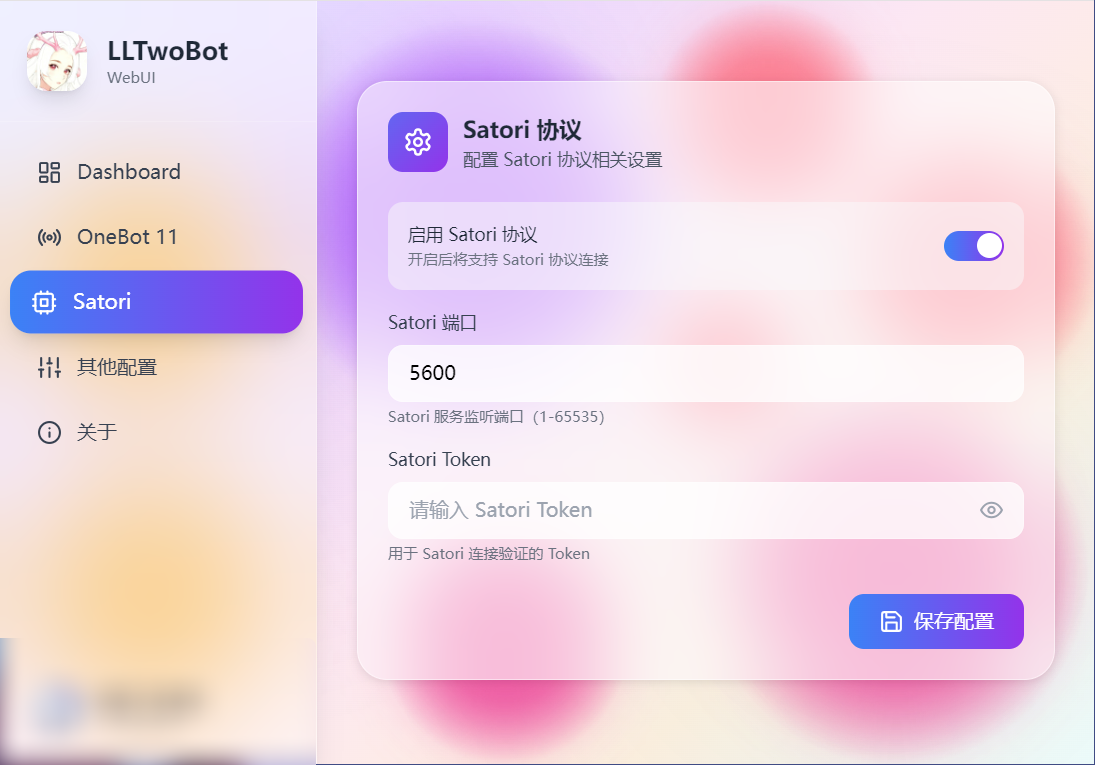
|
||||
|
||||
## 在 AstrBot 中配置 Satori 适配器
|
||||
|
||||
1. 进入 AstrBot 的管理面板
|
||||
2. 点击左边栏 `机器人`
|
||||
3. 然后在右边的界面中,点击 `+ 创建机器人`
|
||||
4. 选择 `satori`
|
||||
|
||||
弹出的配置项填写:
|
||||
|
||||
- 机器人名称 (id): `LLTwoBot`
|
||||
- 启用 (enable): 勾选
|
||||
- Satori API 终结点 (satori_api_base_url):`http://localhost:5600/v1`
|
||||
- Satori WebSocket 终结点 (satori_endpoint):`ws://localhost:5600/v1/events`
|
||||
- Satori 令牌 (satori_token):根据 LLTwoBot 配置填写(如有设置)
|
||||
|
||||
> [!NOTE]
|
||||
>
|
||||
> - LLTwoBot 的 satori协议 默认在 `5600` 端口提供服务
|
||||
> - 因此完整的 URL 路径为 `http://localhost:5600/v1`
|
||||
>
|
||||
> 如果你的 satori协议运行在其他端口,请根据实际情况修改对应的配置!
|
||||
|
||||
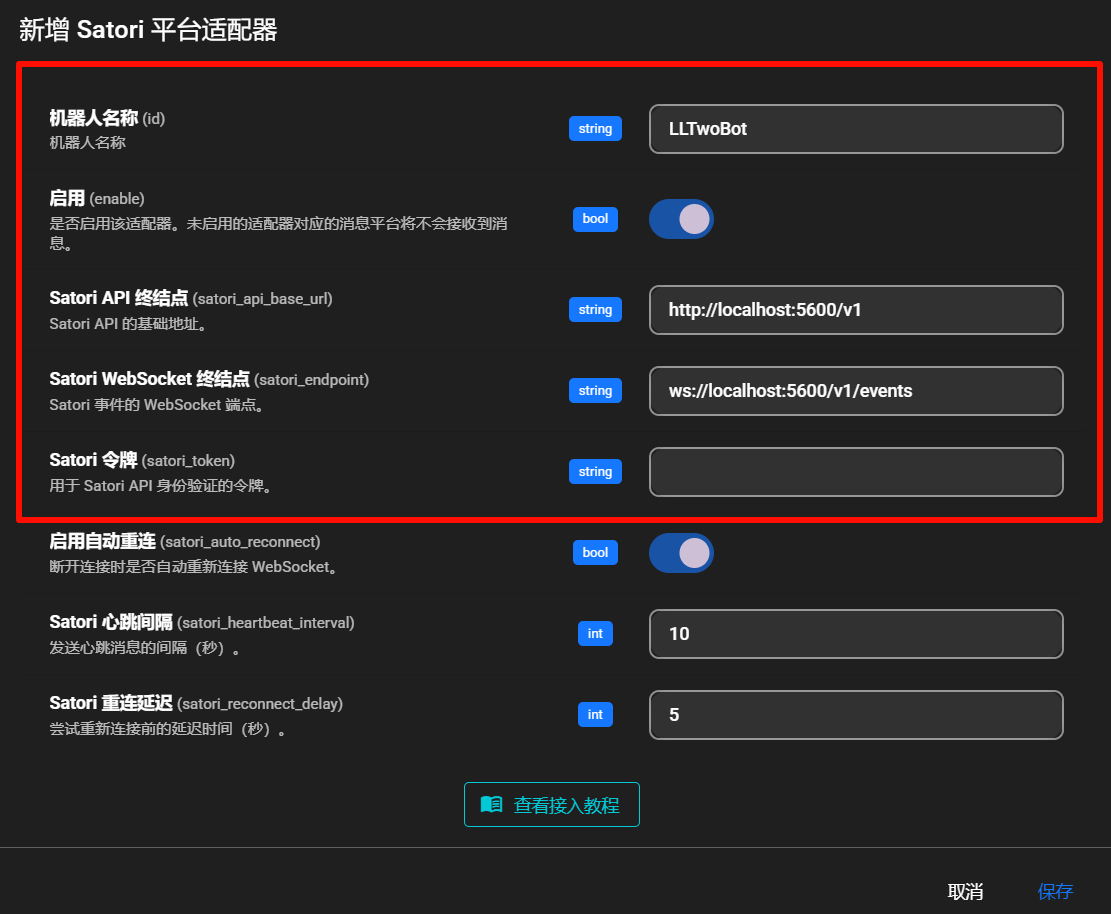
|
||||
|
||||
点击右下角 `保存` 完成配置。
|
||||
|
||||
## 🎉 大功告成
|
||||
|
||||
此时,你的 AstrBot 应该已经通过 Satori 协议成功连接到 LLTwoBot。
|
||||
|
||||
在 QQ 中发送 `/help` 以检查是否连接成功。
|
||||
|
||||
如果成功回复,则配置成功。
|
||||
|
||||
## 常见问题
|
||||
|
||||
如果遇到连接问题,请检查:
|
||||
|
||||
1. LLTwoBot 是否正常运行
|
||||
2. Satori 服务是否已启用
|
||||
3. 端口配置是否正确
|
||||
4. Token 是否匹配(如设置了 Token)
|
||||
@@ -23,7 +23,7 @@ AstrBot 是一个开源的一站式 Agentic 个人和群聊助手,可在 QQ、
|
||||
|
||||
- 部署 AstrBot:阅读部署指南,快速在本地机器或云服务器上部署 AstrBot。
|
||||
- 连接 IM 平台:按照说明将 AstrBot 连接到您喜欢的 IM 平台,如 Discord、Telegram、Slack 等。
|
||||
- 配置 AI 模型:AstrBot 支持各种 AI 模型。请参阅 [连接模型服务](/config/providers/start)
|
||||
- 配置 AI 模型:AstrBot 支持各种 AI 模型。请参阅 [连接模型服务](/providers/start)
|
||||
|
||||
## 它是如何实现的?
|
||||
|
||||
|
||||
@@ -0,0 +1,196 @@
|
||||
from __future__ import annotations
|
||||
|
||||
import argparse
|
||||
import json
|
||||
import subprocess
|
||||
import sys
|
||||
from collections import defaultdict
|
||||
from dataclasses import dataclass
|
||||
from datetime import datetime
|
||||
|
||||
|
||||
@dataclass(frozen=True)
|
||||
class Issue:
|
||||
number: int
|
||||
title: str
|
||||
created_at: datetime
|
||||
url: str
|
||||
|
||||
|
||||
def parse_args() -> argparse.Namespace:
|
||||
parser = argparse.ArgumentParser(
|
||||
description=(
|
||||
"Close duplicate open plugin-publish issues while keeping the latest one."
|
||||
)
|
||||
)
|
||||
parser.add_argument(
|
||||
"--repo",
|
||||
default="AstrBotDevs/AstrBot",
|
||||
help="GitHub repository in owner/name format.",
|
||||
)
|
||||
parser.add_argument(
|
||||
"--label",
|
||||
default="plugin-publish",
|
||||
help="Issue label to target.",
|
||||
)
|
||||
parser.add_argument(
|
||||
"--limit",
|
||||
type=int,
|
||||
default=1000,
|
||||
help="Maximum number of open issues to inspect.",
|
||||
)
|
||||
parser.add_argument(
|
||||
"--apply",
|
||||
action="store_true",
|
||||
help="Actually close duplicate issues. Defaults to dry-run.",
|
||||
)
|
||||
return parser.parse_args()
|
||||
|
||||
|
||||
def run_gh_command(args: list[str]) -> str:
|
||||
try:
|
||||
completed = subprocess.run(
|
||||
args,
|
||||
check=True,
|
||||
capture_output=True,
|
||||
text=True,
|
||||
)
|
||||
except FileNotFoundError as exc:
|
||||
raise RuntimeError("GitHub CLI `gh` is not installed or not in PATH.") from exc
|
||||
except subprocess.CalledProcessError as exc:
|
||||
stderr = exc.stderr.strip()
|
||||
stdout = exc.stdout.strip()
|
||||
details = stderr or stdout or str(exc)
|
||||
raise RuntimeError(f"`{' '.join(args)}` failed: {details}") from exc
|
||||
return completed.stdout
|
||||
|
||||
|
||||
def load_open_issues(repo: str, label: str, limit: int) -> list[Issue]:
|
||||
output = run_gh_command(
|
||||
[
|
||||
"gh",
|
||||
"issue",
|
||||
"list",
|
||||
"--repo",
|
||||
repo,
|
||||
"--label",
|
||||
label,
|
||||
"--state",
|
||||
"open",
|
||||
"--limit",
|
||||
str(limit),
|
||||
"--json",
|
||||
"number,title,createdAt,url",
|
||||
]
|
||||
)
|
||||
items = json.loads(output)
|
||||
return [
|
||||
Issue(
|
||||
number=item["number"],
|
||||
title=item["title"],
|
||||
created_at=datetime.fromisoformat(item["createdAt"].replace("Z", "+00:00")),
|
||||
url=item["url"],
|
||||
)
|
||||
for item in items
|
||||
]
|
||||
|
||||
|
||||
def normalize_title(title: str) -> str:
|
||||
return " ".join(title.split()).strip()
|
||||
|
||||
|
||||
def find_duplicates(
|
||||
issues: list[Issue],
|
||||
) -> list[tuple[Issue, list[Issue]]]:
|
||||
grouped: dict[str, list[Issue]] = defaultdict(list)
|
||||
for issue in issues:
|
||||
grouped[normalize_title(issue.title)].append(issue)
|
||||
|
||||
duplicate_groups: list[tuple[Issue, list[Issue]]] = []
|
||||
for group in grouped.values():
|
||||
if len(group) < 2:
|
||||
continue
|
||||
ordered = sorted(
|
||||
group,
|
||||
key=lambda issue: (issue.created_at, issue.number),
|
||||
reverse=True,
|
||||
)
|
||||
keep = ordered[0]
|
||||
close_candidates = ordered[1:]
|
||||
duplicate_groups.append((keep, close_candidates))
|
||||
|
||||
duplicate_groups.sort(
|
||||
key=lambda item: (item[0].created_at, item[0].number),
|
||||
reverse=True,
|
||||
)
|
||||
return duplicate_groups
|
||||
|
||||
|
||||
def print_plan(duplicate_groups: list[tuple[Issue, list[Issue]]], apply: bool) -> None:
|
||||
action = "Will close" if apply else "Would close"
|
||||
if not duplicate_groups:
|
||||
print("No duplicate open issues found.")
|
||||
return
|
||||
|
||||
total_to_close = sum(len(close_list) for _, close_list in duplicate_groups)
|
||||
print(f"Found {len(duplicate_groups)} duplicate title groups.")
|
||||
print(
|
||||
f"{action} {total_to_close} issues and keep {len(duplicate_groups)} latest issues."
|
||||
)
|
||||
|
||||
for keep, close_list in duplicate_groups:
|
||||
print()
|
||||
print(f'Keep #{keep.number} [{keep.created_at.isoformat()}] "{keep.title}"')
|
||||
print(f" {keep.url}")
|
||||
for issue in close_list:
|
||||
print(
|
||||
f'Close #{issue.number} [{issue.created_at.isoformat()}] "{issue.title}"'
|
||||
)
|
||||
print(f" {issue.url}")
|
||||
|
||||
|
||||
def close_duplicates(
|
||||
repo: str, duplicate_groups: list[tuple[Issue, list[Issue]]]
|
||||
) -> None:
|
||||
for keep, close_list in duplicate_groups:
|
||||
reason = (
|
||||
f"Closing as duplicate of #{keep.number}. "
|
||||
"Keeping the latest open issue with this title."
|
||||
)
|
||||
for issue in close_list:
|
||||
print(f"Closing #{issue.number} as duplicate of #{keep.number}...")
|
||||
run_gh_command(
|
||||
[
|
||||
"gh",
|
||||
"issue",
|
||||
"close",
|
||||
str(issue.number),
|
||||
"--repo",
|
||||
repo,
|
||||
"--comment",
|
||||
reason,
|
||||
]
|
||||
)
|
||||
|
||||
|
||||
def main() -> int:
|
||||
args = parse_args()
|
||||
try:
|
||||
issues = load_open_issues(args.repo, args.label, args.limit)
|
||||
duplicate_groups = find_duplicates(issues)
|
||||
print_plan(duplicate_groups, apply=args.apply)
|
||||
if args.apply and duplicate_groups:
|
||||
print()
|
||||
close_duplicates(args.repo, duplicate_groups)
|
||||
print("Done.")
|
||||
elif not args.apply:
|
||||
print()
|
||||
print("Dry-run only. Re-run with `--apply` to close the duplicates.")
|
||||
except RuntimeError as exc:
|
||||
print(str(exc), file=sys.stderr)
|
||||
return 1
|
||||
return 0
|
||||
|
||||
|
||||
if __name__ == "__main__":
|
||||
raise SystemExit(main())
|
||||
@@ -0,0 +1,56 @@
|
||||
import asyncio
|
||||
|
||||
import pytest
|
||||
|
||||
from astrbot.dashboard.routes.chat import _poll_webchat_stream_result
|
||||
|
||||
|
||||
class _QueueThatRaises:
|
||||
def __init__(self, exc: BaseException):
|
||||
self._exc = exc
|
||||
|
||||
async def get(self):
|
||||
raise self._exc
|
||||
|
||||
|
||||
class _QueueWithResult:
|
||||
def __init__(self, result):
|
||||
self._result = result
|
||||
|
||||
async def get(self):
|
||||
return self._result
|
||||
|
||||
|
||||
@pytest.mark.asyncio
|
||||
async def test_poll_webchat_stream_result_breaks_on_cancelled_error():
|
||||
result, should_break = await _poll_webchat_stream_result(
|
||||
_QueueThatRaises(asyncio.CancelledError()),
|
||||
"alice",
|
||||
)
|
||||
|
||||
assert result is None
|
||||
assert should_break is True
|
||||
|
||||
|
||||
@pytest.mark.asyncio
|
||||
async def test_poll_webchat_stream_result_continues_on_generic_exception():
|
||||
result, should_break = await _poll_webchat_stream_result(
|
||||
_QueueThatRaises(RuntimeError("boom")),
|
||||
"alice",
|
||||
)
|
||||
|
||||
assert result is None
|
||||
assert should_break is False
|
||||
|
||||
|
||||
@pytest.mark.asyncio
|
||||
async def test_poll_webchat_stream_result_returns_queue_payload():
|
||||
payload = {"type": "end", "data": ""}
|
||||
|
||||
result, should_break = await _poll_webchat_stream_result(
|
||||
_QueueWithResult(payload),
|
||||
"alice",
|
||||
)
|
||||
|
||||
assert result == payload
|
||||
assert should_break is False
|
||||
Reference in New Issue
Block a user