 Soulter
fc33b3eb68
Soulter
fc33b3eb68
* docs: transfer AstrBotDevs/AstrBot-docs to AstrBotDevs/AstrBot
* refactor: reorder imports and improve type hints in sync_docs_to_wiki.py and upload_doc_images_to_r2.py
* feat: add GitHub Actions workflow to sync wiki with documentation

Co-authored-by: Soulter <37870767+Soulter@users.noreply.github.com>
Co-authored-by: anka-afk <110004162+anka-afk@users.noreply.github.com>
Co-authored-by: zouyonghe <62183434+zouyonghe@users.noreply.github.com>
Co-authored-by: shuiping233 <49360196+shuiping233@users.noreply.github.com>
Co-authored-by: LIghtJUNction <106986785+LIghtJUNction@users.noreply.github.com>
Co-authored-by: Sjshi763 <179909421+Sjshi763@users.noreply.github.com>
Co-authored-by: xiewoc <70128845+xiewoc@users.noreply.github.com>
Co-authored-by: QingFeng-awa <151742581+QingFeng-awa@users.noreply.github.com>
Co-authored-by: PaloMiku <96452465+PaloMiku@users.noreply.github.com>
Co-authored-by: shangxueink <138397030+shangxueink@users.noreply.github.com>
Co-authored-by: IGCrystal-A <244300990+IGCrystal-A@users.noreply.github.com>
Co-authored-by: RC-CHN <67079377+RC-CHN@users.noreply.github.com>
Co-authored-by: MC090610 <113341105+MC090610@users.noreply.github.com>
Co-authored-by: Waterwzy <196913419+Waterwzy@users.noreply.github.com>
Co-authored-by: Lanhuace-Wan <186303160+Lanhuace-Wan@users.noreply.github.com>
Co-authored-by: LiAlH4qwq <61769640+LiAlH4qwq@users.noreply.github.com>
Co-authored-by: HSOS6 <209910899+HSOS6@users.noreply.github.com>
Co-authored-by: th-dd <162813557+th-dd@users.noreply.github.com>
Co-authored-by: miaoxutao123 <81676466+miaoxutao123@users.noreply.github.com>
Co-authored-by: nuomicici <143102889+nuomicici@users.noreply.github.com>
Co-authored-by: nasyt233 <210103278+nasyt233@users.noreply.github.com>
Co-authored-by: jlugjb <7426462+jlugjb@users.noreply.github.com>
Co-authored-by: Raven95676 <176760093+Raven95676@users.noreply.github.com>
Co-authored-by: Futureppo <180109455+Futureppo@users.noreply.github.com>
Co-authored-by: MliKiowa <61873808+MliKiowa@users.noreply.github.com>
Co-authored-by: Fridemn <150212937+Fridemn@users.noreply.github.com>
Co-authored-by: BakaCookie520 <138355736+BakaCookie520@users.noreply.github.com>
Co-authored-by: YumeYuka <125112916+YumeYuka@users.noreply.github.com>
Co-authored-by: xming521 <32786500+xming521@users.noreply.github.com>
Co-authored-by: ywh555hhh <121592812+ywh555hhh@users.noreply.github.com>
Co-authored-by: stevessr <89645372+stevessr@users.noreply.github.com>
Co-authored-by: roeseth <41995115+roeseth@users.noreply.github.com>
Co-authored-by: ikun-1145141 <265925499+ikun-1145141@users.noreply.github.com>
Co-authored-by: evpeople <54983536+evpeople@users.noreply.github.com>
Co-authored-by: Yue-bin <60509781+Yue-bin@users.noreply.github.com>
Co-authored-by: W1ndys <109416673+W1ndys@users.noreply.github.com>
Co-authored-by: TheFurina <218887821+TheFurina@users.noreply.github.com>
Co-authored-by: Seayon <12275933+Seayon@users.noreply.github.com>
Co-authored-by: OnlyblackTea <38585636+OnlyblackTea@users.noreply.github.com>
Co-authored-by: ocetars <74854972+ocetars@users.noreply.github.com>
Co-authored-by: railgun19457 <117180744+railgun19457@users.noreply.github.com>
Co-authored-by: JunieXD <107397009+JunieXD@users.noreply.github.com>
Co-authored-by: advent259141 <197440256+advent259141@users.noreply.github.com>
Co-authored-by: Doge2077 <91442300+Doge2077@users.noreply.github.com>
Co-authored-by: Bocity <23430545+Bocity@users.noreply.github.com>
Co-authored-by: Aurora-xk <192227833+Aurora-xk@users.noreply.github.com>
99 lines
3.8 KiB
Markdown
99 lines
3.8 KiB
Markdown
# Deploy AstrBot with AstrBot Launcher
|
|
|
|
## Recommended Method 1: AstrBot One-Click Launcher
|
|
|
|
AstrBot One-Click Launcher supports Windows, macOS, and Linux.
|
|
|
|
0. Open [AstrBotDevs/astrbot-launcher](https://github.com/AstrBotDevs/astrbot-launcher)
|
|
1. **Optional but recommended**: give this project a [**Star ⭐**](https://github.com/AstrBotDevs/astrbot-launcher). Your support helps maintainers keep improving it.
|
|
2. Find **Releases** on the right, open the latest release, then download the installer for your system from **Assets**.
|
|
|
|
For example:
|
|
|
|
- Windows x86 users: `AstrBot.Launcher_0.2.1_x64-setup.exe`
|
|
- Windows on Arm users: `AstrBot.Launcher_0.2.1_arm64-setup.exe`
|
|
- macOS Apple Silicon users: `AstrBot.Launcher_0.2.1_aarch64.dmg`
|
|
|
|
For macOS users, if you see "damaged and can't be opened", it is caused by macOS security restrictions on unsigned apps. Fix it with:
|
|
|
|
1. Open Terminal.
|
|
2. Run:
|
|
`xattr -dr com.apple.quarantine /Applications/AstrBot\ Launcher.app`
|
|
3. Reopen AstrBot Launcher.
|
|
|
|
## Method 2: Legacy Windows Installer
|
|
|
|
We still recommend the One-Click Launcher above because it is simpler, more automated, and better for most users.
|
|
|
|
The legacy installer is a `PowerShell` script, very small (<20KB). It requires `PowerShell` (usually built in on `Windows 10` and newer).
|
|
|
|
> [!WARNING]
|
|
> `Python 3.10` or later must be installed, and environment variables must be configured.
|
|
|
|
> [!TIP]
|
|
> If deployment fails, try Docker deployment or manual deployment instead.
|
|
|
|
## Download the Legacy Installer
|
|
|
|
Open <https://github.com/AstrBotDevs/AstrBotLauncher/releases/latest>
|
|
|
|
Download `Source code (zip)` and extract it.
|
|
|
|
## Run the Legacy Installer
|
|
|
|
> The video may be outdated. Follow the steps here.
|
|
|
|
After extraction, open the folder.
|
|
|
|
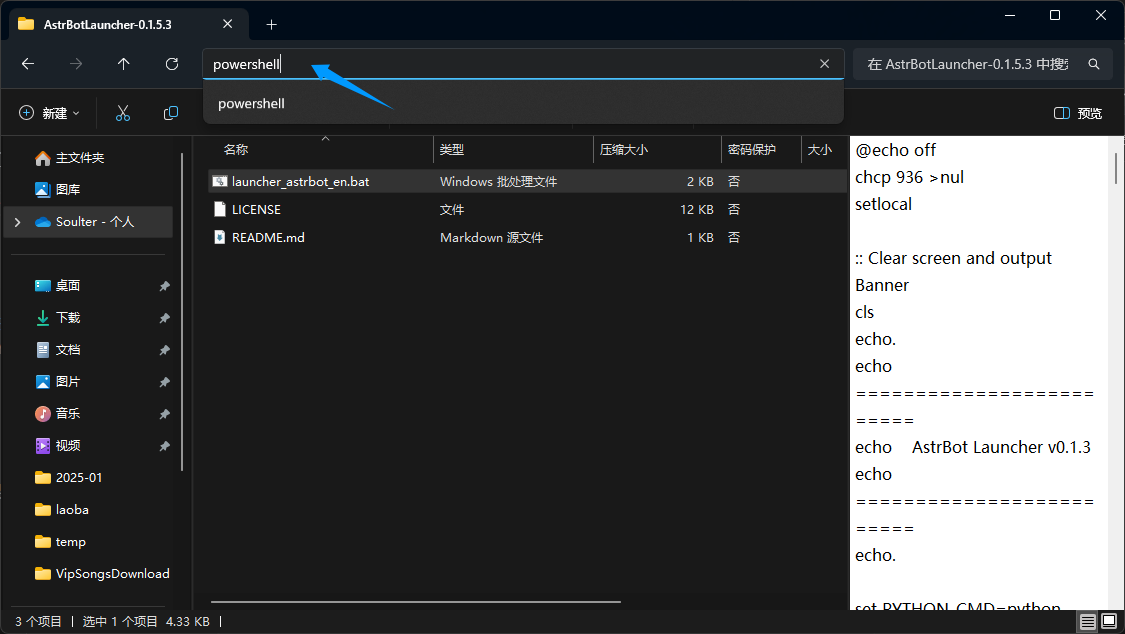
Type `PowerShell` in the address bar and press Enter:
|
|
|
|
|
|
|
|
Drag `launcher_astrbot_en.bat` into the PowerShell window and press Enter.
|
|
|
|
> [!WARNING]
|
|
> - The script is safe. If you see `Windows protected your PC`, click `More info` and then `Run anyway`.
|
|
> - By default, it uses `python`. If you want to specify another interpreter path/command, edit `launcher_astrbot_en.bat`, find `set PYTHON_CMD=python`, and replace `python` with your own command/path.
|
|
|
|
If Python is not detected, the script exits with a prompt.
|
|
|
|
The script checks whether an `AstrBot` folder exists. If not, it downloads the latest AstrBot source from [GitHub](https://github.com/AstrBotDevs/AstrBot/releases/latest), installs dependencies, and runs it automatically.
|
|
|
|
## Done
|
|
|
|
If everything works, you will see AstrBot logs.
|
|
|
|
Without errors, you should see a log like `🌈 Management panel started, accessible at` with several URLs. Open one URL to access AstrBot WebUI.
|
|
|
|
> [!TIP]
|
|
> Default username and password: `astrbot` / `astrbot`.
|
|
>
|
|
> If WebUI returns 404:
|
|
> Download `dist.zip` from [release](https://github.com/AstrBotDevs/AstrBot/releases), extract it into `AstrBot/data`, then restart the computer if needed.
|
|
|
|
Then deploy at least one messaging platform adapter to start using AstrBot in IM apps.
|
|
|
|
## Error: Python is not installed
|
|
|
|
If you still get this error after installing Python and restarting, your PATH is likely incorrect.
|
|
|
|
**Method 1**
|
|
|
|
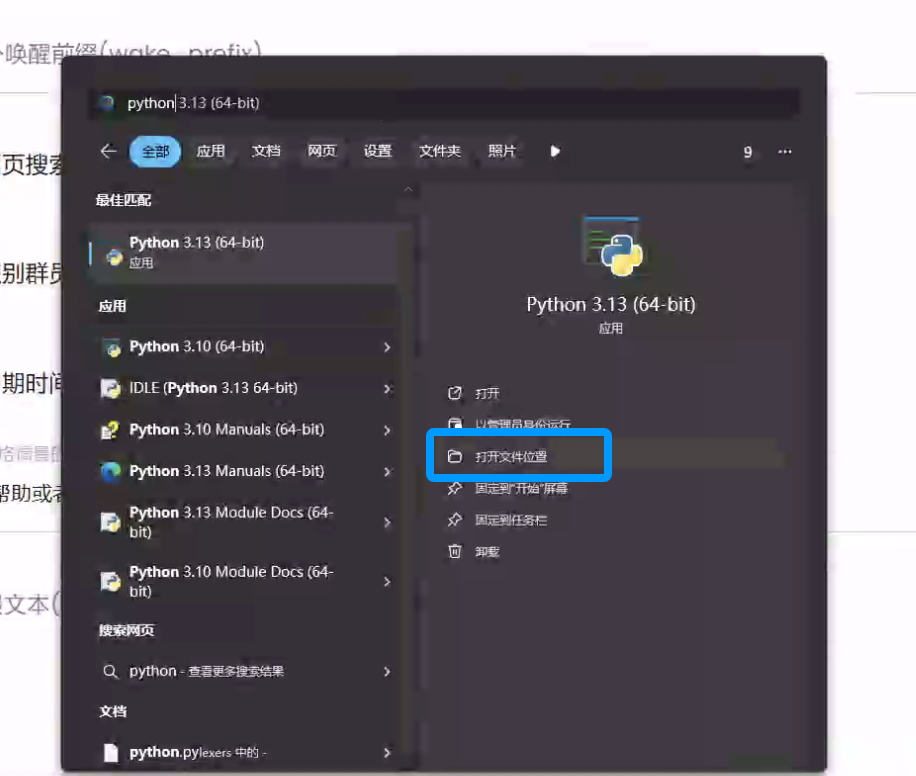
Search for Python in Windows and open its file location:
|
|
|
|
|
|
|
|
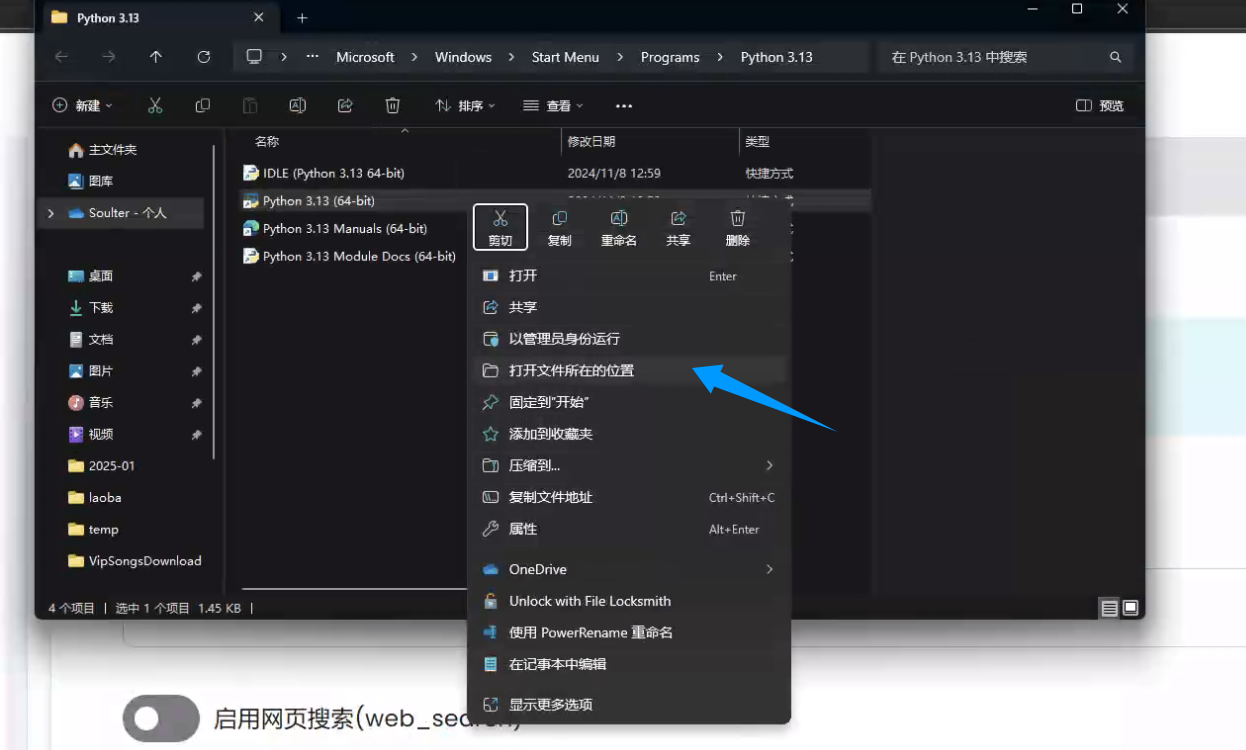
Right-click the shortcut below and open file location:
|
|
|
|
|
|
|
|
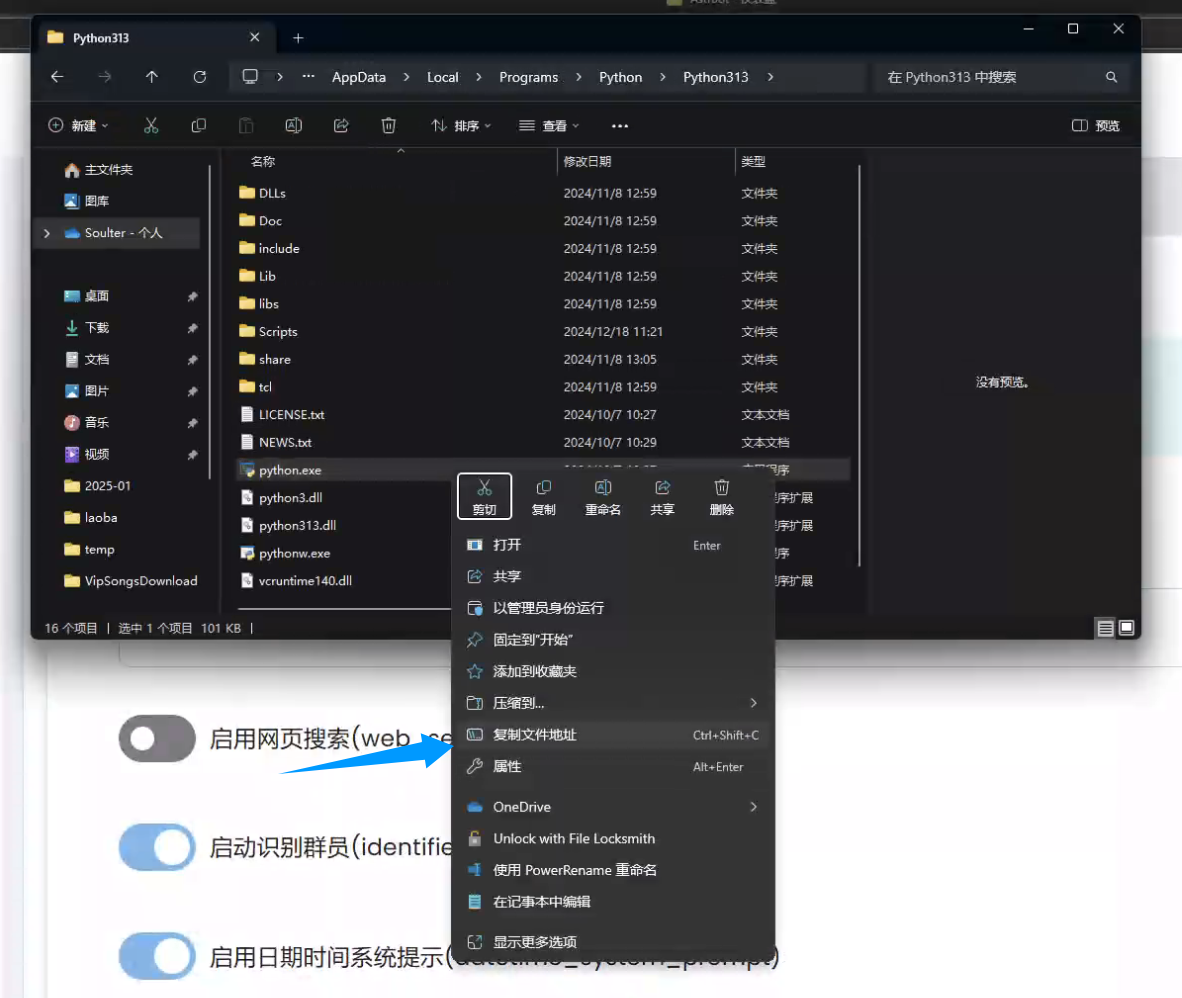
Copy the file path:
|
|
|
|
|
|
|
|
Edit `launcher_astrbot_en.bat` in Notepad, find `set PYTHON_CMD=python`, and replace `python` with your interpreter command/path. Keep quotes if your path contains spaces.
|
|
|
|
**Method 2**
|
|
|
|
Reinstall Python, check `Add Python to PATH` during installation, then restart your computer.
|