 Soulter
fc33b3eb68
Soulter
fc33b3eb68
* docs: transfer AstrBotDevs/AstrBot-docs to AstrBotDevs/AstrBot
* refactor: reorder imports and improve type hints in sync_docs_to_wiki.py and upload_doc_images_to_r2.py
* feat: add GitHub Actions workflow to sync wiki with documentation

Co-authored-by: Soulter <37870767+Soulter@users.noreply.github.com>
Co-authored-by: anka-afk <110004162+anka-afk@users.noreply.github.com>
Co-authored-by: zouyonghe <62183434+zouyonghe@users.noreply.github.com>
Co-authored-by: shuiping233 <49360196+shuiping233@users.noreply.github.com>
Co-authored-by: LIghtJUNction <106986785+LIghtJUNction@users.noreply.github.com>
Co-authored-by: Sjshi763 <179909421+Sjshi763@users.noreply.github.com>
Co-authored-by: xiewoc <70128845+xiewoc@users.noreply.github.com>
Co-authored-by: QingFeng-awa <151742581+QingFeng-awa@users.noreply.github.com>
Co-authored-by: PaloMiku <96452465+PaloMiku@users.noreply.github.com>
Co-authored-by: shangxueink <138397030+shangxueink@users.noreply.github.com>
Co-authored-by: IGCrystal-A <244300990+IGCrystal-A@users.noreply.github.com>
Co-authored-by: RC-CHN <67079377+RC-CHN@users.noreply.github.com>
Co-authored-by: MC090610 <113341105+MC090610@users.noreply.github.com>
Co-authored-by: Waterwzy <196913419+Waterwzy@users.noreply.github.com>
Co-authored-by: Lanhuace-Wan <186303160+Lanhuace-Wan@users.noreply.github.com>
Co-authored-by: LiAlH4qwq <61769640+LiAlH4qwq@users.noreply.github.com>
Co-authored-by: HSOS6 <209910899+HSOS6@users.noreply.github.com>
Co-authored-by: th-dd <162813557+th-dd@users.noreply.github.com>
Co-authored-by: miaoxutao123 <81676466+miaoxutao123@users.noreply.github.com>
Co-authored-by: nuomicici <143102889+nuomicici@users.noreply.github.com>
Co-authored-by: nasyt233 <210103278+nasyt233@users.noreply.github.com>
Co-authored-by: jlugjb <7426462+jlugjb@users.noreply.github.com>
Co-authored-by: Raven95676 <176760093+Raven95676@users.noreply.github.com>
Co-authored-by: Futureppo <180109455+Futureppo@users.noreply.github.com>
Co-authored-by: MliKiowa <61873808+MliKiowa@users.noreply.github.com>
Co-authored-by: Fridemn <150212937+Fridemn@users.noreply.github.com>
Co-authored-by: BakaCookie520 <138355736+BakaCookie520@users.noreply.github.com>
Co-authored-by: YumeYuka <125112916+YumeYuka@users.noreply.github.com>
Co-authored-by: xming521 <32786500+xming521@users.noreply.github.com>
Co-authored-by: ywh555hhh <121592812+ywh555hhh@users.noreply.github.com>
Co-authored-by: stevessr <89645372+stevessr@users.noreply.github.com>
Co-authored-by: roeseth <41995115+roeseth@users.noreply.github.com>
Co-authored-by: ikun-1145141 <265925499+ikun-1145141@users.noreply.github.com>
Co-authored-by: evpeople <54983536+evpeople@users.noreply.github.com>
Co-authored-by: Yue-bin <60509781+Yue-bin@users.noreply.github.com>
Co-authored-by: W1ndys <109416673+W1ndys@users.noreply.github.com>
Co-authored-by: TheFurina <218887821+TheFurina@users.noreply.github.com>
Co-authored-by: Seayon <12275933+Seayon@users.noreply.github.com>
Co-authored-by: OnlyblackTea <38585636+OnlyblackTea@users.noreply.github.com>
Co-authored-by: ocetars <74854972+ocetars@users.noreply.github.com>
Co-authored-by: railgun19457 <117180744+railgun19457@users.noreply.github.com>
Co-authored-by: JunieXD <107397009+JunieXD@users.noreply.github.com>
Co-authored-by: advent259141 <197440256+advent259141@users.noreply.github.com>
Co-authored-by: Doge2077 <91442300+Doge2077@users.noreply.github.com>
Co-authored-by: Bocity <23430545+Bocity@users.noreply.github.com>
Co-authored-by: Aurora-xk <192227833+Aurora-xk@users.noreply.github.com>
138 lines
5.2 KiB
Markdown
138 lines
5.2 KiB
Markdown
# Connect AstrBot to WeCom
|
|
|
|
AstrBot supports both WeCom Applications and WeCom Customer Service.
|
|
|
|
## Supported Basic Message Types
|
|
|
|
> Version v4.15.0.
|
|
|
|
| Message Type | Receive | Send | Notes |
|
|
| --- | --- | --- | --- |
|
|
| Text | Yes | Yes | |
|
|
| Image | Yes | Yes | |
|
|
| Voice | Yes | Yes | |
|
|
| Video | No | Yes | |
|
|
| File | No | Yes | |
|
|
|
|
Proactive message push: Supported for WeCom Application. Not fully tested for WeCom Customer Service.
|
|
|
|
## Before You Start
|
|
|
|
1. Open AstrBot Dashboard.
|
|
2. Click `Bots` in the left sidebar.
|
|
3. Click `+ Create Bot`.
|
|
4. Select `wecom`.
|
|
|
|
A configuration dialog will appear. Keep it open and continue with the steps below.
|
|
|
|
## Method 1: WeCom Customer Service
|
|
|
|
> [!NOTE]
|
|
> 1. Requires AstrBot >= v3.5.7.
|
|
> 2. This method works directly inside WeChat.
|
|
|
|
1. Open [WeCom Customer Service Console](https://kf.weixin.qq.com/) and sign in with WeCom QR login.
|
|
2. Create a customer service account in `Customer Service Account`, then copy its **name** (not account ID) to AstrBot field `wechat_kf_account_name`.
|
|
3. Go to [WeCom Enterprise Info](https://work.weixin.qq.com/wework_admin/frame#profile), copy `Corpid`, and fill AstrBot `corpid`.
|
|
4. Configure callback verification:
|
|
|
|
- If this is your first customer service bot, open `Development Configuration`, click `Start` next to internal access.
|
|
- If you used it before, open `Callback Configuration` directly and click edit.
|
|
|
|

|
|
|
|
5. Click random generation buttons to get `Token` and `EncodingAESKey`, then fill AstrBot `token` and `encoding_aes_key`.
|
|
6. Keep `Unified Webhook Mode (unified_webhook_mode)` enabled, click `Save`, and wait for adapter reload.
|
|
|
|
For callback URL:
|
|
|
|
- If unified mode is enabled, AstrBot generates a unique webhook callback URL after save. Copy it from logs or bot card in WebUI.
|
|
- If unified mode is disabled, use `http://<your-public-server-ip>:6195/callback/command`.
|
|
|
|
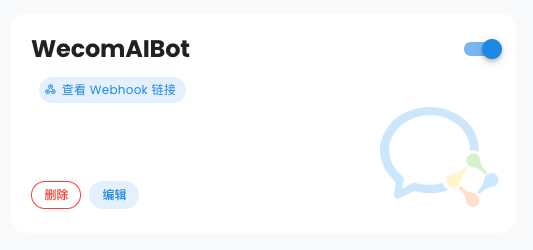
|
|
|
|
> If unified mode is enabled, forward external requests to AstrBot port `6185`; otherwise forward to configured adapter port (default `6195`).
|
|
|
|
Back in WeCom Customer Service callback settings, click `Complete`. If successful, status shows completed.
|
|
|
|
7. In `Development Configuration`, get `Secret`, edit your WeCom adapter in AstrBot, set `secret`, then save again.
|
|
|
|
> [!TIP]
|
|
> Based on [#571](https://github.com/Soulter/AstrBot/issues/571), for newly registered enterprises, `corp_id` may take about 30 minutes to become valid.
|
|
|
|
Then open AstrBot `Console`, you should see logs asking you to open a WeChat scan link.
|
|
|
|
```txt
|
|
Please open the following link and scan with WeChat ...
|
|
```
|
|
|
|
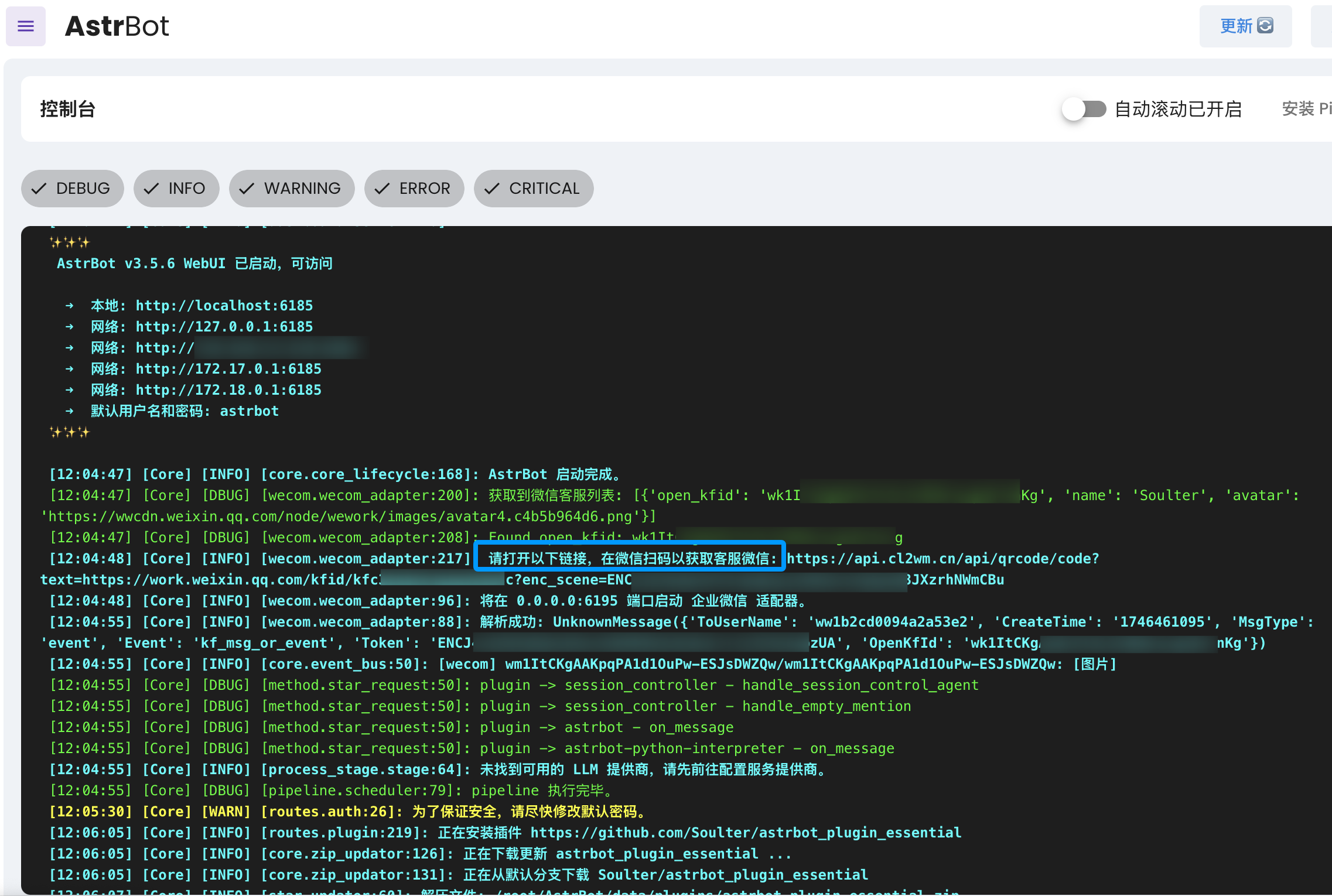
|
|
|
|
Open the link, scan with WeChat, then send `help` in the customer service chat to test connectivity.
|
|
|
|
## Method 2: WeCom Application
|
|
|
|
Open: <https://work.weixin.qq.com/wework_admin/frame#apps>
|
|
|
|
1. Click `My Company`, copy enterprise ID (`Corpid`), and fill AstrBot `corpid`.
|
|
|
|
> [!TIP]
|
|
> For newly registered enterprises, `corp_id` may take time to become valid. See [#571](https://github.com/Soulter/AstrBot/issues/571).
|
|
|
|
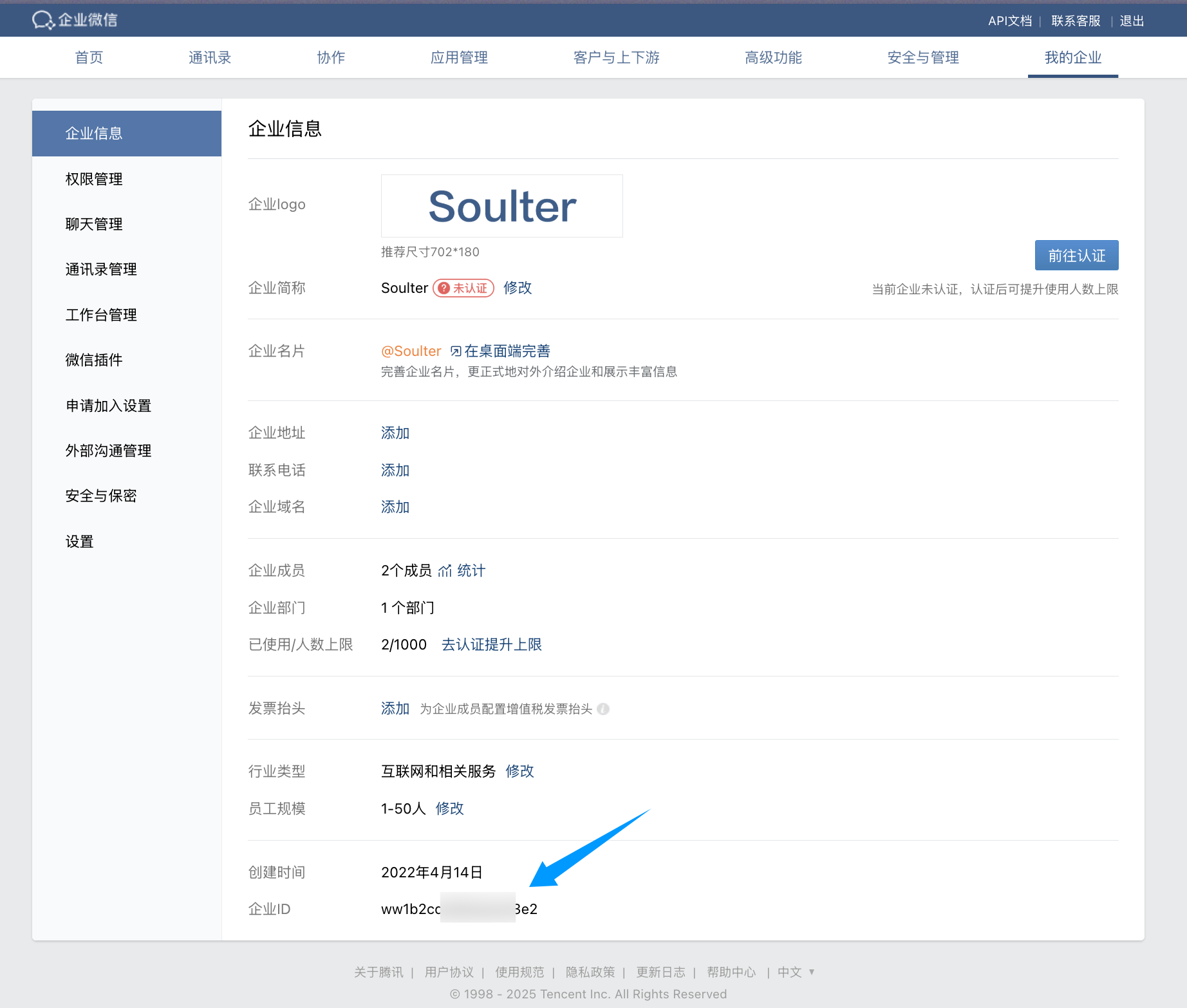
|
|
|
|
2. Create a custom app (`Custom App`) and fill name/avatar/visibility scope.
|
|
3. Open the app, copy `Secret`, and fill AstrBot `secret`.
|
|
|
|
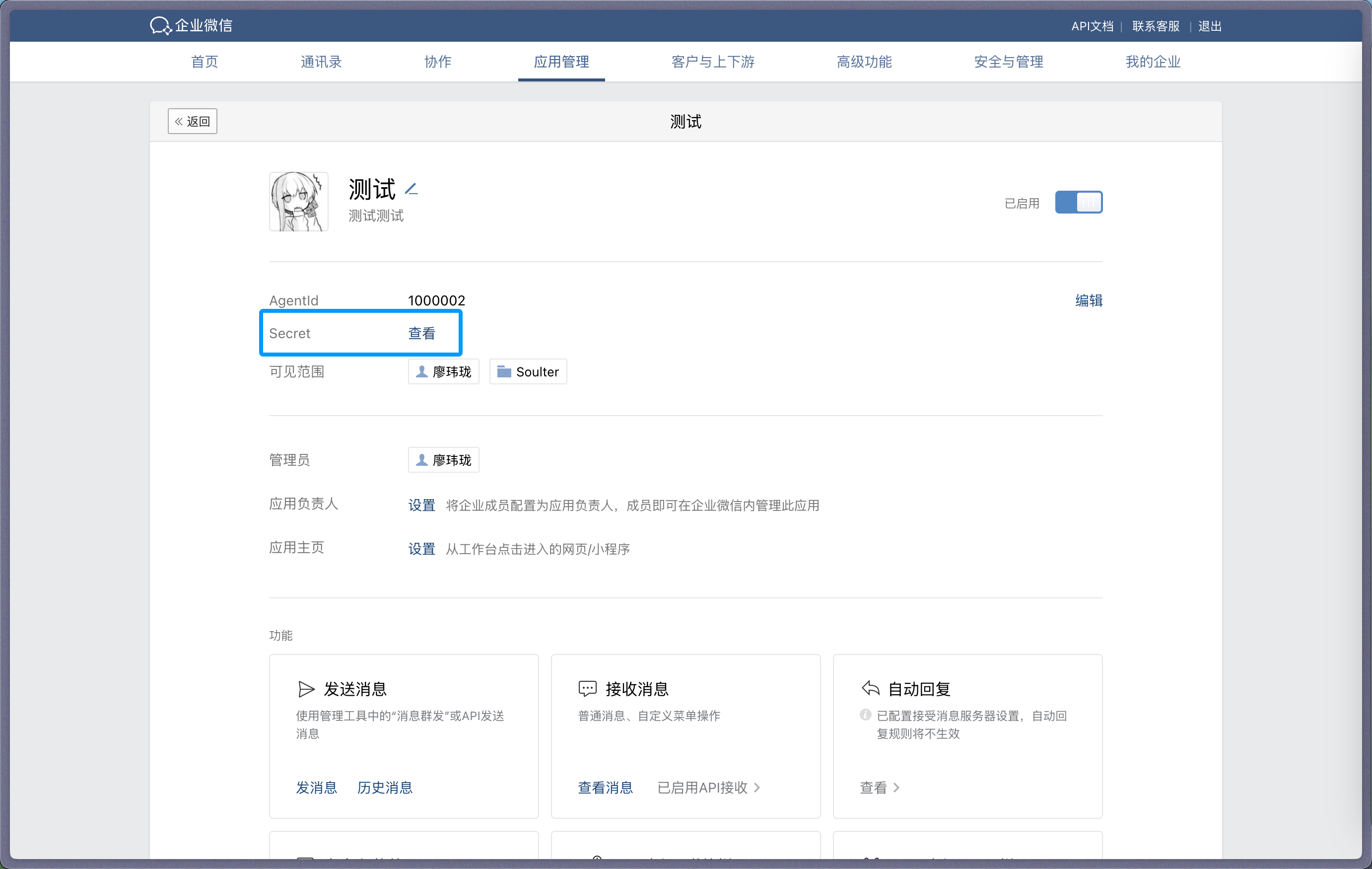
|
|
|
|
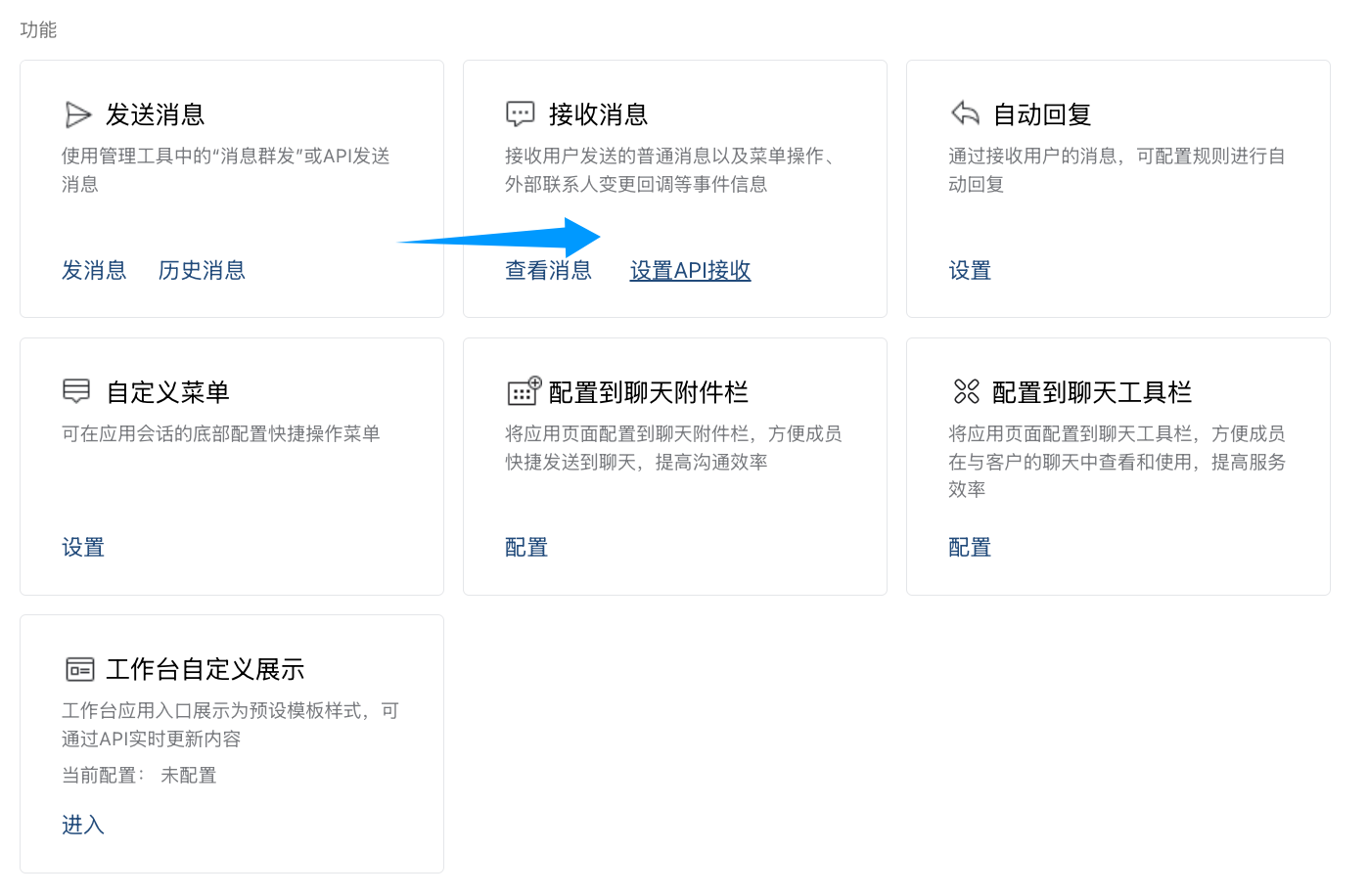
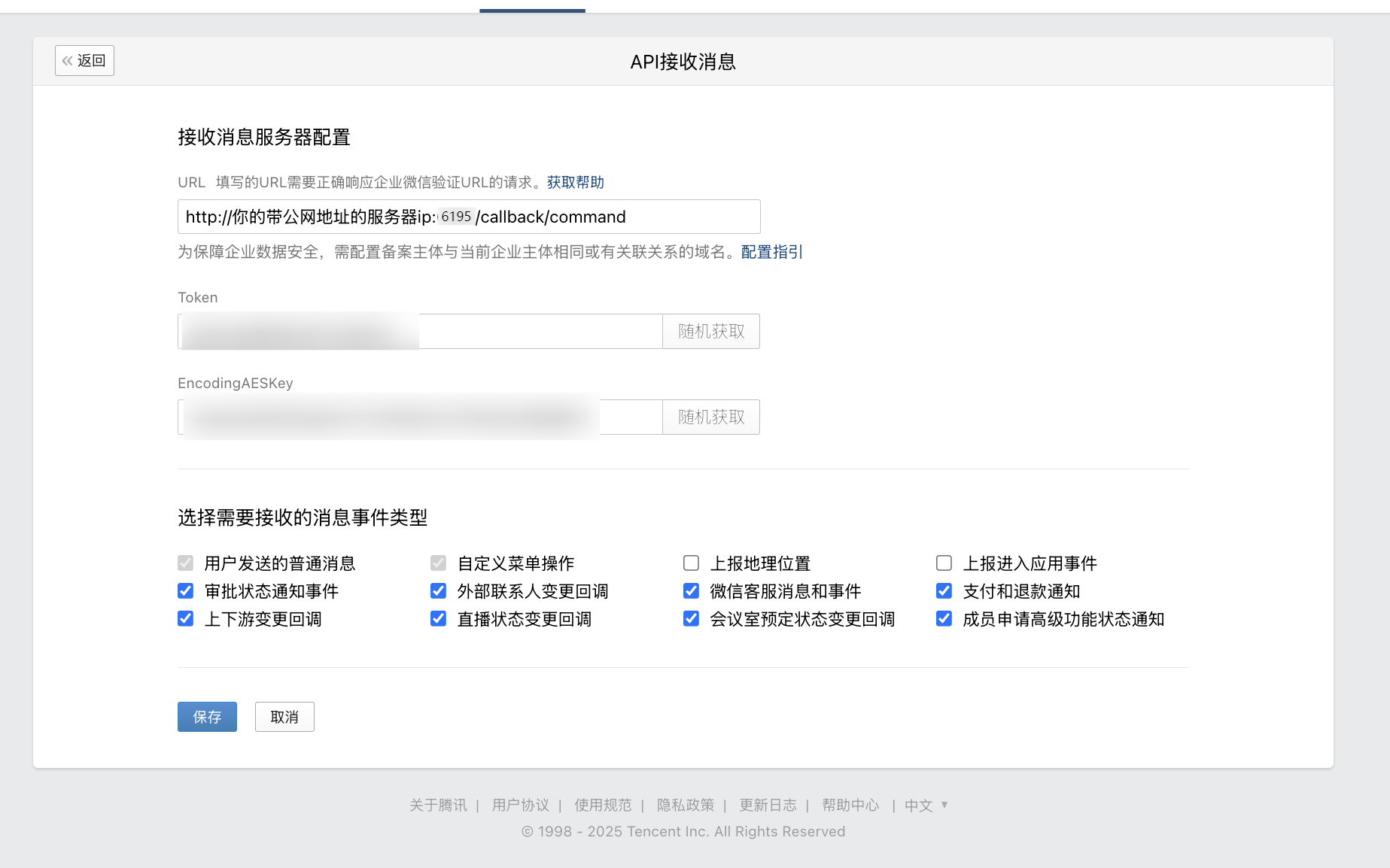
4. In app settings, find `Receive Messages`, click `Set API Receive`.
|
|
|
|
|
|
|
|
|
|
|
|
5. Generate `Token` and `EncodingAESKey`, fill AstrBot `token` and `encoding_aes_key`.
|
|
6. Keep `Unified Webhook Mode (unified_webhook_mode)` enabled (recommended), then click Save in AstrBot and wait for restart.
|
|
|
|
For callback URL:
|
|
|
|
- If unified mode is enabled, use the generated unique callback URL from logs or bot card.
|
|
- If unified mode is disabled, use `http://<your-public-server-ip>:6195/callback/command`.
|
|
|
|

|
|
|
|
> If unified mode is enabled, forward to port `6185`; otherwise forward to configured adapter port (default `6195`).
|
|
|
|
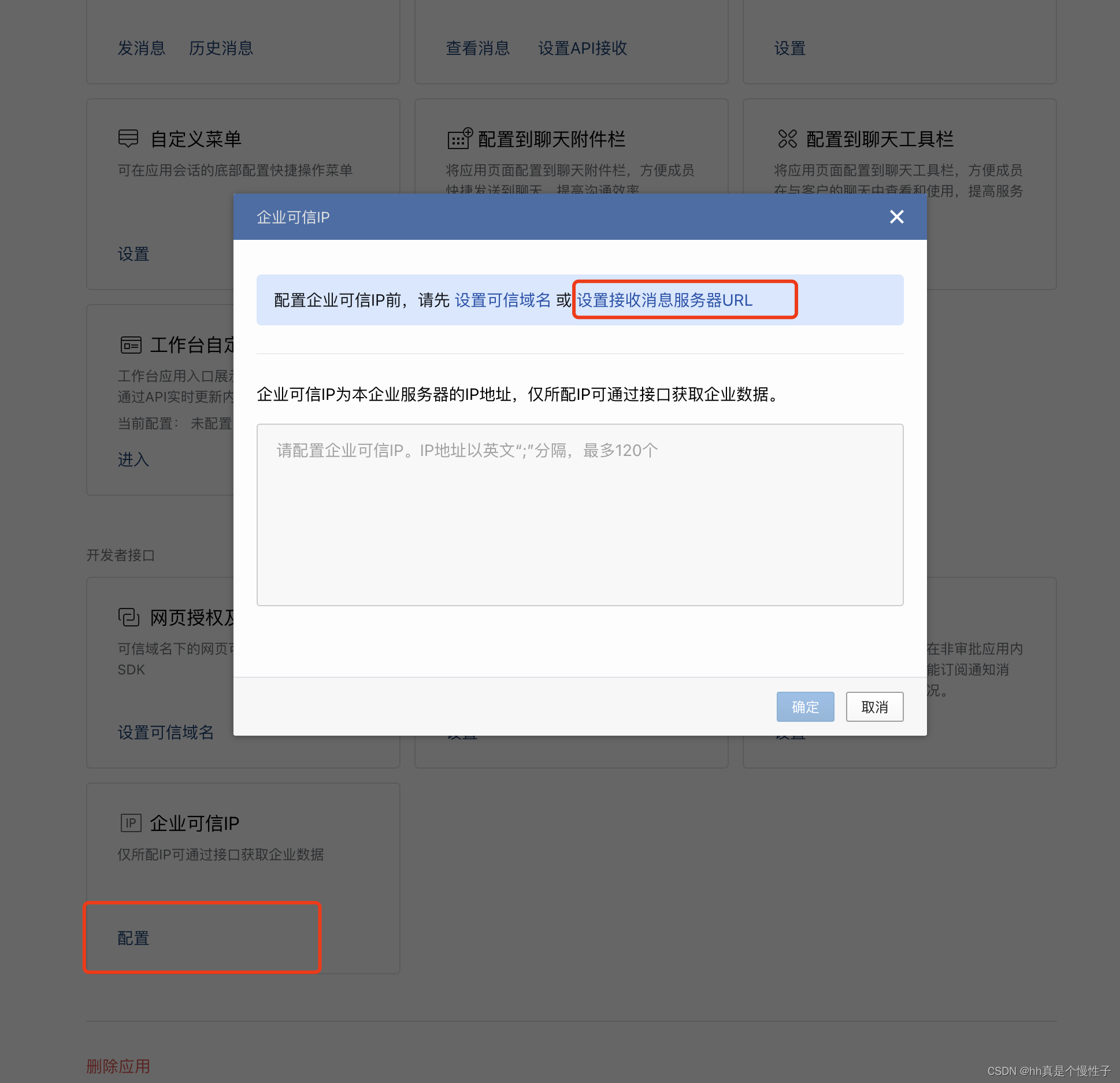
7. Configure trusted enterprise IP in WeCom.
|
|
|
|
|
|
|
|
Add your public IP and confirm.
|
|
|
|

|
|
|
|
After AstrBot restart, return to API receive page and click save. If you see callback verification errors, re-check all required fields.
|
|
|
|
If save succeeds, AstrBot can receive messages from WeCom.
|
|
|
|
## Test
|
|
|
|
In WeCom Workbench, open the app you just created and send `/help`.
|
|
|
|
If AstrBot replies, integration is successful.
|
|
|
|
## Reverse Proxy (Custom API Base)
|
|
|
|
AstrBot supports custom WeCom endpoint (`api_base_url`) for environments without stable public IP.
|
|
|
|
Set your custom endpoint in `api_base_url`.
|
|
|
|
## Voice Input
|
|
|
|
Install `ffmpeg` for voice input support.
|
|
|
|
- Linux: `apt install ffmpeg`
|
|
- Windows: download from [FFmpeg website](https://ffmpeg.org/download.html)
|
|
- macOS: `brew install ffmpeg`
|