 Helian Nuits
c5bd074c28
Helian Nuits
c5bd074c28
* chore(README): updated with README.md

* Update README_fr.md

Co-authored-by: sourcery-ai[bot] <58596630+sourcery-ai[bot]@users.noreply.github.com>

* Update README_zh-TW.md

Co-authored-by: sourcery-ai[bot] <58596630+sourcery-ai[bot]@users.noreply.github.com>

---------

Co-authored-by: sourcery-ai[bot] <58596630+sourcery-ai[bot]@users.noreply.github.com>
292 lines
13 KiB
Markdown
292 lines
13 KiB
Markdown

|
||
|
||
<div align="center">
|
||
|
||
<a href="https://github.com/AstrBotDevs/AstrBot/blob/master/README.md">中文</a> |
|
||
<a href="https://github.com/AstrBotDevs/AstrBot/blob/master/README_en.md">English</a> |
|
||
<a href="https://github.com/AstrBotDevs/AstrBot/blob/master/README_ja.md">日本語</a> |
|
||
<a href="https://github.com/AstrBotDevs/AstrBot/blob/master/README_zh-TW.md">繁體中文</a> |
|
||
<a href="https://github.com/AstrBotDevs/AstrBot/blob/master/README_ru.md">Русский</a>
|
||
|
||
<br>
|
||
|
||
<div>
|
||
<a href="https://trendshift.io/repositories/12875" target="_blank"><img src="https://trendshift.io/api/badge/repositories/12875" alt="Soulter%2FAstrBot | Trendshift" style="width: 250px; height: 55px;" width="250" height="55"/></a>
|
||
<a href="https://hellogithub.com/repository/AstrBotDevs/AstrBot" target="_blank"><img src="https://api.hellogithub.com/v1/widgets/recommend.svg?rid=d127d50cd5e54c5382328acc3bb25483&claim_uid=ZO9by7qCXgSd6Lp&t=2" alt="Featured|HelloGitHub" style="width: 250px; height: 54px;" width="250" height="54" /></a>
|
||
</div>
|
||
|
||
<br>
|
||
|
||
<div>
|
||
<img src="https://img.shields.io/github/v/release/AstrBotDevs/AstrBot?color=76bad9" href="https://github.com/AstrBotDevs/AstrBot/releases/latest">
|
||
<img src="https://img.shields.io/badge/python-3.10+-blue.svg" alt="python">
|
||
<img src="https://deepwiki.com/badge.svg" href="https://deepwiki.com/AstrBotDevs/AstrBot">
|
||
<a href="https://zread.ai/AstrBotDevs/AstrBot" target="_blank"><img src="https://img.shields.io/badge/Ask_Zread-_.svg?style=flat&color=00b0aa&labelColor=000000&logo=data%3Aimage%2Fsvg%2Bxml%3Bbase64%2CPHN2ZyB3aWR0aD0iMTYiIGhlaWdodD0iMTYiIHZpZXdCb3g9IjAgMCAxNiAxNiIgZmlsbD0ibm9uZSIgeG1sbnM9Imh0dHA6Ly93d3cudzMub3JnLzIwMDAvc3ZnIj4KPHBhdGggZD0iTTQuOTYxNTYgMS42MDAxSDIuMjQxNTZDMS44ODgxIDEuNjAwMSAxLjYwMTU2IDEuODg2NjQgMS42MDE1NiAyLjI0MDFWNC45NjAxQzEuNjAxNTYgNS4zMTM1NiAxLjg4ODEgNS42MDAxIDIuMjQxNTYgNS42MDAxSDQuOTYxNTZDNS4zMTUwMiA1LjYwMDEgNS42MDE1NiA1LjMxMzU2IDUuNjAxNTYgNC45NjAxVjIuMjQwMUM1LjYwMTU2IDEuODg2NjQgNS4zMTUwMiAxLjYwMDEgNC45NjE1NiAxLjYwMDFZIiBmaWxsPSIjZmZmIi8%2BCjxwYXRoIGQ9Ik00Ljk2MTU2IDEwLjM5OTlIMi4yNDE1NkMxLjg4ODEgMTAuMzk5OSAxLjYwMTU2IDEwLjY4NjQgMS42MDE1NiAxMS4wMzk5VjEzLjc1OTlDMS42MDE1NiAxNC4xMTM0IDEuODg4MSAxNC4zOTk5IDIuMjQxNTYgMTQuMzk5OUg0Ljk2MTU2QzUuMzE1MDIgMTQuMzk5OSA1LjYwMTU2IDE0LjExMzQgNS42MDE1NiAxMy43NTk5VjExLjAzOTlDNS42MDE1NiAxMC42ODY0IDUuMzE1MDIgMTAuMzk5OSA0Ljk2MTU2IDEwLjM5OTlaIiBmaWxsPSIjZmZmIi8%2BCjxwYXRoIGQ9Ik0xMy43NTg0IDEuNjAwMUgxMS4wMzg0QzEwLjY4NSAxLjYwMDEgMTAuMzk4NCAxLjg4NjY0IDEwLjM5ODQgMi4yNDAxVjQuOTYwMUMxMC4zOTg0IDUuMzEzNTYgMTAuNjg1IDUuNjAwMSAxMS4wMzg0IDUuNjAwMUgxMy43NTg0QzE0LjExMTkgNS42MDAxIDE0LjM5ODQgNS4zMTM1NiAxNC4zOTg0IDQuOTYwMVYyLjI0MDFDMTQuMzk4NCAxLjg4NjY0IDE0LjExMTkgMS42MDAxIDEzLjc1ODQgMS42MDAxWiIgZmlsbD0iI2ZmZiIvPgo8cGF0aCBkPSJNNCAxMkwxMiA0TDQgMTJaIiBmaWxsPSIjZmZmIi8%2BCjxwYXRoIGQ9Ik00IDEyTDEyIDQiIHN0cm9rZT0iI2ZmZiIgc3Ryb2tlLXdpZHRoPSIxLjUiIHN0cm9rZS1saW5lY2FwPSJyb3VuZCIvPgo8L3N2Zz4K&logoColor=ffffff" alt="zread"/></a>
|
||
<a href="https://hub.docker.com/r/soulter/astrbot"><img alt="Docker pull" src="https://img.shields.io/docker/pulls/soulter/astrbot.svg?color=76bad9"/></a>
|
||
<img src="https://img.shields.io/badge/dynamic/json?url=https%3A%2F%2Fapi.soulter.top%2Fastrbot%2Fplugin-num&query=%24.result&suffix=%20&label=Marketplace&cacheSeconds=3600">
|
||
<img src="https://gitcode.com/Soulter/AstrBot/star/badge.svg" href="https://gitcode.com/Soulter/AstrBot">
|
||
</div>
|
||
|
||
<br>
|
||
|
||
<a href="https://astrbot.app/">Documentation</a> |
|
||
<a href="https://blog.astrbot.app/">Blog</a> |
|
||
<a href="https://astrbot.featurebase.app/roadmap">Feuille de route</a> |
|
||
<a href="https://github.com/AstrBotDevs/AstrBot/issues">Signaler un problème</a>
|
||
</div>
|
||
|
||
AstrBot est une plateforme de chatbot Agent tout-en-un open source qui s'intègre aux principales applications de messagerie instantanée. Elle fournit une infrastructure d'IA conversationnelle fiable et évolutive pour les particuliers, les développeurs et les équipes. Que vous construisiez un compagnon IA personnel, un service client intelligent, un assistant d'automatisation ou une base de connaissances d'entreprise, AstrBot vous permet de créer rapidement des applications d'IA prêtes pour la production dans les flux de travail de votre plateforme de messagerie.
|
||
|
||

|
||
|
||
## Fonctionnalités principales
|
||
|
||
1. 💯 Gratuit & Open Source.
|
||
2. ✨ Dialogue avec de grands modèles d'IA, multimodal, Agent, MCP, Skills, Base de connaissances, Paramétrage de personnalité, compression automatique des dialogues.
|
||
3. 🤖 Prise en charge de l'accès aux plateformes d'Agents telles que Dify, Alibaba Cloud Bailian, Coze, etc.
|
||
4. 🌐 Multiplateforme : supporte QQ, WeChat Enterprise, Feishu, DingTalk, Comptes officiels WeChat, Telegram, Slack et [plus encore](#plateformes-de-messagerie-prises-en-charge).
|
||
5. 📦 Extension par plugins, avec plus de 1000 plugins déjà disponibles pour une installation en un clic.
|
||
6. 🛡️ Environnement isolé [Agent Sandbox](https://docs.astrbot.app/use/astrbot-agent-sandbox.html) : exécution sécurisée de code, appels Shell et réutilisation des ressources au niveau de la session.
|
||
7. 💻 Support WebUI.
|
||
8. 🌈 Support Web ChatUI, avec sandbox d'agent intégrée, recherche web, etc.
|
||
9. 🌐 Support de l'internationalisation (i18n).
|
||
|
||
<br>
|
||
|
||
<table align="center">
|
||
<tr align="center">
|
||
<th>💙 Jeux de rôle & Accompagnement émotionnel</th>
|
||
<th>✨ Agent proactif</th>
|
||
<th>🚀 Capacités agentiques générales</th>
|
||
<th>🧩 1000+ Plugins de communauté</th>
|
||
</tr>
|
||
<tr>
|
||
<td align="center"><p align="center"><img width="984" height="1746" alt="99b587c5d35eea09d84f33e6cf6cfd4f" src="https://github.com/user-attachments/assets/89196061-3290-458d-b51f-afa178049f84" /></p></td>
|
||
<td align="center"><p align="center"><img width="976" height="1612" alt="c449acd838c41d0915cc08a3824025b1" src="https://github.com/user-attachments/assets/f75368b4-e022-41dc-a9e0-131c3e73e32e" /></p></td>
|
||
<td align="center"><p align="center"><img width="974" height="1732" alt="image" src="https://github.com/user-attachments/assets/e22a3968-87d7-4708-a7cd-e7f198c7c32e" /></p></td>
|
||
<td align="center"><p align="center"><img width="976" height="1734" alt="image" src="https://github.com/user-attachments/assets/0952b395-6b4a-432a-8a50-c294b7f89750" /></p></td>
|
||
</tr>
|
||
</table>
|
||
|
||
## Démarrage rapide
|
||
|
||
#### Déploiement Docker (Recommandé 🥳)
|
||
|
||
Nous recommandons de déployer AstrBot en utilisant Docker ou Docker Compose.
|
||
|
||
Veuillez consulter la documentation officielle : [Déployer AstrBot avec Docker](https://astrbot.app/deploy/astrbot/docker.html#%E4%BD%BF%E7%94%A8-docker-%E9%83%A8%E7%BD%B2-astrbot).
|
||
|
||
#### Déploiement uv
|
||
|
||
```bash
|
||
uv tool install astrbot
|
||
astrbot
|
||
```
|
||
|
||
#### Application de bureau (Tauri)
|
||
|
||
Dépôt de l'application de bureau : [AstrBot-desktop](https://github.com/AstrBotDevs/AstrBot-desktop).
|
||
|
||
Prend en charge plusieurs architectures système, installation directe, prête à l'emploi. La solution de déploiement de bureau en un clic la plus adaptée aux débutants. Non recommandée pour les serveurs.
|
||
|
||
#### Déploiement en un clic avec le lanceur (AstrBot Launcher)
|
||
|
||
Déploiement rapide et solution multi-instances, isolation de l'environnement. Accédez au dépôt [AstrBot Launcher](https://github.com/Raven95676/astrbot-launcher), trouvez le package d'installation correspondant à votre système sous la dernière version sur la page Releases.
|
||
|
||
#### Déploiement BT-Panel
|
||
|
||
AstrBot s'est associé à BT-Panel et est maintenant disponible sur leur marketplace.
|
||
|
||
Veuillez consulter la documentation officielle : [Déploiement BT-Panel](https://astrbot.app/deploy/astrbot/btpanel.html).
|
||
|
||
#### Déploiement 1Panel
|
||
|
||
AstrBot a été officiellement listé sur le marketplace 1Panel.
|
||
|
||
Veuillez consulter la documentation officielle : [Déploiement 1Panel](https://astrbot.app/deploy/astrbot/1panel.html).
|
||
|
||
#### Déployer sur RainYun
|
||
|
||
AstrBot a été officiellement listé sur la plateforme d'applications cloud de RainYun avec un déploiement en un clic.
|
||
|
||
[](https://app.rainyun.com/apps/rca/store/5994?ref=NjU1ODg0)
|
||
|
||
#### Déployer sur Replit
|
||
|
||
Méthode de déploiement contribuée par la communauté.
|
||
|
||
[](https://repl.it/github/AstrBotDevs/AstrBot)
|
||
|
||
#### Installateur Windows en un clic
|
||
|
||
Veuillez consulter la documentation officielle : [Déployer AstrBot avec l'installateur Windows en un clic](https://astrbot.app/deploy/astrbot/windows.html).
|
||
|
||
#### Déploiement CasaOS
|
||
|
||
Méthode de déploiement contribuée par la communauté.
|
||
|
||
Veuillez consulter la documentation officielle : [Déploiement CasaOS](https://astrbot.app/deploy/astrbot/casaos.html).
|
||
|
||
#### Déploiement manuel
|
||
|
||
Tout d'abord, installez uv :
|
||
|
||
```bash
|
||
pip install uv
|
||
```
|
||
|
||
Installez AstrBot via Git Clone :
|
||
|
||
```bash
|
||
git clone https://github.com/AstrBotDevs/AstrBot && cd AstrBot
|
||
uv run main.py
|
||
```
|
||
|
||
Ou consultez la documentation officielle : [Déployer AstrBot depuis les sources](https://astrbot.app/deploy/astrbot/cli.html).
|
||
|
||
#### Installation via le gestionnaire de paquets du système
|
||
|
||
##### Arch Linux
|
||
|
||
```bash
|
||
yay -S astrbot-git
|
||
# ou utiliser paru
|
||
paru -S astrbot-git
|
||
```
|
||
|
||
## Plateformes de messagerie prises en charge
|
||
|
||
**Maintenues officiellement**
|
||
|
||
- QQ (Plateforme officielle & OneBot)
|
||
- Telegram
|
||
- Application WeChat Work & Bot intelligent WeChat Work
|
||
- Service client WeChat & Comptes officiels WeChat
|
||
- Feishu (Lark)
|
||
- DingTalk
|
||
- Slack
|
||
- Discord
|
||
- Satori
|
||
- Misskey
|
||
- LINE
|
||
- WhatsApp (Bientôt disponible)
|
||
|
||
**Maintenues par la communauté**
|
||
|
||
- [Matrix](https://github.com/stevessr/astrbot_plugin_matrix_adapter)
|
||
- [KOOK](https://github.com/wuyan1003/astrbot_plugin_kook_adapter)
|
||
- [VoceChat](https://github.com/HikariFroya/astrbot_plugin_vocechat)
|
||
|
||
## Services de modèles pris en charge
|
||
|
||
**Services LLM**
|
||
|
||
- OpenAI et services compatibles
|
||
- Anthropic
|
||
- Google Gemini
|
||
- Moonshot AI
|
||
- Zhipu AI
|
||
- DeepSeek
|
||
- Ollama (Auto-hébergé)
|
||
- LM Studio (Auto-hébergé)
|
||
- [CompShare](https://www.compshare.cn/?ytag=GPU_YY-gh_astrbot&referral_code=FV7DcGowN4hB5UuXKgpE74)
|
||
- [302.AI](https://share.302.ai/rr1M3l)
|
||
- [TokenPony](https://www.tokenpony.cn/3YPyf)
|
||
- [SiliconFlow](https://docs.siliconflow.cn/cn/usercases/use-siliconcloud-in-astrbot)
|
||
- [PPIO Cloud](https://ppio.com/user/register?invited_by=AIOONE)
|
||
- ModelScope
|
||
- OneAPI
|
||
|
||
**Plateformes LLMOps**
|
||
|
||
- Dify
|
||
- Applications Alibaba Cloud Bailian
|
||
- Coze
|
||
|
||
**Services de reconnaissance vocale**
|
||
|
||
- OpenAI Whisper
|
||
- SenseVoice
|
||
|
||
**Services de synthèse vocale**
|
||
|
||
- OpenAI TTS
|
||
- Gemini TTS
|
||
- GPT-Sovits-Inference
|
||
- GPT-Sovits
|
||
- FishAudio
|
||
- Edge TTS
|
||
- Alibaba Cloud Bailian TTS
|
||
- Azure TTS
|
||
- Minimax TTS
|
||
- Volcano Engine TTS
|
||
|
||
## ❤️ Contribuer
|
||
|
||
Les Issues et Pull Requests sont toujours les bienvenues ! N'hésitez pas à soumettre vos modifications à ce projet :)
|
||
|
||
### Comment contribuer
|
||
|
||
Vous pouvez contribuer en examinant les issues ou en aidant à la revue des pull requests. Toutes les issues ou PRs sont les bienvenues pour encourager la participation de la communauté. Bien sûr, ce ne sont que des suggestions - vous pouvez contribuer de la manière que vous souhaitez. Pour l'ajout de nouvelles fonctionnalités, veuillez d'abord en discuter via une Issue.
|
||
|
||
### Environnement de développement
|
||
|
||
AstrBot utilise `ruff` pour le formatage et le linting du code.
|
||
|
||
```bash
|
||
git clone https://github.com/AstrBotDevs/AstrBot
|
||
pip install pre-commit
|
||
pre-commit install
|
||
```
|
||
|
||
## 🌍 Communauté
|
||
|
||
### Groupes QQ
|
||
|
||
- Groupe 1 : 322154837
|
||
- Groupe 3 : 630166526
|
||
- Groupe 5 : 822130018
|
||
- Groupe 6 : 753075035
|
||
- Groupe développeurs : 975206796
|
||
|
||
### Groupe Telegram
|
||
|
||
<a href="https://t.me/+hAsD2Ebl5as3NmY1"><img alt="Telegram_community" src="https://img.shields.io/badge/Telegram-AstrBot-purple?style=for-the-badge&color=76bad9"></a>
|
||
|
||
### Serveur Discord
|
||
|
||
<a href="https://discord.gg/hAVk6tgV36"><img alt="Discord_community" src="https://img.shields.io/badge/Discord-AstrBot-purple?style=for-the-badge&color=76bad9"></a>
|
||
|
||
## ❤️ Remerciements spéciaux
|
||
|
||
Un grand merci à tous les contributeurs et développeurs de plugins pour leurs contributions à AstrBot ❤️
|
||
|
||
<a href="https://github.com/AstrBotDevs/AstrBot/graphs/contributors">
|
||
<img src="https://contrib.rocks/image?repo=AstrBotDevs/AstrBot&max=200&columns=14" />
|
||
</a>
|
||
|
||
De plus, la naissance de ce projet n'aurait pas été possible sans l'aide des projets open source suivants :
|
||
|
||
- [NapNeko/NapCatQQ](https://github.com/NapNeko/NapCatQQ) - L'incroyable framework chat
|
||
|
||
## ⭐ Historique des étoiles
|
||
|
||
> [!TIP]
|
||
> Si ce projet vous a aidé dans votre vie ou votre travail, ou si vous êtes intéressé par son développement futur, veuillez donner une étoile au projet. C'est la force motrice derrière la maintenance de ce projet open source <3
|
||
|
||
<div align="center">
|
||
|
||
[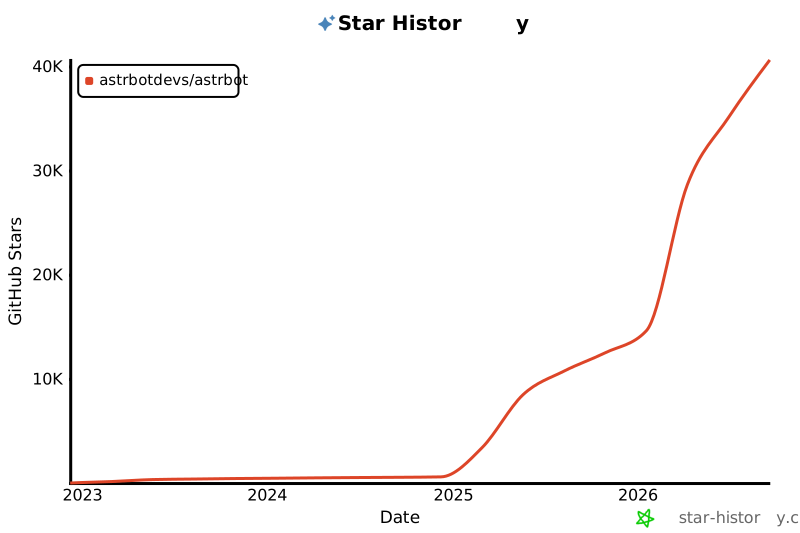](https://star-history.com/#astrbotdevs/astrbot&Date)
|
||
|
||
</div>
|
||
|
||
<div align="center">
|
||
|
||
_La compagnie et la capacité ne devraient jamais être des opposés. Nous souhaitons créer un robot capable à la fois de comprendre les émotions, d'offrir de la présence, et d'accomplir des tâches de manière fiable._
|
||
|
||
_私は、高性能ですから!_
|
||
|
||
<img src="https://files.astrbot.app/watashiwa-koseino-desukara.gif" width="100"/>
|
||
|
||
</div>
|