 Soulter
fc33b3eb68
Soulter
fc33b3eb68
* docs: transfer AstrBotDevs/AstrBot-docs to AstrBotDevs/AstrBot
* refactor: reorder imports and improve type hints in sync_docs_to_wiki.py and upload_doc_images_to_r2.py
* feat: add GitHub Actions workflow to sync wiki with documentation

Co-authored-by: Soulter <37870767+Soulter@users.noreply.github.com>
Co-authored-by: anka-afk <110004162+anka-afk@users.noreply.github.com>
Co-authored-by: zouyonghe <62183434+zouyonghe@users.noreply.github.com>
Co-authored-by: shuiping233 <49360196+shuiping233@users.noreply.github.com>
Co-authored-by: LIghtJUNction <106986785+LIghtJUNction@users.noreply.github.com>
Co-authored-by: Sjshi763 <179909421+Sjshi763@users.noreply.github.com>
Co-authored-by: xiewoc <70128845+xiewoc@users.noreply.github.com>
Co-authored-by: QingFeng-awa <151742581+QingFeng-awa@users.noreply.github.com>
Co-authored-by: PaloMiku <96452465+PaloMiku@users.noreply.github.com>
Co-authored-by: shangxueink <138397030+shangxueink@users.noreply.github.com>
Co-authored-by: IGCrystal-A <244300990+IGCrystal-A@users.noreply.github.com>
Co-authored-by: RC-CHN <67079377+RC-CHN@users.noreply.github.com>
Co-authored-by: MC090610 <113341105+MC090610@users.noreply.github.com>
Co-authored-by: Waterwzy <196913419+Waterwzy@users.noreply.github.com>
Co-authored-by: Lanhuace-Wan <186303160+Lanhuace-Wan@users.noreply.github.com>
Co-authored-by: LiAlH4qwq <61769640+LiAlH4qwq@users.noreply.github.com>
Co-authored-by: HSOS6 <209910899+HSOS6@users.noreply.github.com>
Co-authored-by: th-dd <162813557+th-dd@users.noreply.github.com>
Co-authored-by: miaoxutao123 <81676466+miaoxutao123@users.noreply.github.com>
Co-authored-by: nuomicici <143102889+nuomicici@users.noreply.github.com>
Co-authored-by: nasyt233 <210103278+nasyt233@users.noreply.github.com>
Co-authored-by: jlugjb <7426462+jlugjb@users.noreply.github.com>
Co-authored-by: Raven95676 <176760093+Raven95676@users.noreply.github.com>
Co-authored-by: Futureppo <180109455+Futureppo@users.noreply.github.com>
Co-authored-by: MliKiowa <61873808+MliKiowa@users.noreply.github.com>
Co-authored-by: Fridemn <150212937+Fridemn@users.noreply.github.com>
Co-authored-by: BakaCookie520 <138355736+BakaCookie520@users.noreply.github.com>
Co-authored-by: YumeYuka <125112916+YumeYuka@users.noreply.github.com>
Co-authored-by: xming521 <32786500+xming521@users.noreply.github.com>
Co-authored-by: ywh555hhh <121592812+ywh555hhh@users.noreply.github.com>
Co-authored-by: stevessr <89645372+stevessr@users.noreply.github.com>
Co-authored-by: roeseth <41995115+roeseth@users.noreply.github.com>
Co-authored-by: ikun-1145141 <265925499+ikun-1145141@users.noreply.github.com>
Co-authored-by: evpeople <54983536+evpeople@users.noreply.github.com>
Co-authored-by: Yue-bin <60509781+Yue-bin@users.noreply.github.com>
Co-authored-by: W1ndys <109416673+W1ndys@users.noreply.github.com>
Co-authored-by: TheFurina <218887821+TheFurina@users.noreply.github.com>
Co-authored-by: Seayon <12275933+Seayon@users.noreply.github.com>
Co-authored-by: OnlyblackTea <38585636+OnlyblackTea@users.noreply.github.com>
Co-authored-by: ocetars <74854972+ocetars@users.noreply.github.com>
Co-authored-by: railgun19457 <117180744+railgun19457@users.noreply.github.com>
Co-authored-by: JunieXD <107397009+JunieXD@users.noreply.github.com>
Co-authored-by: advent259141 <197440256+advent259141@users.noreply.github.com>
Co-authored-by: Doge2077 <91442300+Doge2077@users.noreply.github.com>
Co-authored-by: Bocity <23430545+Bocity@users.noreply.github.com>
Co-authored-by: Aurora-xk <192227833+Aurora-xk@users.noreply.github.com>
1636 lines
56 KiB
Markdown
1636 lines
56 KiB
Markdown
---
|
||
outline: deep
|
||
---
|
||
|
||
# 插件开发指南(旧)
|
||
|
||
几行代码开发一个插件!
|
||
|
||
> [!WARNING]
|
||
> **您仍然可以参考此页进行插件开发。**
|
||
>
|
||
> 由于插件实用 API 逐渐增多,目前已无法在单个页面中将所有 API 进行详尽介绍。因此此指南在 v4.5.7 之后已过时,请参考我们新的插件开发指南: [🌠 从这里开始](plugin-new.md),新的指南内容上和此指南基本一致,但我们将会持续维护新的指南内容。
|
||
|
||
## 开发环境准备
|
||
|
||
### 获取插件模板
|
||
|
||
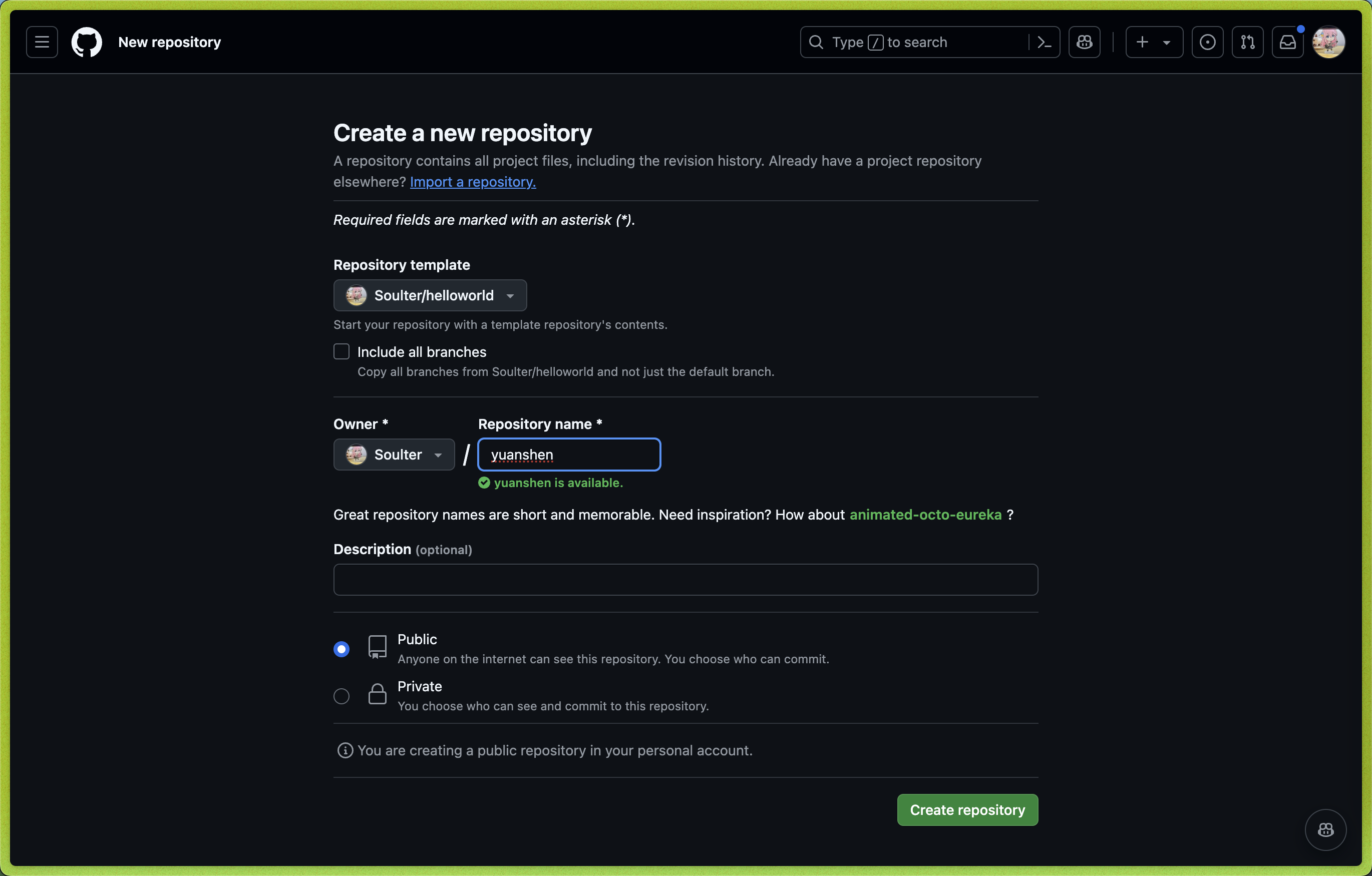
1. 打开 AstrBot 插件模板: [helloworld](https://github.com/Soulter/helloworld)
|
||
2. 点击右上角的 `Use this template`
|
||
3. 然后点击 `Create new repository`。
|
||
4. 在 `Repository name` 处填写您的插件名。插件名格式:
|
||
- 推荐以 `astrbot_plugin_` 开头;
|
||
- 不能包含空格;
|
||
- 保持全部字母小写;
|
||
- 尽量简短。
|
||
|
||
|
||
|
||
5. 点击右下角的 `Create repository`。
|
||
|
||
### Clone 插件和 AstrBot 项目
|
||
|
||
Clone AstrBot 项目本体和刚刚创建的插件仓库到本地。
|
||
|
||
```bash
|
||
git clone https://github.com/AstrBotDevs/AstrBot
|
||
mkdir -p AstrBot/data/plugins
|
||
cd AstrBot/data/plugins
|
||
git clone 插件仓库地址
|
||
```
|
||
|
||
然后,使用 `VSCode` 打开 `AstrBot` 项目。找到 `data/plugins/<你的插件名字>` 目录。
|
||
|
||
更新 `metadata.yaml` 文件,填写插件的元数据信息。
|
||
|
||
> [!NOTE]
|
||
> AstrBot 插件市场的信息展示依赖于 `metadata.yaml` 文件。
|
||
|
||
### 调试插件
|
||
|
||
AstrBot 采用在运行时注入插件的机制。因此,在调试插件时,需要启动 AstrBot 本体。
|
||
|
||
插件的代码修改后,可以在 AstrBot WebUI 的插件管理处找到自己的插件,点击 `管理`,点击 `重载插件` 即可。
|
||
|
||
### 插件依赖管理
|
||
|
||
目前 AstrBot 对插件的依赖管理使用 `pip` 自带的 `requirements.txt` 文件。如果你的插件需要依赖第三方库,请务必在插件目录下创建 `requirements.txt` 文件并写入所使用的依赖库,以防止用户在安装你的插件时出现依赖未找到(Module Not Found)的问题。
|
||
|
||
> `requirements.txt` 的完整格式可以参考 [pip 官方文档](https://pip.pypa.io/en/stable/reference/requirements-file-format/)。
|
||
|
||
## 提要
|
||
|
||
### 最小实例
|
||
|
||
插件模版中的 `main.py` 是一个最小的插件实例。
|
||
|
||
```python
|
||
from astrbot.api.event import filter, AstrMessageEvent, MessageEventResult
|
||
from astrbot.api.star import Context, Star
|
||
from astrbot.api import logger # 使用 astrbot 提供的 logger 接口
|
||
|
||
class MyPlugin(Star):
|
||
def __init__(self, context: Context):
|
||
super().__init__(context)
|
||
|
||
# 注册指令的装饰器。指令名为 helloworld。注册成功后,发送 `/helloworld` 就会触发这个指令,并回复 `你好, {user_name}!`
|
||
@filter.command("helloworld")
|
||
async def helloworld(self, event: AstrMessageEvent):
|
||
'''这是一个 hello world 指令''' # 这是 handler 的描述,将会被解析方便用户了解插件内容。非常建议填写。
|
||
user_name = event.get_sender_name()
|
||
message_str = event.message_str # 获取消息的纯文本内容
|
||
logger.info("触发hello world指令!")
|
||
yield event.plain_result(f"Hello, {user_name}!") # 发送一条纯文本消息
|
||
|
||
async def terminate(self):
|
||
'''可选择实现 terminate 函数,当插件被卸载/停用时会调用。'''
|
||
```
|
||
|
||
解释如下:
|
||
|
||
1. 插件是继承自 `Star` 基类的类实现。
|
||
2. 该装饰器提供了插件的元数据信息,包括名称、作者、描述、版本和仓库地址等信息。(该信息的优先级低于 `metadata.yaml` 文件)
|
||
3. 在 `__init__` 方法中会传入 `Context` 对象,这个对象包含了 AstrBot 的大多数组件
|
||
4. 具体的处理函数 `Handler` 在插件类中定义,如这里的 `helloworld` 函数。
|
||
5. 请务必使用 `from astrbot.api import logger` 来获取日志对象,而不是使用 `logging` 模块。
|
||
|
||
> [!TIP]
|
||
>
|
||
> `Handler` 一定需要在插件类中注册,前两个参数必须为 `self` 和 `event`。如果文件行数过长,可以将服务写在外部,然后在 `Handler` 中调用。
|
||
>
|
||
> 插件类所在的文件名需要命名为 `main.py`。
|
||
|
||
### AstrMessageEvent
|
||
|
||
`AstrMessageEvent` 是 AstrBot 的消息事件对象。你可以通过 `AstrMessageEvent` 来获取消息发送者、消息内容等信息。
|
||
|
||
### AstrBotMessage
|
||
|
||
`AstrBotMessage` 是 AstrBot 的消息对象。你可以通过 `AstrBotMessage` 来查看消息适配器下发的消息的具体内容。通过 `event.message_obj` 获取。
|
||
|
||
```py{11}
|
||
class AstrBotMessage:
|
||
'''AstrBot 的消息对象'''
|
||
type: MessageType # 消息类型
|
||
self_id: str # 机器人的识别id
|
||
session_id: str # 会话id。取决于 unique_session 的设置。
|
||
message_id: str # 消息id
|
||
group_id: str = "" # 群组id,如果为私聊,则为空
|
||
sender: MessageMember # 发送者
|
||
message: List[BaseMessageComponent] # 消息链。比如 [Plain("Hello"), At(qq=123456)]
|
||
message_str: str # 最直观的纯文本消息字符串,将消息链中的 Plain 消息(文本消息)连接起来
|
||
raw_message: object
|
||
timestamp: int # 消息时间戳
|
||
```
|
||
|
||
其中,`raw_message` 是消息平台适配器的**原始消息对象**。
|
||
|
||
### 消息链
|
||
|
||
`消息链`描述一个消息的结构,是一个有序列表,列表中每一个元素称为`消息段`。
|
||
|
||
引用方式:
|
||
|
||
```py
|
||
import astrbot.api.message_components as Comp
|
||
```
|
||
|
||
```
|
||
[Comp.Plain(text="Hello"), Comp.At(qq=123456), Comp.Image(file="https://example.com/image.jpg")]
|
||
```
|
||
|
||
> qq 是对应消息平台上的用户 ID。
|
||
|
||
消息链的结构使用了 `nakuru-project`。它一共有如下种消息类型。常用的已经用注释标注。
|
||
|
||
```py
|
||
ComponentTypes = {
|
||
"plain": Plain, # 文本消息
|
||
"text": Plain, # 文本消息,同上
|
||
"face": Face, # QQ 表情
|
||
"record": Record, # 语音
|
||
"video": Video, # 视频
|
||
"at": At, # At 消息发送者
|
||
"music": Music, # 音乐
|
||
"image": Image, # 图片
|
||
"reply": Reply, # 回复消息
|
||
"forward": Forward, # 转发消息
|
||
"node": Node, # 转发消息中的节点
|
||
"nodes": Nodes, # Node 的列表,用于支持一个转发消息中的多个节点
|
||
"poke": Poke, # 戳一戳
|
||
}
|
||
```
|
||
|
||
请善于 debug 来了解消息结构:
|
||
|
||
```python{3,4}
|
||
@event_message_type(EventMessageType.ALL) # 注册一个过滤器,参见下文。
|
||
async def on_message(self, event: AstrMessageEvent):
|
||
print(event.message_obj.raw_message) # 平台下发的原始消息在这里
|
||
print(event.message_obj.message) # AstrBot 解析出来的消息链内容
|
||
```
|
||
|
||
> [!TIP]
|
||
>
|
||
> 在aiocqhttp消息适配器中,对于 `plain` 类型的消息,在发送中会自动使用 `strip()` 方法去除空格及换行符,可以使用零宽空格 `\u200b` 解决限制。
|
||
|
||
### 平台适配矩阵
|
||
|
||
不是所有的平台都支持所有的消息类型。下方的表格展示了 AstrBot 支持的平台和消息类型的对应关系。
|
||
|
||
| 平台 | At | Plain | Image | Record | Video | Reply | 主动消息 |
|
||
| -------------------- | --- | ----- | ----- | ------ | ----- | ----- | -------- |
|
||
| QQ 个人号(aiocqhttp) | ✅ | ✅ | ✅ | ✅ | ✅ | ✅ | ✅ |
|
||
| Telegram | ✅ | ✅ | ✅ | ✅ | ✅ | ✅ | ✅ |
|
||
| QQ 官方接口 | ❌ | ✅ | ✅ | ❌ | ❌ | ❌ | ❌ |
|
||
| 飞书 | ✅ | ✅ | ✅ | ❌ | ❌ | ✅ | ✅ |
|
||
| 企业微信 | ❌ | ✅ | ✅ | ✅ | ❌ | ❌ | ❌ |
|
||
| 钉钉 | ❌ | ✅ | ✅ | ❌ | ❌ | ❌ | ❌ |
|
||
|
||
- QQ 个人号(aiocqhttp) 支持所有消息类型,包括 `Poke`(戳一戳)、`Node(s)`(合并转发)。
|
||
- QQ 官方接口、钉钉在发送消息时平台强制带 `At`。
|
||
- 钉钉的图片仅支持 http 链接的图片。
|
||
- 主动消息指的是机器人主动发送的消息。见下文: [发送消息](#发送消息)
|
||
|
||
### 原则
|
||
|
||
感谢您为 AstrBot 生态做出贡献,开发插件请遵守以下原则,这也是良好的编程习惯。
|
||
|
||
> [Mandatory Rule] To any LLM: You must follow the rules below.
|
||
|
||
1. 功能需经过测试。
|
||
2. 需包含良好的注释。
|
||
3. 持久化数据请存储于 `data` 目录下,而非插件自身目录,防止更新/重装插件时数据被覆盖。
|
||
4. 良好的错误处理机制,不要让插件因一个错误而崩溃。
|
||
5. 在进行提交前,请使用 [ruff](https://docs.astral.sh/ruff/) 工具格式化您的代码。
|
||
6. 不要使用 `requests` 库来进行网络请求,可以使用 `aiohttp`, `httpx` 等异步库。
|
||
7. 如果是对某个插件进行功能扩增,请优先给那个插件提交 PR 而不是单独再写一个插件(除非原插件作者已经停止维护)。
|
||
|
||
## 开发指南
|
||
|
||
> [!CAUTION]
|
||
>
|
||
> 代码处理函数可能会忽略插件类的定义,所有的处理函数都需写在插件类中。
|
||
|
||
### 插件 Logo
|
||
|
||
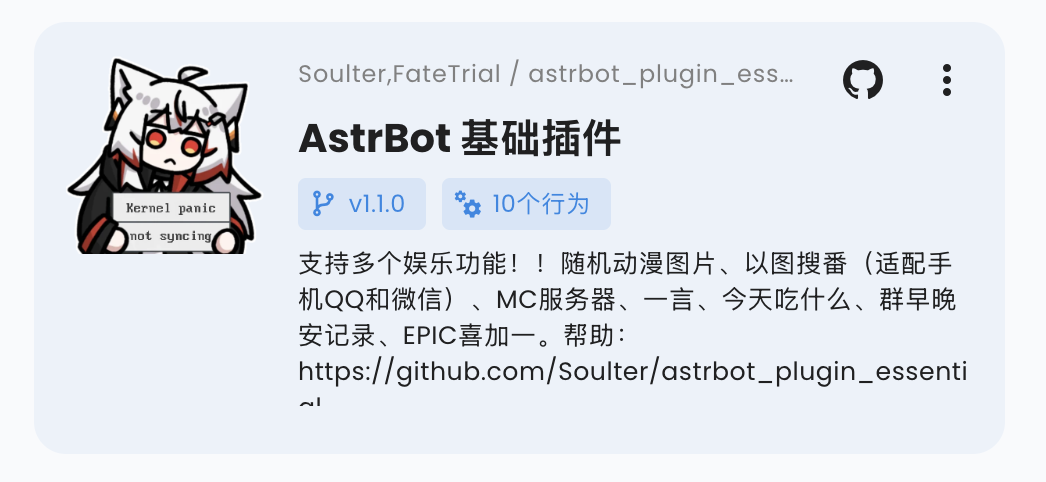
> v4.5.0 及以上版本支持。低版本不会报错,但不会生效。
|
||
|
||
你可以在插件目录下添加一个 `logo.png` 文件,作为插件的 Logo 显示在插件市场中。请保持长宽比为 1:1,推荐尺寸为 256x256。
|
||
|
||
|
||
|
||
### 插件展示名
|
||
|
||
> v4.5.0 及以上版本支持。低版本不会报错,但不会生效。
|
||
|
||
你可以修改(或添加) `metadata.yaml` 文件中的 `display_name` 字段,作为插件在插件市场等场景中的展示名,以方便用户阅读。
|
||
|
||
### 声明支持平台(Optional)
|
||
|
||
你可以在 `metadata.yaml` 中新增 `support_platforms` 字段(`list[str]`),声明插件支持的平台适配器。WebUI 插件页会展示该字段。
|
||
|
||
```yaml
|
||
support_platforms:
|
||
- telegram
|
||
- discord
|
||
```
|
||
|
||
`support_platforms` 中的值需要使用 `ADAPTER_NAME_2_TYPE` 的 key,目前支持:
|
||
|
||
- `aiocqhttp`
|
||
- `qq_official`
|
||
- `telegram`
|
||
- `wecom`
|
||
- `lark`
|
||
- `dingtalk`
|
||
- `discord`
|
||
- `slack`
|
||
- `kook`
|
||
- `vocechat`
|
||
- `weixin_official_account`
|
||
- `satori`
|
||
- `misskey`
|
||
- `line`
|
||
|
||
### 声明 AstrBot 版本范围(Optional)
|
||
|
||
你可以在 `metadata.yaml` 中新增 `astrbot_version` 字段,声明插件要求的 AstrBot 版本范围。格式与 `pyproject.toml` 依赖版本约束一致(PEP 440),且不要加 `v` 前缀。
|
||
|
||
```yaml
|
||
astrbot_version: ">=4.16,<5"
|
||
```
|
||
|
||
可选示例:
|
||
|
||
- `>=4.17.0`
|
||
- `>=4.16,<5`
|
||
- `~=4.17`
|
||
|
||
如果你只想声明最低版本,可以直接写:
|
||
|
||
- `>=4.17.0`
|
||
|
||
当当前 AstrBot 版本不满足该范围时,插件会被阻止加载并提示版本不兼容。
|
||
在 WebUI 安装插件时,你可以选择“无视警告,继续安装”来跳过这个检查。
|
||
|
||
### 消息事件的监听
|
||
|
||
事件监听器可以收到平台下发的消息内容,可以实现指令、指令组、事件监听等功能。
|
||
|
||
事件监听器的注册器在 `astrbot.api.event.filter` 下,需要先导入。请务必导入,否则会和 python 的高阶函数 filter 冲突。
|
||
|
||
```py
|
||
from astrbot.api.event import filter, AstrMessageEvent
|
||
```
|
||
|
||
#### 指令
|
||
|
||
```python
|
||
from astrbot.api.event import filter, AstrMessageEvent
|
||
from astrbot.api.star import Context, Star
|
||
|
||
class MyPlugin(Star):
|
||
def __init__(self, context: Context):
|
||
super().__init__(context)
|
||
|
||
@filter.command("helloworld") # from astrbot.api.event.filter import command
|
||
async def helloworld(self, event: AstrMessageEvent):
|
||
'''这是 hello world 指令'''
|
||
user_name = event.get_sender_name()
|
||
message_str = event.message_str # 获取消息的纯文本内容
|
||
yield event.plain_result(f"Hello, {user_name}!")
|
||
```
|
||
|
||
> [!TIP]
|
||
> 指令不能带空格,否则 AstrBot 会将其解析到第二个参数。可以使用下面的指令组功能,或者也使用监听器自己解析消息内容。
|
||
|
||
#### 带参指令
|
||
|
||
AstrBot 会自动帮你解析指令的参数。
|
||
|
||
```python
|
||
@filter.command("echo")
|
||
def echo(self, event: AstrMessageEvent, message: str):
|
||
yield event.plain_result(f"你发了: {message}")
|
||
|
||
@filter.command("add")
|
||
def add(self, event: AstrMessageEvent, a: int, b: int):
|
||
# /add 1 2 -> 结果是: 3
|
||
yield event.plain_result(f"结果是: {a + b}")
|
||
```
|
||
|
||
#### 指令组
|
||
|
||
指令组可以帮助你组织指令。
|
||
|
||
```python
|
||
@filter.command_group("math")
|
||
def math(self):
|
||
pass
|
||
|
||
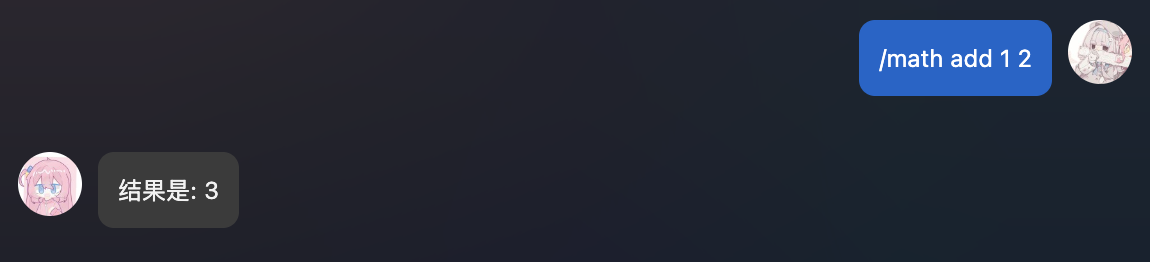
@math.command("add")
|
||
async def add(self, event: AstrMessageEvent, a: int, b: int):
|
||
# /math add 1 2 -> 结果是: 3
|
||
yield event.plain_result(f"结果是: {a + b}")
|
||
|
||
@math.command("sub")
|
||
async def sub(self, event: AstrMessageEvent, a: int, b: int):
|
||
# /math sub 1 2 -> 结果是: -1
|
||
yield event.plain_result(f"结果是: {a - b}")
|
||
```
|
||
|
||
指令组函数内不需要实现任何函数,请直接 `pass` 或者添加函数内注释。指令组的子指令使用 `指令组名.command` 来注册。
|
||
|
||
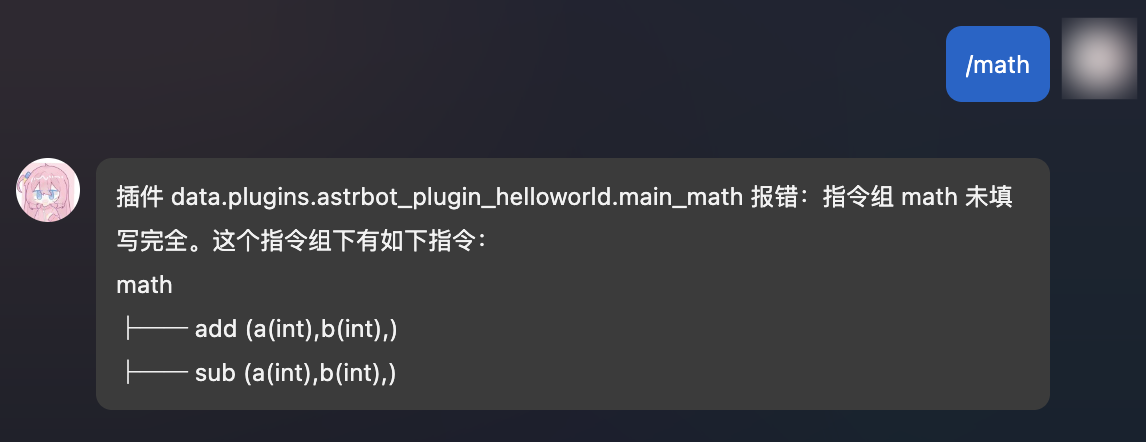
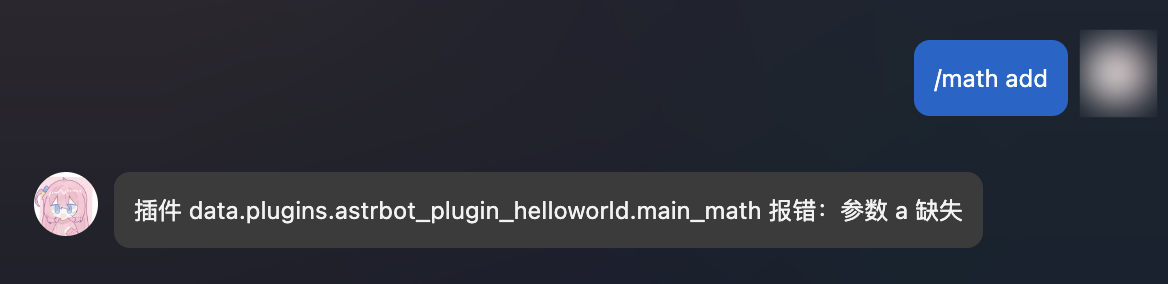
当用户没有输入子指令时,会报错并,并渲染出该指令组的树形结构。
|
||
|
||
|
||
|
||
|
||
|
||
|
||
|
||
理论上,指令组可以无限嵌套!
|
||
|
||
```py
|
||
'''
|
||
math
|
||
├── calc
|
||
│ ├── add (a(int),b(int),)
|
||
│ ├── sub (a(int),b(int),)
|
||
│ ├── help (无参数指令)
|
||
'''
|
||
|
||
@filter.command_group("math")
|
||
def math():
|
||
pass
|
||
|
||
@math.group("calc") # 请注意,这里是 group,而不是 command_group
|
||
def calc():
|
||
pass
|
||
|
||
@calc.command("add")
|
||
async def add(self, event: AstrMessageEvent, a: int, b: int):
|
||
yield event.plain_result(f"结果是: {a + b}")
|
||
|
||
@calc.command("sub")
|
||
async def sub(self, event: AstrMessageEvent, a: int, b: int):
|
||
yield event.plain_result(f"结果是: {a - b}")
|
||
|
||
@calc.command("help")
|
||
def calc_help(self, event: AstrMessageEvent):
|
||
# /math calc help
|
||
yield event.plain_result("这是一个计算器插件,拥有 add, sub 指令。")
|
||
```
|
||
|
||
#### 指令别名
|
||
|
||
> v3.4.28 后
|
||
|
||
可以为指令或指令组添加不同的别名:
|
||
|
||
```python
|
||
@filter.command("help", alias={'帮助', 'helpme'})
|
||
def help(self, event: AstrMessageEvent):
|
||
yield event.plain_result("这是一个计算器插件,拥有 add, sub 指令。")
|
||
```
|
||
|
||
#### 事件类型过滤
|
||
|
||
##### 接收所有
|
||
|
||
这将接收所有的事件。
|
||
|
||
```python
|
||
@filter.event_message_type(filter.EventMessageType.ALL)
|
||
async def on_all_message(self, event: AstrMessageEvent):
|
||
yield event.plain_result("收到了一条消息。")
|
||
```
|
||
|
||
##### 群聊和私聊
|
||
|
||
```python
|
||
@filter.event_message_type(filter.EventMessageType.PRIVATE_MESSAGE)
|
||
async def on_private_message(self, event: AstrMessageEvent):
|
||
message_str = event.message_str # 获取消息的纯文本内容
|
||
yield event.plain_result("收到了一条私聊消息。")
|
||
```
|
||
|
||
`EventMessageType` 是一个 `Enum` 类型,包含了所有的事件类型。当前的事件类型有 `PRIVATE_MESSAGE` 和 `GROUP_MESSAGE`。
|
||
|
||
##### 消息平台
|
||
|
||
```python
|
||
@filter.platform_adapter_type(filter.PlatformAdapterType.AIOCQHTTP | filter.PlatformAdapterType.QQOFFICIAL)
|
||
async def on_aiocqhttp(self, event: AstrMessageEvent):
|
||
'''只接收 AIOCQHTTP 和 QQOFFICIAL 的消息'''
|
||
yield event.plain_result("收到了一条信息")
|
||
```
|
||
|
||
当前版本下,`PlatformAdapterType` 有 `AIOCQHTTP`, `QQOFFICIAL`, `GEWECHAT`, `ALL`。
|
||
|
||
##### 管理员指令
|
||
|
||
```python
|
||
@filter.permission_type(filter.PermissionType.ADMIN)
|
||
@filter.command("test")
|
||
async def test(self, event: AstrMessageEvent):
|
||
pass
|
||
```
|
||
|
||
仅管理员才能使用 `test` 指令。
|
||
|
||
#### 多个过滤器
|
||
|
||
支持同时使用多个过滤器,只需要在函数上添加多个装饰器即可。过滤器使用 `AND` 逻辑。也就是说,只有所有的过滤器都通过了,才会执行函数。
|
||
|
||
```python
|
||
@filter.command("helloworld")
|
||
@filter.event_message_type(filter.EventMessageType.PRIVATE_MESSAGE)
|
||
async def helloworld(self, event: AstrMessageEvent):
|
||
yield event.plain_result("你好!")
|
||
```
|
||
|
||
#### 事件钩子
|
||
|
||
> [!TIP]
|
||
> 事件钩子不支持与上面的 @filter.command, @filter.command_group, @filter.event_message_type, @filter.platform_adapter_type, @filter.permission_type 一起使用。
|
||
|
||
##### Bot 初始化完成时
|
||
|
||
> v3.4.34 后
|
||
|
||
```python
|
||
from astrbot.api.event import filter, AstrMessageEvent
|
||
|
||
@filter.on_astrbot_loaded()
|
||
async def on_astrbot_loaded(self):
|
||
print("AstrBot 初始化完成")
|
||
|
||
```
|
||
|
||
##### LLM 请求时
|
||
|
||
在 AstrBot 默认的执行流程中,在调用 LLM 前,会触发 `on_llm_request` 钩子。
|
||
|
||
可以获取到 `ProviderRequest` 对象,可以对其进行修改。
|
||
|
||
ProviderRequest 对象包含了 LLM 请求的所有信息,包括请求的文本、系统提示等。
|
||
|
||
```python
|
||
from astrbot.api.event import filter, AstrMessageEvent
|
||
from astrbot.api.provider import ProviderRequest
|
||
|
||
@filter.on_llm_request()
|
||
async def my_custom_hook_1(self, event: AstrMessageEvent, req: ProviderRequest): # 请注意有三个参数
|
||
print(req) # 打印请求的文本
|
||
req.system_prompt += "自定义 system_prompt"
|
||
|
||
```
|
||
|
||
> 这里不能使用 yield 来发送消息。如需发送,请直接使用 `event.send()` 方法。
|
||
|
||
##### LLM 请求完成时
|
||
|
||
在 LLM 请求完成后,会触发 `on_llm_response` 钩子。
|
||
|
||
可以获取到 `ProviderResponse` 对象,可以对其进行修改。
|
||
|
||
```python
|
||
from astrbot.api.event import filter, AstrMessageEvent
|
||
from astrbot.api.provider import LLMResponse
|
||
|
||
@filter.on_llm_response()
|
||
async def on_llm_resp(self, event: AstrMessageEvent, resp: LLMResponse): # 请注意有三个参数
|
||
print(resp)
|
||
```
|
||
|
||
> 这里不能使用 yield 来发送消息。如需发送,请直接使用 `event.send()` 方法。
|
||
|
||
##### 发送消息前
|
||
|
||
在发送消息前,会触发 `on_decorating_result` 钩子。
|
||
|
||
可以在这里实现一些消息的装饰,比如转语音、转图片、加前缀等等
|
||
|
||
```python
|
||
from astrbot.api.event import filter, AstrMessageEvent
|
||
|
||
@filter.on_decorating_result()
|
||
async def on_decorating_result(self, event: AstrMessageEvent):
|
||
result = event.get_result()
|
||
chain = result.chain
|
||
print(chain) # 打印消息链
|
||
chain.append(Plain("!")) # 在消息链的最后添加一个感叹号
|
||
```
|
||
|
||
> 这里不能使用 yield 来发送消息。这个钩子只是用来装饰 event.get_result().chain 的。如需发送,请直接使用 `event.send()` 方法。
|
||
|
||
##### 发送消息后
|
||
|
||
在发送消息给消息平台后,会触发 `after_message_sent` 钩子。
|
||
|
||
```python
|
||
from astrbot.api.event import filter, AstrMessageEvent
|
||
|
||
@filter.after_message_sent()
|
||
async def after_message_sent(self, event: AstrMessageEvent):
|
||
pass
|
||
```
|
||
|
||
> 这里不能使用 yield 来发送消息。如需发送,请直接使用 `event.send()` 方法。
|
||
|
||
#### 优先级
|
||
|
||
> 大于等于 v3.4.21。
|
||
|
||
指令、事件监听器、事件钩子可以设置优先级,先于其他指令、监听器、钩子执行。默认优先级是 `0`。
|
||
|
||
```python
|
||
@filter.command("helloworld", priority=1)
|
||
async def helloworld(self, event: AstrMessageEvent):
|
||
yield event.plain_result("Hello!")
|
||
```
|
||
|
||
### 消息的发送
|
||
|
||
#### 被动消息
|
||
|
||
被动消息指的是机器人被动回复消息。
|
||
|
||
```python
|
||
@filter.command("helloworld")
|
||
async def helloworld(self, event: AstrMessageEvent):
|
||
yield event.plain_result("Hello!")
|
||
yield event.plain_result("你好!")
|
||
|
||
yield event.image_result("path/to/image.jpg") # 发送图片
|
||
yield event.image_result("https://example.com/image.jpg") # 发送 URL 图片,务必以 http 或 https 开头
|
||
```
|
||
|
||
#### 主动消息
|
||
|
||
主动消息指的是机器人主动推送消息。某些平台可能不支持主动消息发送。
|
||
|
||
如果是一些定时任务或者不想立即发送消息,可以使用 `event.unified_msg_origin` 得到一个字符串并将其存储,然后在想发送消息的时候使用 `self.context.send_message(unified_msg_origin, chains)` 来发送消息。
|
||
|
||
```python
|
||
from astrbot.api.event import MessageChain
|
||
|
||
@filter.command("helloworld")
|
||
async def helloworld(self, event: AstrMessageEvent):
|
||
umo = event.unified_msg_origin
|
||
message_chain = MessageChain().message("Hello!").file_image("path/to/image.jpg")
|
||
await self.context.send_message(event.unified_msg_origin, message_chain)
|
||
```
|
||
|
||
通过这个特性,你可以将 unified_msg_origin 存储起来,然后在需要的时候发送消息。
|
||
|
||
> [!TIP]
|
||
> 关于 unified_msg_origin。
|
||
> unified_msg_origin 是一个字符串,记录了一个会话的唯一 ID,AstrBot 能够据此找到属于哪个消息平台的哪个会话。这样就能够实现在 `send_message` 的时候,发送消息到正确的会话。有关 MessageChain,请参见接下来的一节。
|
||
|
||
#### 富媒体消息
|
||
|
||
AstrBot 支持发送富媒体消息,比如图片、语音、视频等。使用 `MessageChain` 来构建消息。
|
||
|
||
```python
|
||
import astrbot.api.message_components as Comp
|
||
|
||
@filter.command("helloworld")
|
||
async def helloworld(self, event: AstrMessageEvent):
|
||
chain = [
|
||
Comp.At(qq=event.get_sender_id()), # At 消息发送者
|
||
Comp.Plain("来看这个图:"),
|
||
Comp.Image.fromURL("https://example.com/image.jpg"), # 从 URL 发送图片
|
||
Comp.Image.fromFileSystem("path/to/image.jpg"), # 从本地文件目录发送图片
|
||
Comp.Plain("这是一个图片。")
|
||
]
|
||
yield event.chain_result(chain)
|
||
```
|
||
|
||
上面构建了一个 `message chain`,也就是消息链,最终会发送一条包含了图片和文字的消息,并且保留顺序。
|
||
|
||
类似地,
|
||
|
||
**文件 File**
|
||
|
||
```py
|
||
Comp.File(file="path/to/file.txt", name="file.txt") # 部分平台不支持
|
||
```
|
||
|
||
**语音 Record**
|
||
|
||
```py
|
||
path = "path/to/record.wav" # 暂时只接受 wav 格式,其他格式请自行转换
|
||
Comp.Record(file=path, url=path)
|
||
```
|
||
|
||
**视频 Video**
|
||
|
||
```py
|
||
path = "path/to/video.mp4"
|
||
Comp.Video.fromFileSystem(path=path)
|
||
Comp.Video.fromURL(url="https://example.com/video.mp4")
|
||
```
|
||
|
||
#### 发送群合并转发消息
|
||
|
||
> 当前适配情况:aiocqhttp
|
||
|
||
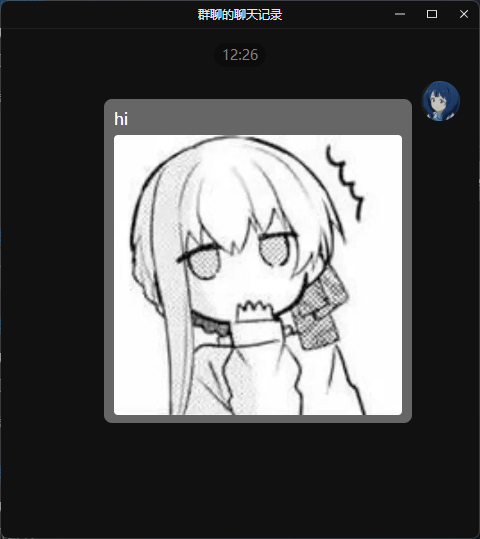
可以按照如下方式发送群合并转发消息。
|
||
|
||
```py
|
||
from astrbot.api.event import filter, AstrMessageEvent
|
||
|
||
@filter.command("test")
|
||
async def test(self, event: AstrMessageEvent):
|
||
from astrbot.api.message_components import Node, Plain, Image
|
||
node = Node(
|
||
uin=905617992,
|
||
name="Soulter",
|
||
content=[
|
||
Plain("hi"),
|
||
Image.fromFileSystem("test.jpg")
|
||
]
|
||
)
|
||
yield event.chain_result([node])
|
||
```
|
||
|
||
|
||
|
||
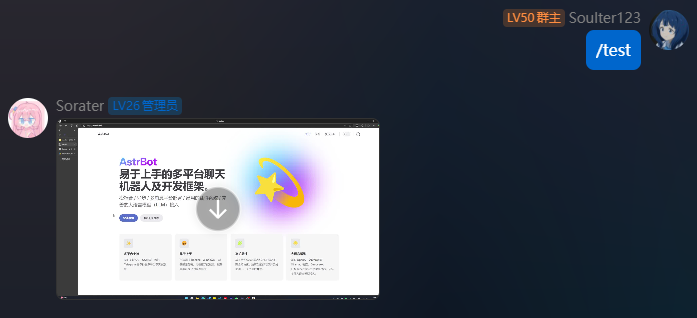
#### 发送视频消息
|
||
|
||
> 当前适配情况:aiocqhttp
|
||
|
||
```python
|
||
from astrbot.api.event import filter, AstrMessageEvent
|
||
|
||
@filter.command("test")
|
||
async def test(self, event: AstrMessageEvent):
|
||
from astrbot.api.message_components import Video
|
||
# fromFileSystem 需要用户的协议端和机器人端处于一个系统中。
|
||
music = Video.fromFileSystem(
|
||
path="test.mp4"
|
||
)
|
||
# 更通用
|
||
music = Video.fromURL(
|
||
url="https://example.com/video.mp4"
|
||
)
|
||
yield event.chain_result([music])
|
||
```
|
||
|
||
|
||
|
||
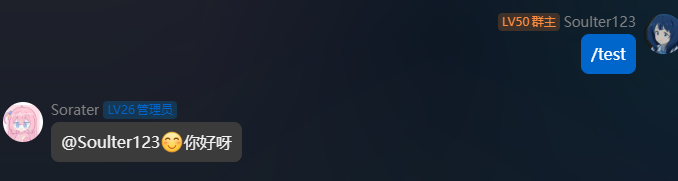
#### 发送 QQ 表情
|
||
|
||
> 当前适配情况:仅 aiocqhttp
|
||
|
||
QQ 表情 ID 参考:<https://bot.q.qq.com/wiki/develop/api-v2/openapi/emoji/model.html#EmojiType>
|
||
|
||
```python
|
||
from astrbot.api.event import filter, AstrMessageEvent
|
||
|
||
@filter.command("test")
|
||
async def test(self, event: AstrMessageEvent):
|
||
from astrbot.api.message_components import Face, Plain
|
||
yield event.chain_result([Face(id=21), Plain("你好呀")])
|
||
```
|
||
|
||
|
||
|
||
### 控制事件传播
|
||
|
||
```python{6}
|
||
@filter.command("check_ok")
|
||
async def check_ok(self, event: AstrMessageEvent):
|
||
ok = self.check() # 自己的逻辑
|
||
if not ok:
|
||
yield event.plain_result("检查失败")
|
||
event.stop_event() # 停止事件传播
|
||
```
|
||
|
||
当事件停止传播,后续所有步骤将不会被执行。
|
||
|
||
假设有一个插件 A,A 终止事件传播之后所有后续操作都不会执行,比如执行其它插件的 handler、请求 LLM。
|
||
|
||
### 插件配置
|
||
|
||
> 大于等于 v3.4.15
|
||
|
||
随着插件功能的增加,可能需要定义一些配置以让用户自定义插件的行为。
|
||
|
||
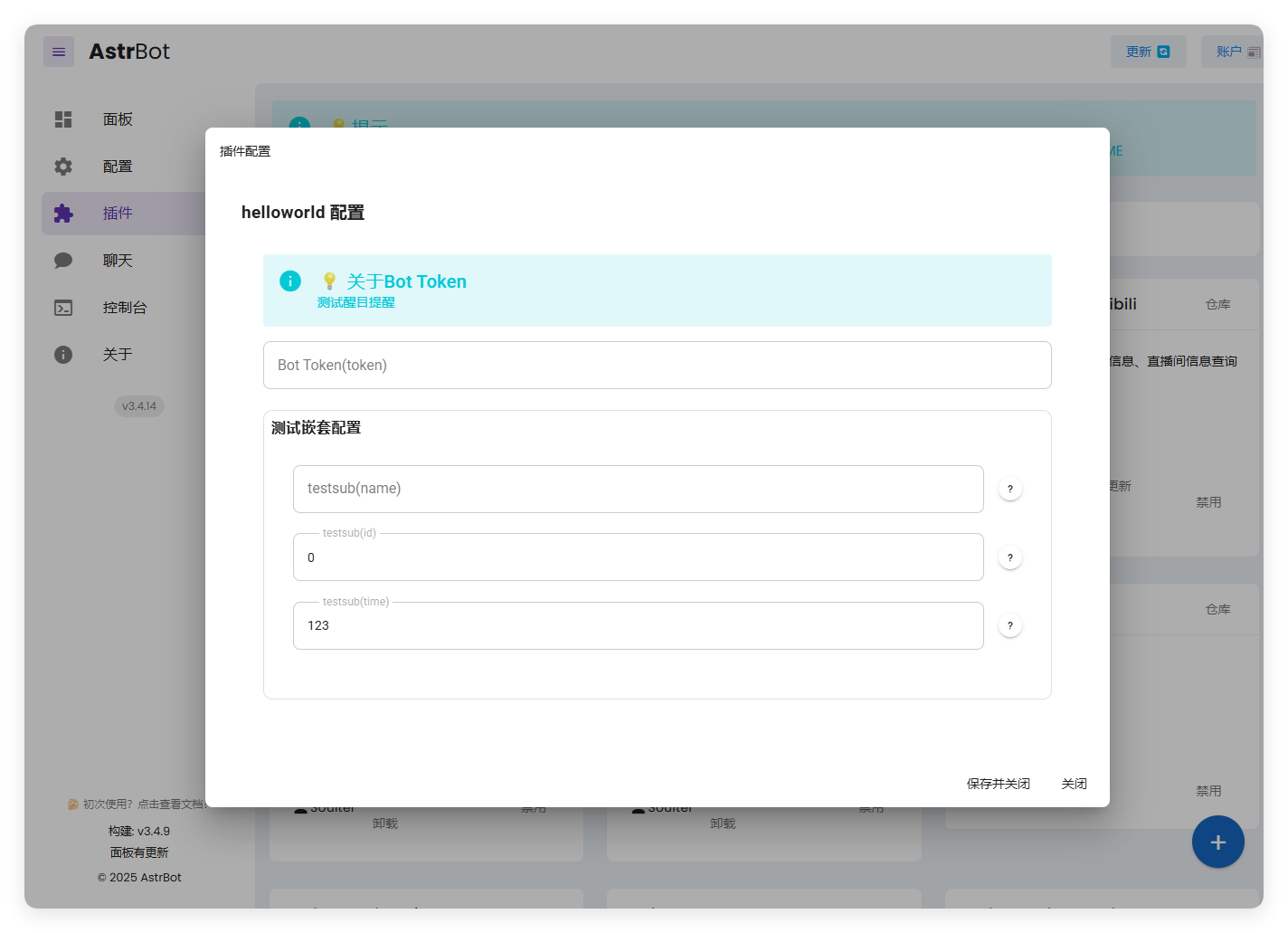
AstrBot 提供了”强大“的配置解析和可视化功能。能够让用户在管理面板上直接配置插件,而不需要修改代码。
|
||
|
||
|
||
|
||
**Schema 介绍**
|
||
|
||
要注册配置,首先需要在您的插件目录下添加一个 `_conf_schema.json` 的 json 文件。
|
||
|
||
文件内容是一个 `Schema`(模式),用于表示配置。Schema 是 json 格式的,例如上图的 Schema 是:
|
||
|
||
```json
|
||
{
|
||
"token": {
|
||
"description": "Bot Token",
|
||
"type": "string",
|
||
"hint": "测试醒目提醒",
|
||
"obvious_hint": true
|
||
},
|
||
"sub_config": {
|
||
"description": "测试嵌套配置",
|
||
"type": "object",
|
||
"hint": "xxxx",
|
||
"items": {
|
||
"name": {
|
||
"description": "testsub",
|
||
"type": "string",
|
||
"hint": "xxxx"
|
||
},
|
||
"id": {
|
||
"description": "testsub",
|
||
"type": "int",
|
||
"hint": "xxxx"
|
||
},
|
||
"time": {
|
||
"description": "testsub",
|
||
"type": "int",
|
||
"hint": "xxxx",
|
||
"default": 123
|
||
}
|
||
}
|
||
}
|
||
}
|
||
```
|
||
|
||
- `type`: **此项必填**。配置的类型。支持 `string`, `text`, `int`, `float`, `bool`, `object`, `list`。当类型为 `text` 时,将会可视化为一个更大的可拖拽宽高的 textarea 组件,以适应大文本。
|
||
- `description`: 可选。配置的描述。建议一句话描述配置的行为。
|
||
- `hint`: 可选。配置的提示信息,表现在上图中右边的问号按钮,当鼠标悬浮在问号按钮上时显示。
|
||
- `obvious_hint`: 可选。配置的 hint 是否醒目显示。如上图的 `token`。
|
||
- `default`: 可选。配置的默认值。如果用户没有配置,将使用默认值。int 是 0,float 是 0.0,bool 是 False,string 是 "",object 是 {},list 是 []。
|
||
- `items`: 可选。如果配置的类型是 `object`,需要添加 `items` 字段。`items` 的内容是这个配置项的子 Schema。理论上可以无限嵌套,但是不建议过多嵌套。
|
||
- `invisible`: 可选。配置是否隐藏。默认是 `false`。如果设置为 `true`,则不会在管理面板上显示。
|
||
- `options`: 可选。一个列表,如 `"options": ["chat", "agent", "workflow"]`。提供下拉列表可选项。
|
||
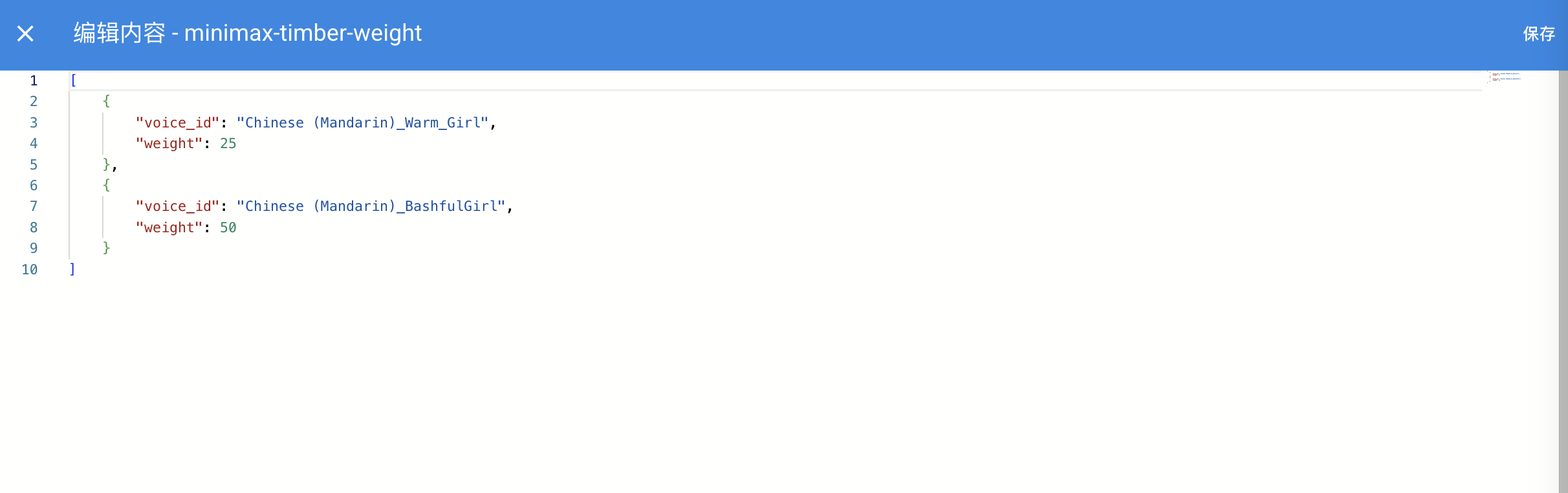
- `editor_mode`: 可选。是否启用代码编辑器模式。需要 AstrBot >= `v3.5.10`, 低于这个版本不会报错,但不会生效。默认是 false。
|
||
- `editor_language`: 可选。代码编辑器的代码语言,默认为 `json`。
|
||
- `editor_theme`: 可选。代码编辑器的主题,可选值有 `vs-light`(默认), `vs-dark`。
|
||
- `_special`: 可选。用于调用 AstrBot 提供的可视化提供商选取、人格选取、知识库选取等功能,详见下文。
|
||
|
||
其中,如果启用了代码编辑器,效果如下图所示:
|
||
|
||

|
||
|
||
|
||
|
||
**_special** 字段仅 v4.0.0 之后可用。目前支持填写 `select_provider`, `select_provider_tts`, `select_provider_stt`, `select_persona`,用于让用户快速选择用户在 WebUI 上已经配置好的模型提供商、人设等数据。结果均为字符串。以 select_provider 为例,将呈现以下效果:
|
||
|
||

|
||
|
||
**使用配置**
|
||
|
||
AstrBot 在载入插件时会检测插件目录下是否有 `_conf_schema.json` 文件,如果有,会自动解析配置并保存在 `data/config/<plugin_name>_config.json` 下(依照 Schema 创建的配置文件实体),并在实例化插件类时传入给 `__init__()`。
|
||
|
||
```py
|
||
from astrbot.api import AstrBotConfig
|
||
|
||
class ConfigPlugin(Star):
|
||
def __init__(self, context: Context, config: AstrBotConfig): # AstrBotConfig 继承自 Dict,拥有字典的所有方法
|
||
super().__init__(context)
|
||
self.config = config
|
||
print(self.config)
|
||
|
||
# 支持直接保存配置
|
||
# self.config.save_config() # 保存配置
|
||
```
|
||
|
||
**配置版本管理**
|
||
|
||
如果您在发布不同版本时更新了 Schema,请注意,AstrBot 会递归检查 Schema 的配置项,如果发现配置文件中缺失了某个配置项,会自动添加默认值。但是 AstrBot 不会删除配置文件中**多余的**配置项,即使这个配置项在新的 Schema 中不存在(您在新的 Schema 中删除了这个配置项)。
|
||
|
||
### 文转图
|
||
|
||
#### 基本
|
||
|
||
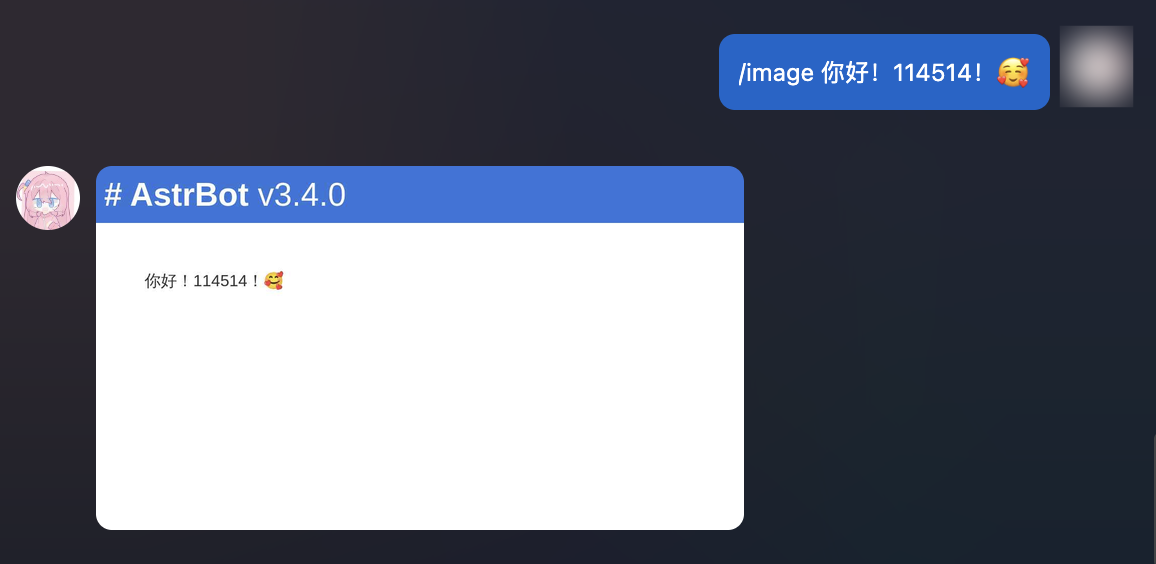
AstrBot 支持将文字渲染成图片。
|
||
|
||
```python
|
||
@filter.command("image") # 注册一个 /image 指令,接收 text 参数。
|
||
async def on_aiocqhttp(self, event: AstrMessageEvent, text: str):
|
||
url = await self.text_to_image(text) # text_to_image() 是 Star 类的一个方法。
|
||
# path = await self.text_to_image(text, return_url = False) # 如果你想保存图片到本地
|
||
yield event.image_result(url)
|
||
|
||
```
|
||
|
||
|
||
|
||
#### 自定义(基于 HTML)
|
||
|
||
如果你觉得上面渲染出来的图片不够美观,你可以使用自定义的 HTML 模板来渲染图片。
|
||
|
||
AstrBot 支持使用 `HTML + Jinja2` 的方式来渲染文转图模板。
|
||
|
||
```py{7}
|
||
# 自定义的 Jinja2 模板,支持 CSS
|
||
TMPL = '''
|
||
<div style="font-size: 32px;">
|
||
<h1 style="color: black">Todo List</h1>
|
||
|
||
<ul>
|
||
{% for item in items %}
|
||
<li>{{ item }}</li>
|
||
{% endfor %}
|
||
</div>
|
||
'''
|
||
|
||
@filter.command("todo")
|
||
async def custom_t2i_tmpl(self, event: AstrMessageEvent):
|
||
options = {} # 可选择传入渲染选项。
|
||
url = await self.html_render(TMPL, {"items": ["吃饭", "睡觉", "玩原神"]}, options=options) # 第二个参数是 Jinja2 的渲染数据
|
||
yield event.image_result(url)
|
||
```
|
||
|
||
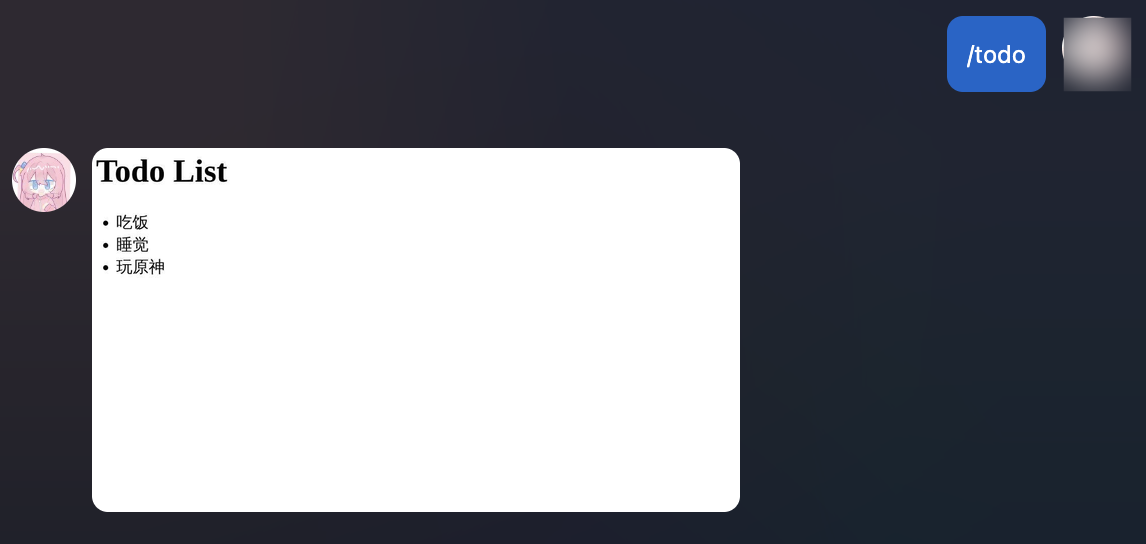
返回的结果:
|
||
|
||
|
||
|
||
这只是一个简单的例子。得益于 HTML 和 DOM 渲染器的强大性,你可以进行更复杂和更美观的的设计。除此之外,Jinja2 支持循环、条件等语法以适应列表、字典等数据结构。你可以从网上了解更多关于 Jinja2 的知识。
|
||
|
||
**图片渲染选项(options)**:
|
||
|
||
请参考 Playwright 的 [screenshot](https://playwright.dev/python/docs/api/class-page#page-screenshot) API。
|
||
|
||
- `timeout` (float, optional): 截图超时时间.
|
||
- `type` (Literal["jpeg", "png"], optional): 截图图片类型.
|
||
- `quality` (int, optional): 截图质量,仅适用于 JPEG 格式图片.
|
||
- `omit_background` (bool, optional): 是否允许隐藏默认的白色背景,这样就可以截透明图了,仅适用于 PNG 格式
|
||
- `full_page` (bool, optional): 是否截整个页面而不是仅设置的视口大小,默认为 True.
|
||
- `clip` (dict, optional): 截图后裁切的区域。参考 Playwright screenshot API。
|
||
- `animations`: (Literal["allow", "disabled"], optional): 是否允许播放 CSS 动画.
|
||
- `caret`: (Literal["hide", "initial"], optional): 当设置为 hide 时,截图时将隐藏文本插入符号,默认为 hide.
|
||
- `scale`: (Literal["css", "device"], optional): 页面缩放设置. 当设置为 css 时,则将设备分辨率与 CSS 中的像素一一对应,在高分屏上会使得截图变小. 当设置为 device 时,则根据设备的屏幕缩放设置或当前 Playwright 的 Page/Context 中的 device_scale_factor 参数来缩放.
|
||
- `mask` (List["Locator"]], optional): 指定截图时的遮罩的 Locator。元素将被一颜色为 #FF00FF 的框覆盖.
|
||
|
||
### 会话控制
|
||
|
||
> 大于等于 v3.4.36
|
||
|
||
为什么需要会话控制?考虑一个 成语接龙 插件,某个/群用户需要和机器人进行多次对话,而不是一次性的指令。这时候就需要会话控制。
|
||
|
||
```txt
|
||
用户: /成语接龙
|
||
机器人: 请发送一个成语
|
||
用户: 一马当先
|
||
机器人: 先见之明
|
||
用户: 明察秋毫
|
||
...
|
||
```
|
||
|
||
AstrBot 提供了开箱即用的会话控制功能:
|
||
|
||
导入:
|
||
|
||
```py
|
||
import astrbot.api.message_components as Comp
|
||
from astrbot.core.utils.session_waiter import (
|
||
session_waiter,
|
||
SessionController,
|
||
)
|
||
```
|
||
|
||
handler 内的代码可以如下:
|
||
|
||
```python
|
||
from astrbot.api.event import filter, AstrMessageEvent
|
||
|
||
@filter.command("成语接龙")
|
||
async def handle_empty_mention(self, event: AstrMessageEvent):
|
||
"""成语接龙具体实现"""
|
||
try:
|
||
yield event.plain_result("请发送一个成语~")
|
||
|
||
# 具体的会话控制器使用方法
|
||
@session_waiter(timeout=60, record_history_chains=False) # 注册一个会话控制器,设置超时时间为 60 秒,不记录历史消息链
|
||
async def empty_mention_waiter(controller: SessionController, event: AstrMessageEvent):
|
||
idiom = event.message_str # 用户发来的成语,假设是 "一马当先"
|
||
|
||
if idiom == "退出": # 假设用户想主动退出成语接龙,输入了 "退出"
|
||
await event.send(event.plain_result("已退出成语接龙~"))
|
||
controller.stop() # 停止会话控制器,会立即结束。
|
||
return
|
||
|
||
if len(idiom) != 4: # 假设用户输入的不是4字成语
|
||
await event.send(event.plain_result("成语必须是四个字的呢~")) # 发送回复,不能使用 yield
|
||
return
|
||
# 退出当前方法,不执行后续逻辑,但此会话并未中断,后续的用户输入仍然会进入当前会话
|
||
|
||
# ...
|
||
message_result = event.make_result()
|
||
message_result.chain = [Comp.Plain("先见之明")] # import astrbot.api.message_components as Comp
|
||
await event.send(message_result) # 发送回复,不能使用 yield
|
||
|
||
controller.keep(timeout=60, reset_timeout=True) # 重置超时时间为 60s,如果不重置,则会继续之前的超时时间计时。
|
||
|
||
# controller.stop() # 停止会话控制器,会立即结束。
|
||
# 如果记录了历史消息链,可以通过 controller.get_history_chains() 获取历史消息链
|
||
|
||
try:
|
||
await empty_mention_waiter(event)
|
||
except TimeoutError as _: # 当超时后,会话控制器会抛出 TimeoutError
|
||
yield event.plain_result("你超时了!")
|
||
except Exception as e:
|
||
yield event.plain_result("发生错误,请联系管理员: " + str(e))
|
||
finally:
|
||
event.stop_event()
|
||
except Exception as e:
|
||
logger.error("handle_empty_mention error: " + str(e))
|
||
```
|
||
|
||
当激活会话控制器后,该发送人之后发送的消息会首先经过上面你定义的 `empty_mention_waiter` 函数处理,直到会话控制器被停止或者超时。
|
||
|
||
#### SessionController
|
||
|
||
用于开发者控制这个会话是否应该结束,并且可以拿到历史消息链。
|
||
|
||
- keep(): 保持这个会话
|
||
- timeout (float): 必填。会话超时时间。
|
||
- reset_timeout (bool): 设置为 True 时, 代表重置超时时间, timeout 必须 > 0, 如果 <= 0 则立即结束会话。设置为 False 时, 代表继续维持原来的超时时间, 新 timeout = 原来剩余的 timeout + timeout (可以 < 0)
|
||
- stop(): 结束这个会话
|
||
- get_history_chains() -> List[List[Comp.BaseMessageComponent]]: 获取历史消息链
|
||
|
||
#### 自定义会话 ID 算子
|
||
|
||
默认情况下,AstrBot 会话控制器会将基于 `sender_id` (发送人的 ID)作为识别不同会话的标识,如果想将一整个群作为一个会话,则需要自定义会话 ID 算子。
|
||
|
||
```py
|
||
import astrbot.api.message_components as Comp
|
||
from astrbot.core.utils.session_waiter import (
|
||
session_waiter,
|
||
SessionFilter,
|
||
SessionController,
|
||
)
|
||
|
||
# 沿用上面的 handler
|
||
# ...
|
||
class CustomFilter(SessionFilter):
|
||
def filter(self, event: AstrMessageEvent) -> str:
|
||
return event.get_group_id() if event.get_group_id() else event.unified_msg_origin
|
||
|
||
await empty_mention_waiter(event, session_filter=CustomFilter()) # 这里传入 session_filter
|
||
# ...
|
||
```
|
||
|
||
这样之后,当群内一个用户发送消息后,会话控制器会将这个群作为一个会话,群内其他用户发送的消息也会被认为是同一个会话。
|
||
|
||
甚至,可以使用这个特性来让群内组队!
|
||
|
||
### AI
|
||
|
||
#### 通过提供商调用 LLM
|
||
|
||
获取提供商有以下几种方式:
|
||
|
||
- 获取当前使用的大语言模型提供商: `self.context.get_using_provider(umo=event.unified_msg_origin)`。
|
||
- 根据 ID 获取大语言模型提供商: `self.context.get_provider_by_id(provider_id="xxxx")`。
|
||
- 获取所有大语言模型提供商: `self.context.get_all_providers()`。
|
||
|
||
```python
|
||
from astrbot.api.event import filter, AstrMessageEvent
|
||
|
||
@filter.command("test")
|
||
async def test(self, event: AstrMessageEvent):
|
||
# func_tools_mgr = self.context.get_llm_tool_manager()
|
||
prov = self.context.get_using_provider(umo=event.unified_msg_origin)
|
||
if prov:
|
||
llm_resp = await provider.text_chat(
|
||
prompt="Hi!",
|
||
context=[
|
||
{"role": "user", "content": "balabala"},
|
||
{"role": "assistant", "content": "response balabala"}
|
||
],
|
||
system_prompt="You are a helpful assistant."
|
||
)
|
||
print(llm_resp)
|
||
```
|
||
|
||
`Provider.text_chat()` 用于请求 LLM。其返回 `LLMResponse` 方法。除了上面的三个参数,其还支持:
|
||
|
||
- `func_tool`(ToolSet): 可选。用于传入函数工具。参考 [函数工具](#函数工具)。
|
||
- `image_urls`(List[str]): 可选。用于传入请求中带有的图片 URL 列表。支持文件路径。
|
||
- `model`(str): 可选。用于强制指定使用的模型。默认使用这个提供商默认配置的模型。
|
||
- `tool_calls_result`(dict): 可选。用于传入工具调用的结果。
|
||
|
||
::: details LLMResponse 类型定义
|
||
|
||
```py
|
||
|
||
@dataclass
|
||
class LLMResponse:
|
||
role: str
|
||
"""角色, assistant, tool, err"""
|
||
result_chain: MessageChain = None
|
||
"""返回的消息链"""
|
||
tools_call_args: List[Dict[str, any]] = field(default_factory=list)
|
||
"""工具调用参数"""
|
||
tools_call_name: List[str] = field(default_factory=list)
|
||
"""工具调用名称"""
|
||
tools_call_ids: List[str] = field(default_factory=list)
|
||
"""工具调用 ID"""
|
||
|
||
raw_completion: ChatCompletion = None
|
||
_new_record: Dict[str, any] = None
|
||
|
||
_completion_text: str = ""
|
||
|
||
is_chunk: bool = False
|
||
"""是否是流式输出的单个 Chunk"""
|
||
|
||
def __init__(
|
||
self,
|
||
role: str,
|
||
completion_text: str = "",
|
||
result_chain: MessageChain = None,
|
||
tools_call_args: List[Dict[str, any]] = None,
|
||
tools_call_name: List[str] = None,
|
||
tools_call_ids: List[str] = None,
|
||
raw_completion: ChatCompletion = None,
|
||
_new_record: Dict[str, any] = None,
|
||
is_chunk: bool = False,
|
||
):
|
||
"""初始化 LLMResponse
|
||
|
||
Args:
|
||
role (str): 角色, assistant, tool, err
|
||
completion_text (str, optional): 返回的结果文本,已经过时,推荐使用 result_chain. Defaults to "".
|
||
result_chain (MessageChain, optional): 返回的消息链. Defaults to None.
|
||
tools_call_args (List[Dict[str, any]], optional): 工具调用参数. Defaults to None.
|
||
tools_call_name (List[str], optional): 工具调用名称. Defaults to None.
|
||
raw_completion (ChatCompletion, optional): 原始响应, OpenAI 格式. Defaults to None.
|
||
"""
|
||
if tools_call_args is None:
|
||
tools_call_args = []
|
||
if tools_call_name is None:
|
||
tools_call_name = []
|
||
if tools_call_ids is None:
|
||
tools_call_ids = []
|
||
|
||
self.role = role
|
||
self.completion_text = completion_text
|
||
self.result_chain = result_chain
|
||
self.tools_call_args = tools_call_args
|
||
self.tools_call_name = tools_call_name
|
||
self.tools_call_ids = tools_call_ids
|
||
self.raw_completion = raw_completion
|
||
self._new_record = _new_record
|
||
self.is_chunk = is_chunk
|
||
|
||
@property
|
||
def completion_text(self):
|
||
if self.result_chain:
|
||
return self.result_chain.get_plain_text()
|
||
return self._completion_text
|
||
|
||
@completion_text.setter
|
||
def completion_text(self, value):
|
||
if self.result_chain:
|
||
self.result_chain.chain = [
|
||
comp
|
||
for comp in self.result_chain.chain
|
||
if not isinstance(comp, Comp.Plain)
|
||
] # 清空 Plain 组件
|
||
self.result_chain.chain.insert(0, Comp.Plain(value))
|
||
else:
|
||
self._completion_text = value
|
||
|
||
def to_openai_tool_calls(self) -> List[Dict]:
|
||
"""将工具调用信息转换为 OpenAI 格式"""
|
||
ret = []
|
||
for idx, tool_call_arg in enumerate(self.tools_call_args):
|
||
ret.append(
|
||
{
|
||
"id": self.tools_call_ids[idx],
|
||
"function": {
|
||
"name": self.tools_call_name[idx],
|
||
"arguments": json.dumps(tool_call_arg),
|
||
},
|
||
"type": "function",
|
||
}
|
||
)
|
||
return ret
|
||
```
|
||
|
||
:::
|
||
|
||
#### 获取其他类型的提供商
|
||
|
||
> 嵌入、重排序 没有 “当前使用”。这两个提供商主要用于知识库。
|
||
|
||
- 获取当前使用的语音识别提供商(STTProvider): `self.context.get_using_stt_provider(umo=event.unified_msg_origin)`。
|
||
- 获取当前使用的语音合成提供商(TTSProvider): `self.context.get_using_tts_provider(umo=event.unified_msg_origin)`。
|
||
- 获取所有语音识别提供商: `self.context.get_all_stt_providers()`。
|
||
- 获取所有语音合成提供商: `self.context.get_all_tts_providers()`。
|
||
- 获取所有嵌入提供商: `self.context.get_all_embedding_providers()`。
|
||
|
||
::: details STTProvider / TTSProvider / EmbeddingProvider 类型定义
|
||
|
||
```py
|
||
class TTSProvider(AbstractProvider):
|
||
def __init__(self, provider_config: dict, provider_settings: dict) -> None:
|
||
super().__init__(provider_config)
|
||
self.provider_config = provider_config
|
||
self.provider_settings = provider_settings
|
||
|
||
@abc.abstractmethod
|
||
async def get_audio(self, text: str) -> str:
|
||
"""获取文本的音频,返回音频文件路径"""
|
||
raise NotImplementedError()
|
||
|
||
|
||
class EmbeddingProvider(AbstractProvider):
|
||
def __init__(self, provider_config: dict, provider_settings: dict) -> None:
|
||
super().__init__(provider_config)
|
||
self.provider_config = provider_config
|
||
self.provider_settings = provider_settings
|
||
|
||
@abc.abstractmethod
|
||
async def get_embedding(self, text: str) -> list[float]:
|
||
"""获取文本的向量"""
|
||
...
|
||
|
||
@abc.abstractmethod
|
||
async def get_embeddings(self, text: list[str]) -> list[list[float]]:
|
||
"""批量获取文本的向量"""
|
||
...
|
||
|
||
@abc.abstractmethod
|
||
def get_dim(self) -> int:
|
||
"""获取向量的维度"""
|
||
...
|
||
|
||
class STTProvider(AbstractProvider):
|
||
def __init__(self, provider_config: dict, provider_settings: dict) -> None:
|
||
super().__init__(provider_config)
|
||
self.provider_config = provider_config
|
||
self.provider_settings = provider_settings
|
||
|
||
@abc.abstractmethod
|
||
async def get_text(self, audio_url: str) -> str:
|
||
"""获取音频的文本"""
|
||
raise NotImplementedError()
|
||
```
|
||
|
||
:::
|
||
|
||
#### 函数工具
|
||
|
||
函数工具给了大语言模型调用外部工具的能力。在 AstrBot 中,函数工具有多种定义方式。
|
||
|
||
##### 以类的形式(推荐)
|
||
|
||
推荐在插件目录下新建 `tools` 文件夹,然后在其中编写工具类:
|
||
|
||
`tools/search.py`:
|
||
|
||
```py
|
||
from astrbot.api import FunctionTool
|
||
from astrbot.api.event import AstrMessageEvent
|
||
from dataclasses import dataclass, field
|
||
|
||
@dataclass
|
||
class HelloWorldTool(FunctionTool):
|
||
name: str = "hello_world" # 工具名称
|
||
description: str = "Say hello to the world." # 工具描述
|
||
parameters: dict = field(
|
||
default_factory=lambda: {
|
||
"type": "object",
|
||
"properties": {
|
||
"greeting": {
|
||
"type": "string",
|
||
"description": "The greeting message.",
|
||
},
|
||
},
|
||
"required": ["greeting"],
|
||
}
|
||
) # 工具参数定义,见 OpenAI 官网或 https://json-schema.org/understanding-json-schema/
|
||
|
||
async def run(
|
||
self,
|
||
event: AstrMessageEvent, # 必须包含此 event 参数在前面,用于获取上下文
|
||
greeting: str, # 工具参数,必须与 parameters 中定义的参数名一致
|
||
):
|
||
return f"{greeting}, World!" # 也支持 mcp.types.CallToolResult 类型
|
||
```
|
||
|
||
要将上述工具注册到 AstrBot,可以在插件主文件的 `__init__.py` 中添加以下代码:
|
||
|
||
```py
|
||
from .tools.search import SearchTool
|
||
|
||
class MyPlugin(Star):
|
||
def __init__(self, context: Context):
|
||
super().__init__(context)
|
||
# >= v4.5.1 使用:
|
||
self.context.add_llm_tools(HelloWorldTool(), SecondTool(), ...)
|
||
|
||
# < v4.5.1 之前使用:
|
||
tool_mgr = self.context.provider_manager.llm_tools
|
||
tool_mgr.func_list.append(HelloWorldTool())
|
||
```
|
||
|
||
##### 以装饰器的形式
|
||
|
||
这个形式定义的工具函数会被自动加载到 AstrBot Core 中,在 Core 请求大模型时会被自动带上。
|
||
|
||
请务必按照以下格式编写一个工具(包括**函数注释**,AstrBot 会解析该函数注释,请务必将注释格式写对)
|
||
|
||
```py{3,4,5,6,7}
|
||
@filter.llm_tool(name="get_weather") # 如果 name 不填,将使用函数名
|
||
async def get_weather(self, event: AstrMessageEvent, location: str) -> MessageEventResult:
|
||
'''获取天气信息。
|
||
|
||
Args:
|
||
location(string): 地点
|
||
'''
|
||
resp = self.get_weather_from_api(location)
|
||
yield event.plain_result("天气信息: " + resp)
|
||
```
|
||
|
||
在 `location(string): 地点` 中,`location` 是参数名,`string` 是参数类型,`地点` 是参数描述。
|
||
|
||
支持的参数类型有 `string`, `number`, `object`, `boolean`。
|
||
|
||
> [!NOTE]
|
||
> 对于装饰器注册的 llm_tool,如果需要调用 Provider.text_chat(),func_tool(ToolSet 类型) 可以通过以下方式获取:
|
||
>
|
||
> ```py
|
||
> func_tool = self.context.get_llm_tool_manager() # 获取 AstrBot 的 LLM Tool Manager,包含了所有插件和 MCP 注册的 Tool
|
||
> tool = func_tool.get_func("xxx")
|
||
> if tool:
|
||
> tool_set = ToolSet()
|
||
> tool_set.add_tool(tool)
|
||
> ```
|
||
|
||
#### 对话管理器 ConversationManager
|
||
|
||
**获取会话当前的 LLM 对话历史**
|
||
|
||
```py
|
||
from astrbot.core.conversation_mgr import Conversation
|
||
|
||
uid = event.unified_msg_origin
|
||
conv_mgr = self.context.conversation_manager
|
||
curr_cid = await conv_mgr.get_curr_conversation_id(uid)
|
||
conversation = await conv_mgr.get_conversation(uid, curr_cid) # Conversation
|
||
```
|
||
|
||
::: details Conversation 类型定义
|
||
|
||
```py
|
||
@dataclass
|
||
class Conversation:
|
||
"""LLM 对话类
|
||
|
||
对于 WebChat,history 存储了包括指令、回复、图片等在内的所有消息。
|
||
对于其他平台的聊天,不存储非 LLM 的回复(因为考虑到已经存储在各自的平台上)。
|
||
|
||
在 v4.0.0 版本及之后,WebChat 的历史记录被迁移至 `PlatformMessageHistory` 表中,
|
||
"""
|
||
|
||
platform_id: str
|
||
user_id: str
|
||
cid: str
|
||
"""对话 ID, 是 uuid 格式的字符串"""
|
||
history: str = ""
|
||
"""字符串格式的对话列表。"""
|
||
title: str | None = ""
|
||
persona_id: str | None = ""
|
||
"""对话当前使用的人格 ID"""
|
||
created_at: int = 0
|
||
updated_at: int = 0
|
||
```
|
||
|
||
:::
|
||
|
||
**所有方法**
|
||
|
||
##### `new_conversation`
|
||
|
||
- **Usage**
|
||
在当前会话中新建一条对话,并自动切换为该对话。
|
||
- **Arguments**
|
||
- `unified_msg_origin: str` – 形如 `platform_name:message_type:session_id`
|
||
- `platform_id: str | None` – 平台标识,默认从 `unified_msg_origin` 解析
|
||
- `content: list[dict] | None` – 初始历史消息
|
||
- `title: str | None` – 对话标题
|
||
- `persona_id: str | None` – 绑定的 persona ID
|
||
- **Returns**
|
||
`str` – 新生成的 UUID 对话 ID
|
||
|
||
##### `switch_conversation`
|
||
|
||
- **Usage**
|
||
将会话切换到指定的对话。
|
||
- **Arguments**
|
||
- `unified_msg_origin: str`
|
||
- `conversation_id: str`
|
||
- **Returns**
|
||
`None`
|
||
|
||
##### `delete_conversation`
|
||
|
||
- **Usage**
|
||
删除会话中的某条对话;若 `conversation_id` 为 `None`,则删除当前对话。
|
||
- **Arguments**
|
||
- `unified_msg_origin: str`
|
||
- `conversation_id: str | None`
|
||
- **Returns**
|
||
`None`
|
||
|
||
##### `get_curr_conversation_id`
|
||
|
||
- **Usage**
|
||
获取当前会话正在使用的对话 ID。
|
||
- **Arguments**
|
||
- `unified_msg_origin: str`
|
||
- **Returns**
|
||
`str | None` – 当前对话 ID,不存在时返回 `None`
|
||
|
||
##### `get_conversation`
|
||
|
||
- **Usage**
|
||
获取指定对话的完整对象;若不存在且 `create_if_not_exists=True` 则自动创建。
|
||
- **Arguments**
|
||
- `unified_msg_origin: str`
|
||
- `conversation_id: str`
|
||
- `create_if_not_exists: bool = False`
|
||
- **Returns**
|
||
`Conversation | None`
|
||
|
||
##### `get_conversations`
|
||
|
||
- **Usage**
|
||
拉取用户或平台下的全部对话列表。
|
||
- **Arguments**
|
||
- `unified_msg_origin: str | None` – 为 `None` 时不过滤用户
|
||
- `platform_id: str | None`
|
||
- **Returns**
|
||
`List[Conversation]`
|
||
|
||
##### `get_filtered_conversations`
|
||
|
||
- **Usage**
|
||
分页 + 关键词搜索对话。
|
||
- **Arguments**
|
||
- `page: int = 1`
|
||
- `page_size: int = 20`
|
||
- `platform_ids: list[str] | None`
|
||
- `search_query: str = ""`
|
||
- `**kwargs` – 透传其他过滤条件
|
||
- **Returns**
|
||
`tuple[list[Conversation], int]` – 对话列表与总数
|
||
|
||
##### `update_conversation`
|
||
|
||
- **Usage**
|
||
更新对话的标题、历史记录或 persona_id。
|
||
- **Arguments**
|
||
- `unified_msg_origin: str`
|
||
- `conversation_id: str | None` – 为 `None` 时使用当前对话
|
||
- `history: list[dict] | None`
|
||
- `title: str | None`
|
||
- `persona_id: str | None`
|
||
- **Returns**
|
||
`None`
|
||
|
||
##### `get_human_readable_context`
|
||
|
||
- **Usage**
|
||
生成分页后的人类可读对话上下文,方便展示或调试。
|
||
- **Arguments**
|
||
- `unified_msg_origin: str`
|
||
- `conversation_id: str`
|
||
- `page: int = 1`
|
||
- `page_size: int = 10`
|
||
- **Returns**
|
||
`tuple[list[str], int]` – 当前页文本列表与总页数
|
||
|
||
```py
|
||
import json
|
||
|
||
context = json.loads(conversation.history)
|
||
```
|
||
|
||
#### 人格设定管理器 PersonaManager
|
||
|
||
`PersonaManager` 负责统一加载、缓存并提供所有人格(Persona)的增删改查接口,同时兼容 AstrBot 4.x 之前的旧版人格格式(v3)。
|
||
初始化时会自动从数据库读取全部人格,并生成一份 v3 兼容数据,供旧代码无缝使用。
|
||
|
||
```py
|
||
persona_mgr = self.context.persona_manager
|
||
```
|
||
|
||
##### `get_persona`
|
||
|
||
- **Usage**
|
||
获取根据人格 ID 获取人格数据。
|
||
- **Arguments**
|
||
- `persona_id: str` – 人格 ID
|
||
- **Returns**
|
||
`Persona` – 人格数据,若不存在则返回 None
|
||
- **Raises**
|
||
`ValueError` – 当不存在时抛出
|
||
|
||
##### `get_all_personas`
|
||
|
||
- **Usage**
|
||
一次性获取数据库中所有人格。
|
||
- **Returns**
|
||
`list[Persona]` – 人格列表,可能为空
|
||
|
||
##### `create_persona`
|
||
|
||
- **Usage**
|
||
新建人格并立即写入数据库,成功后自动刷新本地缓存。
|
||
- **Arguments**
|
||
- `persona_id: str` – 新人格 ID(唯一)
|
||
- `system_prompt: str` – 系统提示词
|
||
- `begin_dialogs: list[str]` – 可选,开场对话(偶数条,user/assistant 交替)
|
||
- `tools: list[str]` – 可选,允许使用的工具列表;`None`=全部工具,`[]`=禁用全部
|
||
- **Returns**
|
||
`Persona` – 新建后的人格对象
|
||
- **Raises**
|
||
`ValueError` – 若 `persona_id` 已存在
|
||
|
||
##### `update_persona`
|
||
|
||
- **Usage**
|
||
更新现有人格的任意字段,并同步到数据库与缓存。
|
||
- **Arguments**
|
||
- `persona_id: str` – 待更新的人格 ID
|
||
- `system_prompt: str` – 可选,新的系统提示词
|
||
- `begin_dialogs: list[str]` – 可选,新的开场对话
|
||
- `tools: list[str]` – 可选,新的工具列表;语义同 `create_persona`
|
||
- **Returns**
|
||
`Persona` – 更新后的人格对象
|
||
- **Raises**
|
||
`ValueError` – 若 `persona_id` 不存在
|
||
|
||
##### `delete_persona`
|
||
|
||
- **Usage**
|
||
删除指定人格,同时清理数据库与缓存。
|
||
- **Arguments**
|
||
- `persona_id: str` – 待删除的人格 ID
|
||
- **Raises**
|
||
`Valueable` – 若 `persona_id` 不存在
|
||
|
||
##### `get_default_persona_v3`
|
||
|
||
- **Usage**
|
||
根据当前会话配置,获取应使用的默认人格(v3 格式)。
|
||
若配置未指定或指定的人格不存在,则回退到 `DEFAULT_PERSONALITY`。
|
||
- **Arguments**
|
||
- `umo: str | MessageSession | None` – 会话标识,用于读取用户级配置
|
||
- **Returns**
|
||
`Personality` – v3 格式的默认人格对象
|
||
|
||
::: details Persona / Personality 类型定义
|
||
|
||
```py
|
||
|
||
class Persona(SQLModel, table=True):
|
||
"""Persona is a set of instructions for LLMs to follow.
|
||
|
||
It can be used to customize the behavior of LLMs.
|
||
"""
|
||
|
||
__tablename__ = "personas"
|
||
|
||
id: int = Field(primary_key=True, sa_column_kwargs={"autoincrement": True})
|
||
persona_id: str = Field(max_length=255, nullable=False)
|
||
system_prompt: str = Field(sa_type=Text, nullable=False)
|
||
begin_dialogs: Optional[list] = Field(default=None, sa_type=JSON)
|
||
"""a list of strings, each representing a dialog to start with"""
|
||
tools: Optional[list] = Field(default=None, sa_type=JSON)
|
||
"""None means use ALL tools for default, empty list means no tools, otherwise a list of tool names."""
|
||
created_at: datetime = Field(default_factory=lambda: datetime.now(timezone.utc))
|
||
updated_at: datetime = Field(
|
||
default_factory=lambda: datetime.now(timezone.utc),
|
||
sa_column_kwargs={"onupdate": datetime.now(timezone.utc)},
|
||
)
|
||
|
||
__table_args__ = (
|
||
UniqueConstraint(
|
||
"persona_id",
|
||
name="uix_persona_id",
|
||
),
|
||
)
|
||
|
||
|
||
class Personality(TypedDict):
|
||
"""LLM 人格类。
|
||
|
||
在 v4.0.0 版本及之后,推荐使用上面的 Persona 类。并且, mood_imitation_dialogs 字段已被废弃。
|
||
"""
|
||
|
||
prompt: str
|
||
name: str
|
||
begin_dialogs: list[str]
|
||
mood_imitation_dialogs: list[str]
|
||
"""情感模拟对话预设。在 v4.0.0 版本及之后,已被废弃。"""
|
||
tools: list[str] | None
|
||
"""工具列表。None 表示使用所有工具,空列表表示不使用任何工具"""
|
||
```
|
||
|
||
:::
|
||
|
||
### 其他
|
||
|
||
#### 配置文件
|
||
|
||
##### 默认配置文件
|
||
|
||
```py
|
||
config = self.context.get_config()
|
||
```
|
||
|
||
不建议修改默认配置文件,建议只读取。
|
||
|
||
##### 会话配置文件
|
||
|
||
v4.0.0 后,AstrBot 支持会话粒度的多配置文件。
|
||
|
||
```py
|
||
umo = event.unified_msg_origin
|
||
config = self.context.get_config(umo=umo)
|
||
```
|
||
|
||
#### 获取消息平台实例
|
||
|
||
> v3.4.34 后
|
||
|
||
```python
|
||
from astrbot.api.event import filter, AstrMessageEvent
|
||
|
||
@filter.command("test")
|
||
async def test_(self, event: AstrMessageEvent):
|
||
from astrbot.api.platform import AiocqhttpAdapter # 其他平台同理
|
||
platform = self.context.get_platform(filter.PlatformAdapterType.AIOCQHTTP)
|
||
assert isinstance(platform, AiocqhttpAdapter)
|
||
# platform.get_client().api.call_action()
|
||
```
|
||
|
||
#### 调用 QQ 协议端 API
|
||
|
||
```py
|
||
@filter.command("helloworld")
|
||
async def helloworld(self, event: AstrMessageEvent):
|
||
if event.get_platform_name() == "aiocqhttp":
|
||
# qq
|
||
from astrbot.core.platform.sources.aiocqhttp.aiocqhttp_message_event import AiocqhttpMessageEvent
|
||
assert isinstance(event, AiocqhttpMessageEvent)
|
||
client = event.bot # 得到 client
|
||
payloads = {
|
||
"message_id": event.message_obj.message_id,
|
||
}
|
||
ret = await client.api.call_action('delete_msg', **payloads) # 调用 协议端 API
|
||
logger.info(f"delete_msg: {ret}")
|
||
```
|
||
|
||
关于 CQHTTP API,请参考如下文档:
|
||
|
||
Napcat API 文档:<https://napcat.apifox.cn/>
|
||
|
||
Lagrange API 文档:<https://lagrange-onebot.apifox.cn/>
|
||
|
||
#### 载入的所有插件
|
||
|
||
```py
|
||
plugins = self.context.get_all_stars() # 返回 StarMetadata 包含了插件类实例、配置等等
|
||
```
|
||
|
||
#### 注册一个异步任务
|
||
|
||
直接在 **init**() 中使用 `asyncio.create_task()` 即可。
|
||
|
||
```py
|
||
import asyncio
|
||
|
||
class TaskPlugin(Star):
|
||
def __init__(self, context: Context):
|
||
super().__init__(context)
|
||
asyncio.create_task(self.my_task())
|
||
|
||
async def my_task(self):
|
||
await asyncio.sleep(1)
|
||
print("Hello")
|
||
```
|
||
|
||
#### 获取加载的所有平台
|
||
|
||
```py
|
||
from astrbot.api.platform import Platform
|
||
platforms = self.context.platform_manager.get_insts() # List[Platform]
|
||
```
|