mirror of
https://github.com/laoxong/nofx.git
synced 2026-06-04 09:58:22 +08:00
 tinkle-community
471 lines
15 KiB
Markdown
471 lines
15 KiB
Markdown
# NOFX - Agentic Trading OS
|
|
|
|
[](https://golang.org/)
|
|
[](https://reactjs.org/)
|
|
[](https://www.typescriptlang.org/)
|
|
[](LICENSE)
|
|
|
|
| CONTRIBUTOR AIRDROP PROGRAM |
|
|
|:----------------------------------:|
|
|
| Code · Bug Fixes · Issues → Airdrop |
|
|
| [Learn More](#contributor-airdrop-program) |
|
|
|
|
**Languages:** [English](README.md) | [中文](docs/i18n/zh-CN/README.md) | [日本語](docs/i18n/ja/README.md) | [한국어](docs/i18n/ko/README.md) | [Русский](docs/i18n/ru/README.md) | [Українська](docs/i18n/uk/README.md) | [Tiếng Việt](docs/i18n/vi/README.md)
|
|
|
|
---
|
|
|
|
## AI-Powered Multi-Asset Trading Platform
|
|
|
|
**NOFX** is an open-source AI trading system that lets you run multiple AI models to trade automatically. Configure strategies through a web interface, monitor performance in real-time, and let AI agents compete to find the best trading approach.
|
|
|
|
### Supported Markets
|
|
|
|
| Market | Trading | Status |
|
|
|--------|---------|--------|
|
|
| 🪙 **Crypto** | BTC, ETH, Altcoins | ✅ Supported |
|
|
| 📈 **US Stocks** | AAPL, TSLA, NVDA, etc. | ✅ Supported |
|
|
| 💱 **Forex** | EUR/USD, GBP/USD, etc. | ✅ Supported |
|
|
| 🥇 **Metals** | Gold, Silver | ✅ Supported |
|
|
|
|
### Core Features
|
|
|
|
- **Multi-AI Support**: Run DeepSeek, Qwen, GPT, Claude, Gemini, Grok, Kimi - switch models anytime
|
|
- **Multi-Exchange**: Trade on Binance, Bybit, OKX, Bitget, Hyperliquid, Aster DEX, Lighter from one platform
|
|
- **Strategy Studio**: Visual strategy builder with coin sources, indicators, and risk controls
|
|
- **AI Debate Arena**: Multiple AI models debate trading decisions with different roles (Bull, Bear, Analyst)
|
|
- **AI Competition Mode**: Multiple AI traders compete in real-time, track performance side by side
|
|
- **Web-Based Config**: No JSON editing - configure everything through the web interface
|
|
- **Real-Time Dashboard**: Live positions, P/L tracking, AI decision logs with Chain of Thought
|
|
|
|
### Core Team
|
|
|
|
- **Tinkle** - [@Web3Tinkle](https://x.com/Web3Tinkle)
|
|
- **Official Twitter** - [@nofx_official](https://x.com/nofx_official)
|
|
|
|
> **Risk Warning**: This system is experimental. AI auto-trading carries significant risks. Strongly recommended for learning/research purposes or testing with small amounts only!
|
|
|
|
## Developer Community
|
|
|
|
Join our Telegram developer community: **[NOFX Developer Community](https://t.me/nofx_dev_community)**
|
|
|
|
---
|
|
|
|
## Screenshots
|
|
|
|
### Config Page
|
|
| AI Models & Exchanges | Traders List |
|
|
|:---:|:---:|
|
|
| <img src="screenshots/config-ai-exchanges.png" width="400" alt="Config - AI Models & Exchanges"/> | <img src="screenshots/config-traders-list.png" width="400" alt="Config - Traders List"/> |
|
|
|
|
### Competition & Backtest
|
|
| Competition Mode | Backtest Lab |
|
|
|:---:|:---:|
|
|
| <img src="screenshots/competition-page.png" width="400" alt="Competition Page"/> | <img src="screenshots/backtest-lab.png" width="400" alt="Backtest Lab"/> |
|
|
|
|
### Dashboard
|
|
| Overview | Market Chart |
|
|
|:---:|:---:|
|
|
| <img src="screenshots/dashboard-page.png" width="400" alt="Dashboard Overview"/> | <img src="screenshots/dashboard-market-chart.png" width="400" alt="Dashboard Market Chart"/> |
|
|
|
|
| Trading Stats | Position History |
|
|
|:---:|:---:|
|
|
| <img src="screenshots/dashboard-trading-stats.png" width="400" alt="Trading Stats"/> | <img src="screenshots/dashboard-position-history.png" width="400" alt="Position History"/> |
|
|
|
|
| Positions | Trader Details |
|
|
|:---:|:---:|
|
|
| <img src="screenshots/dashboard-positions.png" width="400" alt="Dashboard Positions"/> | <img src="screenshots/details-page.png" width="400" alt="Trader Details"/> |
|
|
|
|
### Strategy Studio
|
|
| Strategy Editor | Indicators Config |
|
|
|:---:|:---:|
|
|
| <img src="screenshots/strategy-studio.png" width="400" alt="Strategy Studio"/> | <img src="screenshots/strategy-indicators.png" width="400" alt="Strategy Indicators"/> |
|
|
|
|
### Debate Arena
|
|
| AI Debate Session | Create Debate |
|
|
|:---:|:---:|
|
|
| <img src="screenshots/debate-arena.png" width="400" alt="Debate Arena"/> | <img src="screenshots/debate-create.png" width="400" alt="Create Debate"/> |
|
|
|
|
---
|
|
|
|
## Supported Exchanges
|
|
|
|
### CEX (Centralized Exchanges)
|
|
|
|
| Exchange | Status | Register (Fee Discount) |
|
|
|----------|--------|-------------------------|
|
|
| **Binance** | ✅ Supported | [Register](https://www.binance.com/join?ref=NOFXENG) |
|
|
| **Bybit** | ✅ Supported | [Register](https://partner.bybit.com/b/83856) |
|
|
| **OKX** | ✅ Supported | [Register](https://www.okx.com/join/1865360) |
|
|
| **Bitget** | ✅ Supported | [Register](https://www.bitget.com/referral/register?from=referral&clacCode=c8a43172) |
|
|
|
|
### Perp-DEX (Decentralized Perpetual Exchanges)
|
|
|
|
| Exchange | Status | Register (Fee Discount) |
|
|
|----------|--------|-------------------------|
|
|
| **Hyperliquid** | ✅ Supported | [Register](https://app.hyperliquid.xyz/join/AITRADING) |
|
|
| **Aster DEX** | ✅ Supported | [Register](https://www.asterdex.com/en/referral/fdfc0e) |
|
|
| **Lighter** | ✅ Supported | [Register](https://app.lighter.xyz/?referral=68151432) |
|
|
|
|
---
|
|
|
|
## Supported AI Models
|
|
|
|
| AI Model | Status | Get API Key |
|
|
|----------|--------|-------------|
|
|
| **DeepSeek** | ✅ Supported | [Get API Key](https://platform.deepseek.com) |
|
|
| **Qwen** | ✅ Supported | [Get API Key](https://dashscope.console.aliyun.com) |
|
|
| **OpenAI (GPT)** | ✅ Supported | [Get API Key](https://platform.openai.com) |
|
|
| **Claude** | ✅ Supported | [Get API Key](https://console.anthropic.com) |
|
|
| **Gemini** | ✅ Supported | [Get API Key](https://aistudio.google.com) |
|
|
| **Grok** | ✅ Supported | [Get API Key](https://console.x.ai) |
|
|
| **Kimi** | ✅ Supported | [Get API Key](https://platform.moonshot.cn) |
|
|
|
|
---
|
|
|
|
## Quick Start
|
|
|
|
### One-Click Install (Recommended)
|
|
|
|
**Linux / macOS:**
|
|
```bash
|
|
curl -fsSL https://raw.githubusercontent.com/NoFxAiOS/nofx/main/install.sh | bash
|
|
```
|
|
|
|
That's it! Open **http://127.0.0.1:3000** in your browser.
|
|
|
|
### Docker Compose (Manual)
|
|
|
|
```bash
|
|
# Download and start
|
|
curl -O https://raw.githubusercontent.com/NoFxAiOS/nofx/main/docker-compose.prod.yml
|
|
docker compose -f docker-compose.prod.yml up -d
|
|
```
|
|
|
|
Access Web Interface: **http://127.0.0.1:3000**
|
|
|
|
```bash
|
|
# Management commands
|
|
docker compose -f docker-compose.prod.yml logs -f # View logs
|
|
docker compose -f docker-compose.prod.yml restart # Restart
|
|
docker compose -f docker-compose.prod.yml down # Stop
|
|
docker compose -f docker-compose.prod.yml pull && docker compose -f docker-compose.prod.yml up -d # Update
|
|
```
|
|
|
|
### Keeping Updated
|
|
|
|
> **💡 Updates are frequent.** Run this command daily to stay current with the latest features and fixes:
|
|
|
|
```bash
|
|
curl -fsSL https://raw.githubusercontent.com/NoFxAiOS/nofx/main/install.sh | bash
|
|
```
|
|
|
|
This one-liner pulls the latest official images and restarts services automatically.
|
|
|
|
### Manual Installation (For Developers)
|
|
|
|
#### Prerequisites
|
|
|
|
- **Go 1.21+**
|
|
- **Node.js 18+**
|
|
- **TA-Lib** (technical indicator library)
|
|
|
|
```bash
|
|
# Install TA-Lib
|
|
# macOS
|
|
brew install ta-lib
|
|
|
|
# Ubuntu/Debian
|
|
sudo apt-get install libta-lib0-dev
|
|
```
|
|
|
|
#### Installation Steps
|
|
|
|
```bash
|
|
# 1. Clone the repository
|
|
git clone https://github.com/NoFxAiOS/nofx.git
|
|
cd nofx
|
|
|
|
# 2. Install backend dependencies
|
|
go mod download
|
|
|
|
# 3. Install frontend dependencies
|
|
cd web
|
|
npm install
|
|
cd ..
|
|
|
|
# 4. Build and start backend
|
|
go build -o nofx
|
|
./nofx
|
|
|
|
# 5. Start frontend (new terminal)
|
|
cd web
|
|
npm run dev
|
|
```
|
|
|
|
Access Web Interface: **http://127.0.0.1:3000**
|
|
|
|
---
|
|
|
|
## Windows Installation
|
|
|
|
### Method 1: Docker Desktop (Recommended)
|
|
|
|
1. **Install Docker Desktop**
|
|
- Download from [docker.com/products/docker-desktop](https://www.docker.com/products/docker-desktop/)
|
|
- Run the installer and restart your computer
|
|
- Start Docker Desktop and wait for it to be ready
|
|
|
|
2. **Run NOFX**
|
|
```powershell
|
|
# Open PowerShell and run:
|
|
curl -o docker-compose.prod.yml https://raw.githubusercontent.com/NoFxAiOS/nofx/main/docker-compose.prod.yml
|
|
docker compose -f docker-compose.prod.yml up -d
|
|
```
|
|
|
|
3. **Access**: Open **http://127.0.0.1:3000** in your browser
|
|
|
|
### Method 2: WSL2 (For Development)
|
|
|
|
1. **Install WSL2**
|
|
```powershell
|
|
# Open PowerShell as Administrator
|
|
wsl --install
|
|
```
|
|
Restart your computer after installation.
|
|
|
|
2. **Install Ubuntu from Microsoft Store**
|
|
- Open Microsoft Store
|
|
- Search "Ubuntu 22.04" and install
|
|
- Launch Ubuntu and set up username/password
|
|
|
|
3. **Install Dependencies in WSL2**
|
|
```bash
|
|
# Update system
|
|
sudo apt update && sudo apt upgrade -y
|
|
|
|
# Install Go
|
|
wget https://go.dev/dl/go1.21.5.linux-amd64.tar.gz
|
|
sudo tar -C /usr/local -xzf go1.21.5.linux-amd64.tar.gz
|
|
echo 'export PATH=$PATH:/usr/local/go/bin' >> ~/.bashrc
|
|
source ~/.bashrc
|
|
|
|
# Install Node.js
|
|
curl -fsSL https://deb.nodesource.com/setup_18.x | sudo -E bash -
|
|
sudo apt-get install -y nodejs
|
|
|
|
# Install TA-Lib
|
|
sudo apt-get install -y libta-lib0-dev
|
|
|
|
# Install Git
|
|
sudo apt-get install -y git
|
|
```
|
|
|
|
4. **Clone and Run NOFX**
|
|
```bash
|
|
git clone https://github.com/NoFxAiOS/nofx.git
|
|
cd nofx
|
|
|
|
# Build and run backend
|
|
go build -o nofx && ./nofx
|
|
|
|
# In another terminal, run frontend
|
|
cd web && npm install && npm run dev
|
|
```
|
|
|
|
5. **Access**: Open **http://127.0.0.1:3000** in Windows browser
|
|
|
|
### Method 3: Docker in WSL2 (Best of Both Worlds)
|
|
|
|
1. **Install Docker Desktop with WSL2 backend**
|
|
- During Docker Desktop installation, enable "Use WSL 2 based engine"
|
|
- In Docker Desktop Settings → Resources → WSL Integration, enable your Linux distro
|
|
|
|
2. **Run from WSL2 terminal**
|
|
```bash
|
|
curl -fsSL https://raw.githubusercontent.com/NoFxAiOS/nofx/main/install.sh | bash
|
|
```
|
|
|
|
---
|
|
|
|
## Server Deployment
|
|
|
|
### Quick Deploy (HTTP via IP)
|
|
|
|
By default, transport encryption is **disabled**, allowing you to access NOFX via IP address without HTTPS:
|
|
|
|
```bash
|
|
# Deploy to your server
|
|
curl -fsSL https://raw.githubusercontent.com/NoFxAiOS/nofx/main/install.sh | bash
|
|
```
|
|
|
|
Access via `http://YOUR_SERVER_IP:3000` - works immediately.
|
|
|
|
### Enhanced Security (HTTPS)
|
|
|
|
For enhanced security, enable transport encryption in `.env`:
|
|
|
|
```bash
|
|
TRANSPORT_ENCRYPTION=true
|
|
```
|
|
|
|
When enabled, browser uses Web Crypto API to encrypt API keys before transmission. This requires:
|
|
- `https://` - Any domain with SSL
|
|
- `http://localhost` - Local development
|
|
|
|
### Quick HTTPS Setup with Cloudflare
|
|
|
|
1. **Add your domain to Cloudflare** (free plan works)
|
|
- Go to [dash.cloudflare.com](https://dash.cloudflare.com)
|
|
- Add your domain and update nameservers
|
|
|
|
2. **Create DNS record**
|
|
- Type: `A`
|
|
- Name: `nofx` (or your subdomain)
|
|
- Content: Your server IP
|
|
- Proxy status: **Proxied** (orange cloud)
|
|
|
|
3. **Configure SSL/TLS**
|
|
- Go to SSL/TLS settings
|
|
- Set encryption mode to **Flexible**
|
|
|
|
```
|
|
User ──[HTTPS]──→ Cloudflare ──[HTTP]──→ Your Server:3000
|
|
```
|
|
|
|
4. **Enable transport encryption**
|
|
```bash
|
|
# Edit .env and set
|
|
TRANSPORT_ENCRYPTION=true
|
|
```
|
|
|
|
5. **Done!** Access via `https://nofx.yourdomain.com`
|
|
|
|
---
|
|
|
|
## Initial Setup (Web Interface)
|
|
|
|
After starting the system, configure through the web interface:
|
|
|
|
1. **Configure AI Models** - Add your AI API keys (DeepSeek, OpenAI, etc.)
|
|
2. **Configure Exchanges** - Set up exchange API credentials
|
|
3. **Create Strategy** - Configure trading strategy in Strategy Studio
|
|
4. **Create Trader** - Combine AI model + Exchange + Strategy
|
|
5. **Start Trading** - Launch your configured traders
|
|
|
|
All configuration is done through the web interface - no JSON file editing required.
|
|
|
|
---
|
|
|
|
## Web Interface Features
|
|
|
|
### Competition Page
|
|
- Real-time ROI leaderboard
|
|
- Multi-AI performance comparison charts
|
|
- Live P/L tracking and rankings
|
|
|
|
### Dashboard
|
|
- TradingView-style candlestick charts
|
|
- Real-time position management
|
|
- AI decision logs with Chain of Thought reasoning
|
|
- Equity curve tracking
|
|
|
|
### Strategy Studio
|
|
- Coin source configuration (Static list, AI500 pool, OI Top)
|
|
- Technical indicators (EMA, MACD, RSI, ATR, Volume, OI, Funding Rate)
|
|
- Risk control settings (leverage, position limits, margin usage)
|
|
- AI test with real-time prompt preview
|
|
|
|
### Debate Arena
|
|
- Multi-AI debate sessions for trading decisions
|
|
- Configurable AI roles (Bull, Bear, Analyst, Contrarian, Risk Manager)
|
|
- Multiple rounds of debate with consensus voting
|
|
- Auto-execute consensus trades
|
|
|
|
### Backtest Lab
|
|
- 3-step wizard configuration (Model → Parameters → Confirm)
|
|
- Real-time progress visualization with animated ring
|
|
- Equity curve chart with trade markers
|
|
- Trade timeline with card-style display
|
|
- Performance metrics (Return, Max DD, Sharpe, Win Rate)
|
|
- AI decision trail with Chain of Thought
|
|
|
|
---
|
|
|
|
## Common Issues
|
|
|
|
### TA-Lib not found
|
|
```bash
|
|
# macOS
|
|
brew install ta-lib
|
|
|
|
# Ubuntu
|
|
sudo apt-get install libta-lib0-dev
|
|
```
|
|
|
|
### AI API timeout
|
|
- Check if API key is correct
|
|
- Check network connection
|
|
- System timeout is 120 seconds
|
|
|
|
### Frontend can't connect to backend
|
|
- Ensure backend is running on http://localhost:8080
|
|
- Check if port is occupied
|
|
|
|
---
|
|
|
|
## Documentation
|
|
|
|
| Document | Description |
|
|
|----------|-------------|
|
|
| **[Architecture Overview](docs/architecture/README.md)** | System design and module index |
|
|
| **[Strategy Module](docs/architecture/STRATEGY_MODULE.md)** | Coin selection, data assembly, AI prompts, execution |
|
|
| **[Backtest Module](docs/architecture/BACKTEST_MODULE.md)** | Historical simulation, metrics, checkpoint/resume |
|
|
| **[Debate Module](docs/architecture/DEBATE_MODULE.md)** | Multi-AI debate, voting consensus, auto-execution |
|
|
| **[FAQ](docs/faq/README.md)** | Frequently asked questions |
|
|
| **[Getting Started](docs/getting-started/README.md)** | Deployment guide |
|
|
|
|
---
|
|
|
|
## License
|
|
|
|
This project is licensed under **GNU Affero General Public License v3.0 (AGPL-3.0)** - See [LICENSE](LICENSE) file.
|
|
|
|
---
|
|
|
|
## Contributing
|
|
|
|
We welcome contributions! See:
|
|
- **[Contributing Guide](CONTRIBUTING.md)** - Development workflow and PR process
|
|
- **[Code of Conduct](CODE_OF_CONDUCT.md)** - Community guidelines
|
|
- **[Security Policy](SECURITY.md)** - Report vulnerabilities
|
|
|
|
---
|
|
|
|
## Contributor Airdrop Program
|
|
|
|
All contributions are tracked on GitHub. When NOFX generates revenue, contributors will receive airdrops based on their contributions.
|
|
|
|
**PRs that resolve [Pinned Issues](https://github.com/NoFxAiOS/nofx/issues) receive the HIGHEST rewards!**
|
|
|
|
| Contribution Type | Weight |
|
|
|------------------|:------:|
|
|
| **Pinned Issue PRs** | ⭐⭐⭐⭐⭐⭐ |
|
|
| **Code Commits** (Merged PRs) | ⭐⭐⭐⭐⭐ |
|
|
| **Bug Fixes** | ⭐⭐⭐⭐ |
|
|
| **Feature Suggestions** | ⭐⭐⭐ |
|
|
| **Bug Reports** | ⭐⭐ |
|
|
| **Documentation** | ⭐⭐ |
|
|
|
|
---
|
|
|
|
## Contact
|
|
|
|
- **GitHub Issues**: [Submit an Issue](https://github.com/NoFxAiOS/nofx/issues)
|
|
- **Developer Community**: [Telegram Group](https://t.me/nofx_dev_community)
|
|
|
|
---
|
|
|
|
## Star History
|
|
|
|
[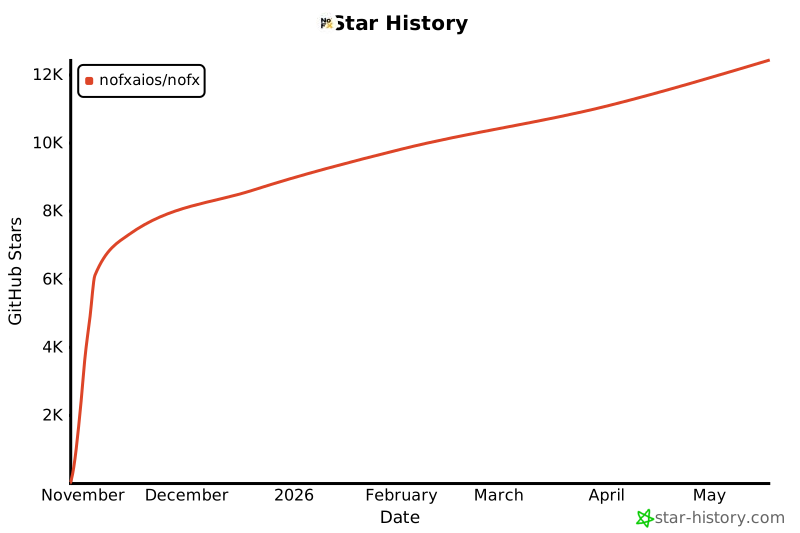](https://star-history.com/#NoFxAiOS/nofx&Date)
|