Compare commits
25 Commits
| Author | SHA1 | Date | |
|---|---|---|---|
 Soulter Soulter
|
6d687691a2 | ||
|
Soulter
|
0c71d351ee | ||
 LIghtJUNction LIghtJUNction
|
f00ba5adc6 | ||
|
LIghtJUNction
|
d3d4e1db7b | ||
|
LIghtJUNction
|
78b3e12c66 | ||
 Futureppo Futureppo
|
c42ac87ee1 | ||
 QuietStars QuietStars
|
3fbd16b211 | ||
 qingyun qingyun
|
e77500ff69 | ||
 lppsuixn lppsuixn
|
2c49ac0dcf | ||
|
Soulter
|
65decfbe87 | ||
 stevessr stevessr
|
92c31192de | ||
|
LIghtJUNction
|
b795f804a7 | ||
|
LIghtJUNction
|
bc3b5e58a4 | ||
|
LIghtJUNction
|
7e3c32b828 | ||
|
LIghtJUNction
|
ceb32dce9f | ||
|
LIghtJUNction
|
84e880af5f | ||
|
LIghtJUNction
|
9909d774ed | ||
|
LIghtJUNction
|
6b3868b4be | ||
|
LIghtJUNction
|
11c840953a | ||
|
LIghtJUNction
|
2bbca887ce | ||
 copilot-swe-agent[bot] copilot-swe-agent[bot]
|
dd89a4b334 | ||
|
copilot-swe-agent[bot]
|
a3fa8a5a7c | ||
|
LIghtJUNction
|
aa60467782 | ||
|
LIghtJUNction
|
d936bb0a10 | ||
 Stable Genius Stable Genius
|
64e0183b55 |
@@ -3,8 +3,8 @@
|
||||
|
||||
### Modifications / 改动点
|
||||
|
||||
<!--请总结你的改动:哪些核心文件被修改了?实现了什么功能?-->
|
||||
<!--Please summarize your changes: What core files were modified? What functionality was implemented?-->
|
||||
<!--请总结你的改动:哪些核心文件被修改了?实现了什么功能?-->
|
||||
|
||||
- [x] This is NOT a breaking change. / 这不是一个破坏性变更。
|
||||
<!-- If your changes is a breaking change, please uncheck the checkbox above -->
|
||||
@@ -21,7 +21,14 @@
|
||||
<!--If merged, your code will serve tens of thousands of users! Please double-check the following items before submitting.-->
|
||||
<!--如果分支被合并,您的代码将服务于数万名用户!在提交前,请核查一下几点内容。-->
|
||||
|
||||
- [ ] 😊 如果 PR 中有新加入的功能,已经通过 Issue / 邮件等方式和作者讨论过。/ If there are new features added in the PR, I have discussed it with the authors through issues/emails, etc.
|
||||
- [ ] 👀 我的更改经过了良好的测试,**并已在上方提供了“验证步骤”和“运行截图”**。/ My changes have been well-tested, **and "Verification Steps" and "Screenshots" have been provided above**.
|
||||
- [ ] 🤓 我确保没有引入新依赖库,或者引入了新依赖库的同时将其添加到了 `requirements.txt` 和 `pyproject.toml` 文件相应位置。/ I have ensured that no new dependencies are introduced, OR if new dependencies are introduced, they have been added to the appropriate locations in `requirements.txt` and `pyproject.toml`.
|
||||
- [ ] 😮 我的更改没有引入恶意代码。/ My changes do not introduce malicious code.
|
||||
- [ ] 😊 If there are new features added in the PR, I have discussed it with the authors through issues/emails, etc.
|
||||
/ 如果 PR 中有新加入的功能,已经通过 Issue / 邮件等方式和作者讨论过。
|
||||
|
||||
- [ ] 👀 My changes have been well-tested, **and "Verification Steps" and "Screenshots" have been provided above**.
|
||||
/ 我的更改经过了良好的测试,**并已在上方提供了“验证步骤”和“运行截图”**。
|
||||
|
||||
- [ ] 🤓 I have ensured that no new dependencies are introduced, OR if new dependencies are introduced, they have been added to the appropriate locations in `requirements.txt` and `pyproject.toml`.
|
||||
/ 我确保没有引入新依赖库,或者引入了新依赖库的同时将其添加到 `requirements.txt` 和 `pyproject.toml` 文件相应位置。
|
||||
|
||||
- [ ] 😮 My changes do not introduce malicious code.
|
||||
/ 我的更改没有引入恶意代码。
|
||||
|
||||
@@ -0,0 +1,45 @@
|
||||
name: PR Checklist Check
|
||||
|
||||
on:
|
||||
pull_request_target:
|
||||
types: [opened, edited, reopened, synchronize]
|
||||
|
||||
jobs:
|
||||
check:
|
||||
runs-on: ubuntu-latest
|
||||
|
||||
permissions:
|
||||
pull-requests: write
|
||||
issues: write
|
||||
|
||||
steps:
|
||||
- name: Check checklist
|
||||
id: check
|
||||
uses: actions/github-script@v7
|
||||
with:
|
||||
script: |
|
||||
const body = context.payload.pull_request.body || "";
|
||||
const regex = /-\s*\[\s*x\s*\].*没有.*认真阅读/i;
|
||||
const bad = regex.test(body);
|
||||
core.setOutput("bad", bad);
|
||||
|
||||
- name: Close PR
|
||||
if: steps.check.outputs.bad == 'true'
|
||||
uses: actions/github-script@v7
|
||||
with:
|
||||
script: |
|
||||
const pr = context.payload.pull_request;
|
||||
|
||||
await github.rest.issues.createComment({
|
||||
owner: context.repo.owner,
|
||||
repo: context.repo.repo,
|
||||
issue_number: pr.number,
|
||||
body: `检测到你勾选了“我没有认真阅读”,PR 已关闭。`
|
||||
});
|
||||
|
||||
await github.rest.pulls.update({
|
||||
owner: context.repo.owner,
|
||||
repo: context.repo.repo,
|
||||
pull_number: pr.number,
|
||||
state: "closed"
|
||||
});
|
||||
@@ -1 +1 @@
|
||||
__version__ = "4.20.0"
|
||||
__version__ = "4.20.1"
|
||||
|
||||
@@ -5,7 +5,7 @@ from typing import Any, TypedDict
|
||||
|
||||
from astrbot.core.utils.astrbot_path import get_astrbot_data_path
|
||||
|
||||
VERSION = "4.20.0"
|
||||
VERSION = "4.20.1"
|
||||
DB_PATH = os.path.join(get_astrbot_data_path(), "data_v4.db")
|
||||
|
||||
WEBHOOK_SUPPORTED_PLATFORMS = [
|
||||
|
||||
@@ -440,9 +440,16 @@ class WecomAIBotAdapter(Platform):
|
||||
)
|
||||
|
||||
def _extract_session_id(self, message_data: dict[str, Any]) -> str:
|
||||
"""从消息数据中提取会话ID"""
|
||||
user_id = message_data.get("from", {}).get("userid", "default_user")
|
||||
return format_session_id("wecomai", user_id)
|
||||
"""从消息数据中提取会话ID
|
||||
群聊使用 chatid,单聊使用 userid
|
||||
"""
|
||||
chattype = message_data.get("chattype", "single")
|
||||
if chattype == "group":
|
||||
chat_id = message_data.get("chatid", "default_group")
|
||||
return format_session_id("wecomai", chat_id)
|
||||
else:
|
||||
user_id = message_data.get("from", {}).get("userid", "default_user")
|
||||
return format_session_id("wecomai", user_id)
|
||||
|
||||
async def _enqueue_message(
|
||||
self,
|
||||
|
||||
@@ -808,6 +808,8 @@ class ProviderManager:
|
||||
config.save_config()
|
||||
# load instance
|
||||
await self.load_provider(new_config)
|
||||
# sync in-memory config for API queries (e.g., embedding provider list)
|
||||
self.providers_config = astrbot_config["provider"]
|
||||
|
||||
async def terminate(self) -> None:
|
||||
if self._mcp_init_task and not self._mcp_init_task.done():
|
||||
|
||||
@@ -13,3 +13,11 @@ class ProviderGroq(ProviderOpenAIOfficial):
|
||||
) -> None:
|
||||
super().__init__(provider_config, provider_settings)
|
||||
self.reasoning_key = "reasoning"
|
||||
|
||||
def _finally_convert_payload(self, payloads: dict) -> None:
|
||||
"""Groq rejects assistant history items that include reasoning_content."""
|
||||
super()._finally_convert_payload(payloads)
|
||||
for message in payloads.get("messages", []):
|
||||
if message.get("role") == "assistant":
|
||||
message.pop("reasoning_content", None)
|
||||
message.pop("reasoning", None)
|
||||
|
||||
@@ -16,4 +16,7 @@ class ProviderOpenRouter(ProviderOpenAIOfficial):
|
||||
self.client._custom_headers["HTTP-Referer"] = ( # type: ignore
|
||||
"https://github.com/AstrBotDevs/AstrBot"
|
||||
)
|
||||
self.client._custom_headers["X-TITLE"] = "AstrBot" # type: ignore
|
||||
self.client._custom_headers["X-OpenRouter-Title"] = "AstrBot" # type: ignore
|
||||
self.client._custom_headers["X-OpenRouter-Categories"] = (
|
||||
"general-chat,personal-agent" # type: ignore
|
||||
)
|
||||
|
||||
@@ -25,12 +25,22 @@ class UmopConfigRouter:
|
||||
)
|
||||
self.umop_to_conf_id = sp_data
|
||||
|
||||
@staticmethod
|
||||
def _split_umo(umo: str) -> tuple[str, str, str] | None:
|
||||
"""将 UMO 拆分为 3 个部分,同时保留 session_id 中的 ':'"""
|
||||
if not isinstance(umo, str):
|
||||
return None
|
||||
parts = umo.split(":", 2)
|
||||
if len(parts) != 3:
|
||||
return None
|
||||
return parts[0], parts[1], parts[2]
|
||||
|
||||
def _is_umo_match(self, p1: str, p2: str) -> bool:
|
||||
"""判断 p2 umo 是否逻辑包含于 p1 umo"""
|
||||
p1_ls = p1.split(":")
|
||||
p2_ls = p2.split(":")
|
||||
p1_ls = self._split_umo(p1)
|
||||
p2_ls = self._split_umo(p2)
|
||||
|
||||
if len(p1_ls) != 3 or len(p2_ls) != 3:
|
||||
if p1_ls is None or p2_ls is None:
|
||||
return False # 非法格式
|
||||
|
||||
return all(p == "" or fnmatch.fnmatchcase(t, p) for p, t in zip(p1_ls, p2_ls))
|
||||
@@ -62,7 +72,7 @@ class UmopConfigRouter:
|
||||
|
||||
"""
|
||||
for part in new_routing:
|
||||
if not isinstance(part, str) or len(part.split(":")) != 3:
|
||||
if self._split_umo(part) is None:
|
||||
raise ValueError(
|
||||
"umop keys must be strings in the format [platform_id]:[message_type]:[session_id], with optional wildcards * or empty for all",
|
||||
)
|
||||
@@ -81,7 +91,7 @@ class UmopConfigRouter:
|
||||
ValueError: 如果 umo 格式不正确
|
||||
|
||||
"""
|
||||
if not isinstance(umo, str) or len(umo.split(":")) != 3:
|
||||
if self._split_umo(umo) is None:
|
||||
raise ValueError(
|
||||
"umop must be a string in the format [platform_id]:[message_type]:[session_id], with optional wildcards * or empty for all",
|
||||
)
|
||||
@@ -99,7 +109,7 @@ class UmopConfigRouter:
|
||||
ValueError: 当 umo 格式不正确时抛出
|
||||
"""
|
||||
|
||||
if not isinstance(umo, str) or len(umo.split(":")) != 3:
|
||||
if self._split_umo(umo) is None:
|
||||
raise ValueError(
|
||||
"umop must be a string in the format [platform_id]:[message_type]:[session_id], with optional wildcards * or empty for all",
|
||||
)
|
||||
|
||||
@@ -0,0 +1,93 @@
|
||||
## What's Changed
|
||||
|
||||
### 新增
|
||||
|
||||
- 补充 MiniMax Provider。([#6318](https://github.com/AstrBotDevs/AstrBot/pull/6318))
|
||||
- 新增 WebUI ChatUI 页面的会话批量删除功能。([#6160](https://github.com/AstrBotDevs/AstrBot/pull/6160))
|
||||
- 新增 WebUI ChatUI 配置发送快捷键。([#6272](https://github.com/AstrBotDevs/AstrBot/pull/6272))
|
||||
|
||||
### 优化
|
||||
|
||||
- 优化 UMO 处理兼容性。([#5996](https://github.com/AstrBotDevs/AstrBot/pull/5996))
|
||||
- 重构 `_extract_session_id`,改进聊天类型分支处理。(#5775)
|
||||
- 优化聊天组件行为,使用 `shiki` 进行代码块渲染。([#6286](https://github.com/AstrBotDevs/AstrBot/pull/6286))
|
||||
- 优化 WebUI 主题配色与视觉体验。([#6263](https://github.com/AstrBotDevs/AstrBot/pull/6263))
|
||||
- 优化 OneBot @ 组件后处理,避免消息文本解析空格问题。([#6238](https://github.com/AstrBotDevs/AstrBot/pull/6238))
|
||||
|
||||
### 修复
|
||||
|
||||
- 修复创建新 Provider 后未同步 `providers_config` 的问题。([#6388](https://github.com/AstrBotDevs/AstrBot/pull/6388))
|
||||
- 修复 API 返回 `null choices` 时的 `TypeError`。([#6313](https://github.com/AstrBotDevs/AstrBot/pull/6313))
|
||||
- 修复 QQ Webhook 重试回调重复触发的问题。([#6320](https://github.com/AstrBotDevs/AstrBot/pull/6320))
|
||||
- 修复流式模式下 `delta` 为 `None` 导致工具调用时报错的问题。([#6365](https://github.com/AstrBotDevs/AstrBot/pull/6365))
|
||||
- 修复模型服务链接说明文字错误。([#6296](https://github.com/AstrBotDevs/AstrBot/pull/6296))
|
||||
- 修复 AI 在 tool-calling 模式设为 `skills-like` 时发送媒体失败的问题。([#6317](https://github.com/AstrBotDevs/AstrBot/pull/6317))
|
||||
- 修复 Telegram 适配器中 GIF 被错误转成静态图的问题。([#6329](https://github.com/AstrBotDevs/AstrBot/pull/6329))
|
||||
- 将 Provider 图标来源替换为 jsDelivr CDN 地址,修复部分环境下图标加载问题。([#6340](https://github.com/AstrBotDevs/AstrBot/pull/6340))
|
||||
- 修复 QQ 官方表情消息未解析为可读文本的问题。([#6355](https://github.com/AstrBotDevs/AstrBot/pull/6355))
|
||||
- 修复 WebChat 队列异常时流式结果页面崩溃的问题。([#6123](https://github.com/AstrBotDevs/AstrBot/pull/6123))
|
||||
- 修复子代理 handoff 工具在插件过滤时丢失的问题。([#6155](https://github.com/AstrBotDevs/AstrBot/pull/6155))
|
||||
- 修复 Cron 提示文案缺少空格及 `utcnow()` 的弃用警告问题。([#6192](https://github.com/AstrBotDevs/AstrBot/pull/6192))
|
||||
- 修复 WebUI 启动时 Sidebar hash 导航抖动/定位问题。([#6159](https://github.com/AstrBotDevs/AstrBot/pull/6159))
|
||||
- 修复启动重试过程中移除已移除 API Key 的 `ValueError` 报错。([#6193](https://github.com/AstrBotDevs/AstrBot/pull/6193))
|
||||
- 修复 README 启动命令引用更新为 `astrbot run`。([#6189](https://github.com/AstrBotDevs/AstrBot/pull/6189))
|
||||
- 修复 `Plain.toDict()` 在 `@` 提及场景下空白字符丢失的问题。([#6244](https://github.com/AstrBotDevs/AstrBot/pull/6244))
|
||||
- 修复 provider 依赖重复定义问题。([#6247](https://github.com/AstrBotDevs/AstrBot/pull/6247))
|
||||
- 修复 Telegram 中普通回复被误判为线程的处理问题。([#6174](https://github.com/AstrBotDevs/AstrBot/pull/6174))
|
||||
|
||||
### 其他
|
||||
|
||||
- 调整 `astrbot.service` 及 CI 配置,升级 GitHub Actions 版本。
|
||||
|
||||
---
|
||||
|
||||
## What's Changed (EN)
|
||||
|
||||
### New Features
|
||||
|
||||
- Added OpenRouter chat completion provider adapter with support for custom headers ([#6436](https://github.com/AstrBotDevs/AstrBot/pull/6436)).
|
||||
- Added MiniMax provider ([#6318](https://github.com/AstrBotDevs/AstrBot/pull/6318)).
|
||||
- Added batch conversation deletion in WebChat ([#6160](https://github.com/AstrBotDevs/AstrBot/pull/6160)).
|
||||
- Added send shortcut settings and localization support for WebChat input ([#6272](https://github.com/AstrBotDevs/AstrBot/pull/6272)).
|
||||
- Added local temporary directory binding in YAML config ([#6191](https://github.com/AstrBotDevs/AstrBot/pull/6191)).
|
||||
|
||||
### Improvements
|
||||
|
||||
- Improved UMO processing compatibility ([#5996](https://github.com/AstrBotDevs/AstrBot/pull/5996)).
|
||||
- Refactored `_extract_session_id` for chat type handling (#5775).
|
||||
- Improved chat component behavior and uses `shiki` for code-block rendering ([#6286](https://github.com/AstrBotDevs/AstrBot/pull/6286)).
|
||||
- Improved WebUI theme color and visual behavior ([#6263](https://github.com/AstrBotDevs/AstrBot/pull/6263)).
|
||||
- Improved OneBot `@` component spacing handling ([#6238](https://github.com/AstrBotDevs/AstrBot/pull/6238)).
|
||||
- Improved PR checklist validation and closure messaging.
|
||||
|
||||
### Bug Fixes
|
||||
|
||||
- Fixed missing `providers_config` sync after creating new providers ([#6388](https://github.com/AstrBotDevs/AstrBot/pull/6388)).
|
||||
- Fixed `TypeError` when API returns null choices ([#6313](https://github.com/AstrBotDevs/AstrBot/pull/6313)).
|
||||
- Fixed repeated QQ webhook retry callbacks ([#6320](https://github.com/AstrBotDevs/AstrBot/pull/6320)).
|
||||
- Fixed tool-calling streaming null `delta` handling to prevent `AttributeError` ([#6365](https://github.com/AstrBotDevs/AstrBot/pull/6365)).
|
||||
- Fixed model service link wording in docs/config ([#6296](https://github.com/AstrBotDevs/AstrBot/pull/6296)).
|
||||
- Fixed AI media sending failure when tool-calling mode is set to `skills-like` ([#6317](https://github.com/AstrBotDevs/AstrBot/pull/6317)).
|
||||
- Fixed GIF being sent as static image in Telegram adapter ([#6329](https://github.com/AstrBotDevs/AstrBot/pull/6329)).
|
||||
- Replaced npm registry URLs with jsDelivr CDN for provider icons ([#6340](https://github.com/AstrBotDevs/AstrBot/pull/6340)).
|
||||
- Fixed QQ official face message parsing to readable text ([#6355](https://github.com/AstrBotDevs/AstrBot/pull/6355)).
|
||||
- Fixed WebChat stream-result crash on queue errors ([#6123](https://github.com/AstrBotDevs/AstrBot/pull/6123)).
|
||||
- Preserved subagent handoff tools during plugin filtering ([#6155](https://github.com/AstrBotDevs/AstrBot/pull/6155)).
|
||||
- Fixed cron prompt spacing and deprecated `utcnow()` usage ([#6192](https://github.com/AstrBotDevs/AstrBot/pull/6192)).
|
||||
- Fixed unstable sidebar hash navigation on startup ([#6159](https://github.com/AstrBotDevs/AstrBot/pull/6159)).
|
||||
- Fixed `ValueError` in retry loop when removing an already removed API key ([#6193](https://github.com/AstrBotDevs/AstrBot/pull/6193)).
|
||||
- Updated startup command to `astrbot run` across READMEs ([#6189](https://github.com/AstrBotDevs/AstrBot/pull/6189)).
|
||||
- Preserved whitespace in `Plain.toDict()` for @ mentions ([#6244](https://github.com/AstrBotDevs/AstrBot/pull/6244)).
|
||||
- Removed duplicate dependencies entries ([#6247](https://github.com/AstrBotDevs/AstrBot/pull/6247)).
|
||||
- Fixed Telegram normal reply being treated as topic thread ([#6174](https://github.com/AstrBotDevs/AstrBot/pull/6174)).
|
||||
|
||||
### Documentation
|
||||
|
||||
- Updated `rainyun` backup/access documentation ([#6427](https://github.com/AstrBotDevs/AstrBot/pull/6427)).
|
||||
- Updated `package.md` and platform docs, including Matrix and Wecom AI bot documentation.
|
||||
- Fixed Discord invite link in community docs.
|
||||
|
||||
### Chores
|
||||
|
||||
- Updated PR templates/checklist workflow, repository service config, and automated checks.
|
||||
- Refreshed repository automation and formatting maintenance, and removed obsolete changelog scripts.
|
||||
@@ -87,7 +87,13 @@ export default defineConfig({
|
||||
},
|
||||
{
|
||||
text: "OneBot v11",
|
||||
link: "/aiocqhttp"
|
||||
base: "/platform/aiocqhttp",
|
||||
collapsed: true,
|
||||
items: [
|
||||
{ text: "NapCat", link: "/napcat" },
|
||||
{ text: "Lagrange", link: "/lagrange" },
|
||||
{ text: "其他端", link: "/others" },
|
||||
],
|
||||
},
|
||||
{ text: "企微应用", link: "/wecom" },
|
||||
{ text: "企微智能机器人", link: "/wecom_ai_bot" },
|
||||
@@ -105,7 +111,7 @@ export default defineConfig({
|
||||
base: "/platform/satori",
|
||||
collapsed: true,
|
||||
items: [
|
||||
{ text: "接入 Satori", link: "/guide" },
|
||||
{ text: "使用 LLOneBot", link: "/llonebot" },
|
||||
{ text: "使用 server-satori", link: "/server-satori" },
|
||||
],
|
||||
},
|
||||
|
||||
@@ -41,4 +41,4 @@ AstrBot 已经上架至雨云的预装软件列表,支持**一键安装** Astr
|
||||
|
||||
|
||||
|
||||
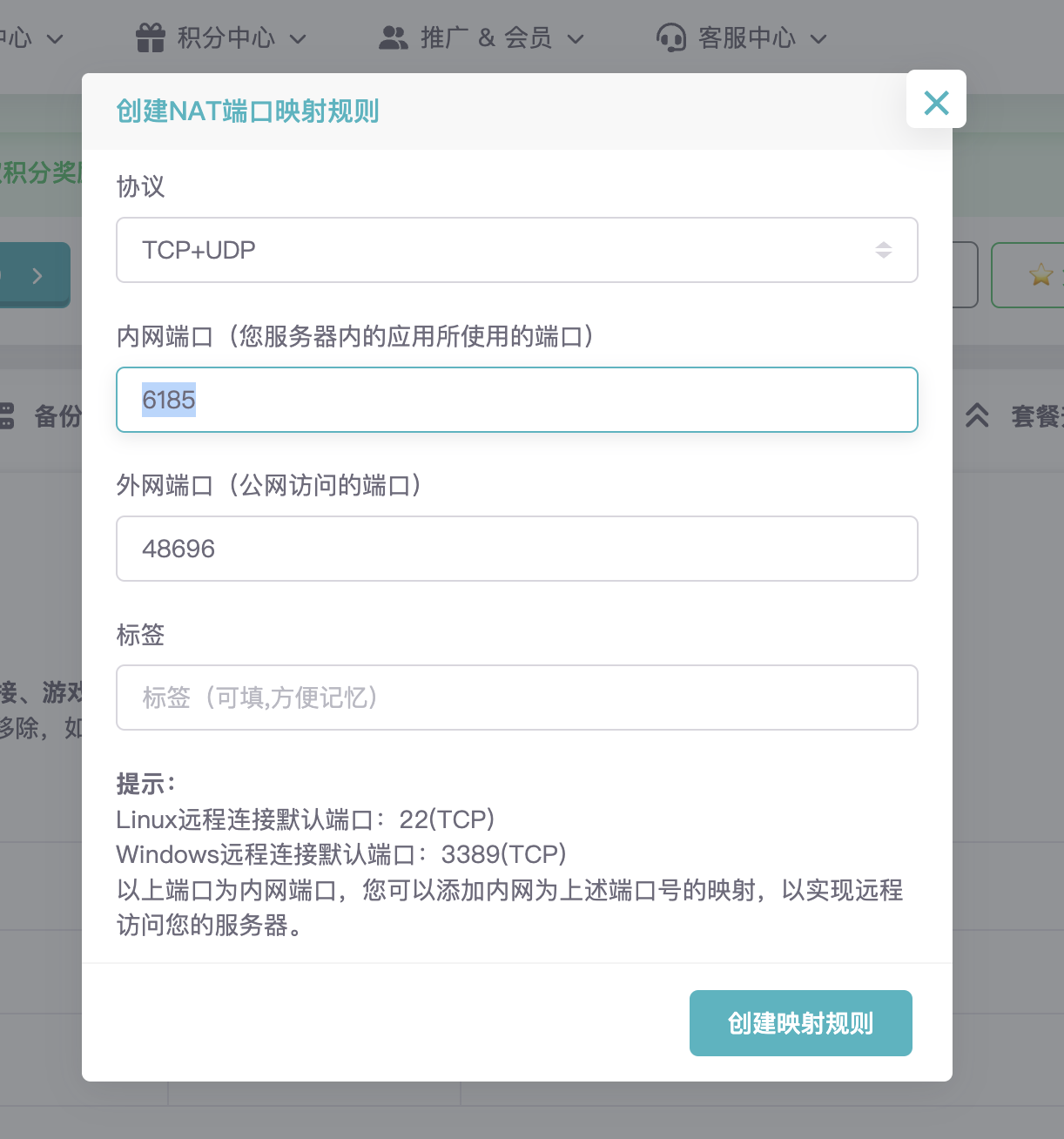
然后,内网端口填写 `6185`,点击 `创建映射规则`,这样就可以通过 `http://IP:上面设置好的外网端口` 访问 AstrBot 的管理面板了。
|
||||
然后,内网端口填写 `6185`,点击 `创建映射规则`,这样就可以通过 `http://IP:上面设置好的外网端口` 访问 AstrBot 的管理面板了。如果无法打开,请点击`备用地址`,通过备用地址访问管理面板。
|
||||
|
||||
@@ -1,43 +0,0 @@
|
||||
# 接入 OneBot v11 协议实现
|
||||
|
||||
OneBot 是一个聊天机器人应用接口标准,旨在统一不同聊天平台上的机器人应用开发接口,使开发者只需编写一次业务逻辑代码即可应用到多种机器人平台。
|
||||
|
||||
AstrBot 支持接入所有适配了 OneBotv11 反向 Websockets(AstrBot 做服务器端)的机器人协议端。
|
||||
|
||||
下文给出一些常见的 OneBot v11 协议实现端项目。
|
||||
|
||||
- [NapCat](https://github.com/NapNeko/NapCatQQ)
|
||||
- [OneDisc](https://github.com/ITCraftDevelopmentTeam/OneDisc)
|
||||
- [Tele-KiraLink](https://github.com/Echomirix/Tele-KiraLink)
|
||||
|
||||
请参阅对应的协议实现端项目的部署文档。
|
||||
|
||||
## 1. 配置 OneBot v11
|
||||
|
||||
1. 进入 AstrBot 的 WebUI
|
||||
2. 点击左边栏 `机器人`
|
||||
3. 然后在右边的界面中,点击 `+ 创建机器人`
|
||||
4. 选择 `OneBot v11`
|
||||
|
||||
在出现的表单中,填写:
|
||||
|
||||
- ID(id):随意填写,仅用于区分不同的消息平台实例。
|
||||
- 启用(enable): 勾选。
|
||||
- 反向 WebSocket 主机地址:请填写你的机器的 IP 地址,一般情况下请直接填写 `0.0.0.0`
|
||||
- 反向 WebSocket 端口:填写一个端口,默认为 `6199`。
|
||||
- 反向 Websocket Token:只有当 NapCat 网络配置中配置了 token 才需填写。
|
||||
|
||||
点击 `保存`。
|
||||
|
||||
## 2. 配置协议实现端
|
||||
|
||||
请参阅对应的协议实现端项目的部署文档。
|
||||
|
||||
一些注意点:
|
||||
|
||||
1. 协议实现端需要支持 `反向 WebSocket` 实现,及 AstrBot 端作为服务端,实现端作为客户端。
|
||||
2. `反向 WebSocket` 的 URL 为 `ws(s)://<your-host>:6199/ws`。
|
||||
|
||||
## 3. 验证
|
||||
|
||||
前往 AstrBot WebUI `控制台`,如果出现 ` aiocqhttp(OneBot v11) 适配器已连接。` 蓝色的日志,说明连接成功。如果没有,若干秒后出现` aiocqhttp 适配器已被关闭` 则为连接超时(失败),请检查配置是否正确。
|
||||
@@ -0,0 +1,61 @@
|
||||
# 接入 Lagrange
|
||||
|
||||
> [!TIP]
|
||||
>
|
||||
> - 请合理控制使用频率。过于频繁地发送消息可能会被判定为异常行为,增加触发风控机制的风险。
|
||||
> - 本项目严禁用于任何违反法律法规的用途。若您意图将 AstrBot 应用于非法产业或活动,我们**明确反对并拒绝**您使用本项目。
|
||||
> - 最新的部署方式请以 [Lagrange Doc](https://lagrangedev.github.io/Lagrange.Doc/Lagrange.OneBot/Config/#%E4%B8%8B%E8%BD%BD%E5%AE%89%E8%A3%85) 为准。
|
||||
|
||||
## 下载
|
||||
|
||||
从 [GitHub Release](https://github.com/LagrangeDev/Lagrange.Core/releases) 下载最新版的 `Lagrange.OneBot`。
|
||||
|
||||
对于 Windows 设备,请下载 `Lagrange.OneBot_win-x64_xxxx` 压缩包。
|
||||
|
||||
对于 X86 的 Linux 用户,下载 `Lagrange.OneBot_linux-x64_xxx` 压缩包。
|
||||
|
||||
对于 Arm 的 Linux 用户,下载 `Lagrange.OneBot_linux-arm64_xxx` 压缩包。
|
||||
|
||||
对于 M 芯片 Mac 用户,下载 `Lagrange.OneBot_osx-arm64_xxx` 压缩包。
|
||||
|
||||
对于 Intel 芯片 Mac 用户,下载 `Lagrange.OneBot_osx-x64_xxx` 压缩包。
|
||||
|
||||
## 部署
|
||||
|
||||
请参阅 [Lagrange Doc](https://lagrangedev.github.io/Lagrange.Doc/Lagrange.OneBot/Config/#%E8%BF%90%E8%A1%8C)。
|
||||
|
||||
运行完成后,请修改 [配置文件](https://lagrangedev.github.io/Lagrange.Doc/Lagrange.OneBot/Config/#%E9%85%8D%E7%BD%AE%E6%96%87%E4%BB%B6),
|
||||
|
||||
在 `Implementations` 字段下添加:
|
||||
|
||||
```json
|
||||
{
|
||||
"Type": "ReverseWebSocket",
|
||||
"Host": "127.0.0.1",
|
||||
"Port": 6199,
|
||||
"Suffix": "/ws",
|
||||
"ReconnectInterval": 5000,
|
||||
"HeartBeatInterval": 5000,
|
||||
"AccessToken": ""
|
||||
}
|
||||
```
|
||||
|
||||
一定要保证 `Suffix` 为 `/ws`。
|
||||
|
||||
## 连接到 AstrBot
|
||||
|
||||
### 配置 aiocqhttp
|
||||
|
||||
1. 进入 AstrBot 的管理面板
|
||||
2. 点击左边栏 `机器人`
|
||||
3. 然后在右边的界面中,点击 `+ 创建机器人`
|
||||
4. 选择 `aiocqhttp(OneBotv11)`
|
||||
|
||||
弹出的配置项填写:
|
||||
|
||||
配置项填写:
|
||||
|
||||
- ID(id):随意填写,用于区分不同的消息平台实例。
|
||||
- 启用(enable): 勾选。
|
||||
- 反向 WebSocket 主机地址:请填写你的机器的 IP 地址。一般情况下请直接填写 `0.0.0.0`
|
||||
- 反向 WebSocket 端口:填写一个端口,例如 `6199`。
|
||||
@@ -0,0 +1,134 @@
|
||||
# 使用 NapCat
|
||||
|
||||
> [!TIP]
|
||||
>
|
||||
> - 本项目严禁用于任何违反法律法规的用途。若您意图将 AstrBot 应用于非法产业或活动,我们**明确反对并拒绝**您使用本项目。
|
||||
> - AstrBot 通过 `aiocqhttp` 适配器接入 OneBot v11 协议。OneBot v11 协议是一个开放的通信协议,并不代表任何具体的软件或服务。
|
||||
|
||||
NapCat 的 GitHub 仓库:[NapCat](https://github.com/NapNeko/NapCatQQ)
|
||||
NapCat 的文档:[NapCat 文档](https://napcat.napneko.icu/)
|
||||
|
||||
NapCat 提供了大量的部署方式,包括 Docker、Windows 一键安装包等等。
|
||||
|
||||
## 通过一键脚本部署
|
||||
|
||||
推荐采用这种方式部署。
|
||||
|
||||
### Windows
|
||||
|
||||
看这篇文章:[NapCat.Shell - Win手动启动教程](https://napneko.github.io/guide/boot/Shell#napcat-shell-win%E6%89%8B%E5%8A%A8%E5%90%AF%E5%8A%A8%E6%95%99%E7%A8%8B)
|
||||
|
||||
### Linux
|
||||
|
||||
看这篇文章:[NapCat.Installer - Linux一键使用脚本(支持Ubuntu 20+/Debian 10+/Centos9)](https://napneko.github.io/guide/boot/Shell#napcat-installer-linux%E4%B8%80%E9%94%AE%E4%BD%BF%E7%94%A8%E8%84%9A%E6%9C%AC-%E6%94%AF%E6%8C%81ubuntu-20-debian-10-centos9)
|
||||
|
||||
> [!TIP]
|
||||
> **Napcat WebUI 在哪打开**:
|
||||
> 在 napcat 的日志里会显示 WebUI 链接。
|
||||
>
|
||||
> 如果是 linux 命令行一键部署的napcat:`docker log <账号>`。
|
||||
>
|
||||
> Docker部署的 NapCat:`docker logs napcat`。
|
||||
|
||||
## 通过 Docker Compose 部署
|
||||
|
||||
1. 下载或复制 [astrbot.yml](https://github.com/NapNeko/NapCat-Docker/blob/main/compose/astrbot.yml) 内容
|
||||
2. 将刚刚下载的文件重命名为 `astrbot.yml`
|
||||
3. 编辑 `astrbot.yml`,将 `# - "6199:6199"` 修改为 `- "6199:6199"`,移除开头的 `#`
|
||||
4. 在 `astrbot.yml` 文件所在目录执行:
|
||||
|
||||
```bash
|
||||
NAPCAT_UID=$(id -u) NAPCAT_GID=$(id -g) docker compose -f ./astrbot.yml up -d
|
||||
```
|
||||
|
||||
## 通过 Docker 部署
|
||||
|
||||
此教程默认您安装了 Docker。
|
||||
|
||||
在终端执行以下命令即可一键部署。
|
||||
|
||||
```bash
|
||||
docker run -d \
|
||||
-e NAPCAT_GID=$(id -g) \
|
||||
-e NAPCAT_UID=$(id -u) \
|
||||
-p 3000:3000 \
|
||||
-p 3001:3001 \
|
||||
-p 6099:6099 \
|
||||
--name napcat \
|
||||
--restart=always \
|
||||
mlikiowa/napcat-docker:latest
|
||||
```
|
||||
|
||||
执行成功后,需要查看日志以得到登录二维码和管理面板的 URL。
|
||||
|
||||
```bash
|
||||
docker logs napcat
|
||||
```
|
||||
|
||||
请复制管理面板的 URL,然后在浏览器中打开备用。
|
||||
|
||||
然后使用你要登录的账号扫描出现的二维码,即可登录。
|
||||
|
||||
如果登录阶段没有出现问题,即成功部署。
|
||||
|
||||
## 连接到 AstrBot
|
||||
|
||||
## 在 AstrBot 配置 aiocqhttp
|
||||
|
||||
1. 进入 AstrBot 的管理面板
|
||||
2. 点击左边栏 `机器人`
|
||||
3. 然后在右边的界面中,点击 `+ 创建机器人`
|
||||
4. 选择 `OneBot v11`
|
||||
|
||||
弹出的配置项填写:
|
||||
- ID(id):随意填写,仅用于区分不同的消息平台实例。
|
||||
- 启用(enable): 勾选。
|
||||
- 反向 WebSocket 主机地址:请填写你的机器的 IP 地址,一般情况下请直接填写 `0.0.0.0`
|
||||
- 反向 WebSocket 端口:填写一个端口,默认为 `6199`。
|
||||
- 反向 Websocket Token:只有当 NapCat 网络配置中配置了 token 才需填写。
|
||||
|
||||
图例:(最快只需要点击启用,然后保存即可)
|
||||
|
||||
<img width="818" height="799" alt="xinjianya" src="https://github.com/user-attachments/assets/813ac338-2fd7-4add-bde4-8b0f6d0bda95" />
|
||||
|
||||
|
||||
点击 `保存`。
|
||||
|
||||
### 配置管理员
|
||||
|
||||
填写完毕后,进入 `配置文件` 页,点击 `平台配置` 选项卡,找到 `管理员 ID`,填写你的账号(不是机器人的账号)。
|
||||
|
||||
切记点击右下角 `保存`,AstrBot 重启并会应用配置。
|
||||
|
||||
### 在 NapCat 中添加 WebSocket 客户端
|
||||
|
||||
切换回 NapCat 的管理面板,点击 `网络配置->新建->WebSockets客户端`。
|
||||
|
||||
<img width="649" height="751" alt="jiaochenXJY" src="https://github.com/user-attachments/assets/5044f96a-a81f-407a-a3b1-0c518499eda4" />
|
||||
|
||||
|
||||
在新弹出的窗口中:
|
||||
|
||||
- 勾选 `启用`。
|
||||
- `URL` 填写 `ws://宿主机IP:端口/ws`。如 `ws://localhost:6199/ws` 或 `ws://127.0.0.1:6199/ws`。
|
||||
|
||||
> [!IMPORTANT]
|
||||
> 1. 如果采用 Docker 部署并同时把 AstrBot 和 NapCat 两个容器接入了同一网络,`ws://astrbot:6199/ws`(参考本文档的 Docker 脚本)。
|
||||
> 2. 由于 Docker 网络隔离的原因,不在同一个网络时请使用内网 IP 地址或公网 IP 地址 ***(不安全)*** 进行连接,即 `ws://(内网/公网):6199/ws`。
|
||||
|
||||
- 消息格式:`Array`
|
||||
- 心跳间隔: `5000`
|
||||
- 重连间隔: `5000`
|
||||
|
||||
> [!WARNING]
|
||||
>
|
||||
> 1. 切记后面加一个 `/ws`!
|
||||
> 2. 这里的 IP 不能填为 `0.0.0.0`
|
||||
|
||||
点击 `保存`。
|
||||
|
||||
前往 AstrBot WebUI `控制台`,如果出现 ` aiocqhttp(OneBot v11) 适配器已连接。` 蓝色的日志,说明连接成功。如果没有,若干秒后出现` aiocqhttp 适配器已被关闭` 则为连接超时(失败),请检查配置是否正确。
|
||||
|
||||
## 🎉 大功告成
|
||||
|
||||
此时,你的 AstrBot 和 NapCat 应该已经连接成功!使用 `私聊` 的方式对机器人发送 `/help` 以检查是否连接成功。
|
||||
@@ -0,0 +1 @@
|
||||
支持接入所有适配了 OneBotv11 反向 Websockets(AstrBot 做服务器端) 的机器人协议端。
|
||||
@@ -1,32 +0,0 @@
|
||||
# 接入 Satori 协议
|
||||
|
||||
## Satori 协议简介
|
||||
|
||||
> 摘录自:https://satori.chat/zh-CN/introduction.html
|
||||
|
||||
Satori 是一个通用的聊天协议。Satori 协议希望能够抹平不同聊天平台之间的差异,让开发者以更低的成本开发出跨平台、可扩展、高性能的聊天应用。
|
||||
|
||||
Satori 的名称来源于游戏东方 Project 中的角色 [古明地觉 (Komeiji Satori)](https://zh.touhouwiki.net/wiki/%E5%8F%A4%E6%98%8E%E5%9C%B0%E8%A7%89)。古明地觉能够以心灵感应的方式与各种动物交流,取这个名字是希望 Satori 能够成为各个聊天平台之间的桥梁。
|
||||
|
||||
Satori 的开发团队长期从事聊天机器人开发,熟悉各种聊天平台的通信方式。经过长达 4 年的发展,Satori 有了健全的设计和完善的实现。目前,Satori 官方提供了超过 15 个聊天平台的适配器,完全覆盖了世界上主流的聊天平台,如 QQ、Discord、企业微信、KOOK 等等。
|
||||
|
||||
## 1. 配置协议实现端
|
||||
|
||||
请参阅对应的协议实现端项目的部署文档。
|
||||
|
||||
## 2. 配置 Satori 协议
|
||||
|
||||
1. 进入 AstrBot 的 WebUI
|
||||
2. 点击左边栏 `机器人`
|
||||
3. 然后在右边的界面中,点击 `+ 创建机器人`
|
||||
4. 选择 `Satori`
|
||||
|
||||
弹出的配置项填写:
|
||||
|
||||
- 机器人名称 (id): `satori` (随意)
|
||||
- 启用 (enable): 勾选
|
||||
- Satori API 终结点 (satori_api_base_url):`http://localhost:5600/v1`(端口和上面配置的协议端端口一致)
|
||||
- Satori WebSocket 终结点 (satori_endpoint):`ws://localhost:5600/v1/events`(端口和上面配置的协议端端口一致)
|
||||
- Satori 令牌 (satori_token):根据协议端配置情况选择填写
|
||||
|
||||
点击 `保存`。
|
||||
@@ -0,0 +1,78 @@
|
||||
# 接入 LLTwoBot (Satori)
|
||||
|
||||
> [!TIP]
|
||||
> LLTwoBot 是一个基于 QQNT 的 Onebot v11、Satori 多协议实现端,可以让你在 QQ 平台使用 Satori 协议与 AstrBot 进行通信。
|
||||
|
||||
> [!TIP]
|
||||
>
|
||||
> - 请合理控制使用频率。过于频繁地发送消息可能会被判定为异常行为,增加触发风控机制的风险。
|
||||
> - 本项目严禁用于任何违反法律法规的用途。若您意图将 AstrBot 应用于非法产业或活动,我们**明确反对并拒绝**您使用本项目。
|
||||
|
||||
## 准备工作
|
||||
|
||||
请先参考 LLTwoBot 官方文档完成基础配置:
|
||||
[LLTwoBot 文档](https://llonebot.com/guide/getting-started)
|
||||
|
||||
完成文档中的步骤,确保你已经:
|
||||
|
||||
1. 下载并安装了 LLTwoBot
|
||||
2. 成功登录了 QQ 账号
|
||||
|
||||
## 配置 LLTwoBot 的 Satori 服务
|
||||
|
||||
在成功登录 QQ 后,先打开 LLTwoBot 的 WebUI 配置界面。
|
||||
> WebUI 默认地址为:<http://localhost:3080/>
|
||||
|
||||
---
|
||||
|
||||
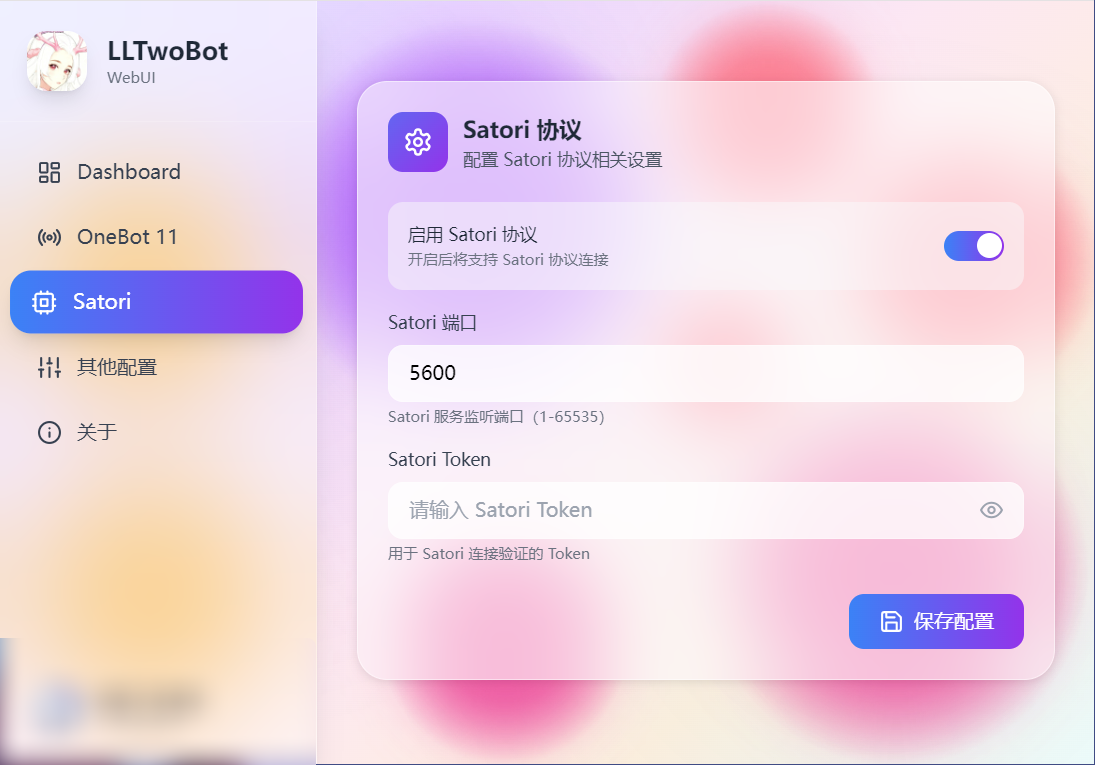
在WebUI的配置界面侧边,选择【Satori】选项卡,进行如下配置:
|
||||
|
||||
1. 确认【启用 Satori 协议】配置项已开启
|
||||
2. 端口默认为 5600(如需修改请记住新端口)
|
||||
3. 如有必要,可填写【Satori Token】
|
||||
4. 点击右下角的【保存配置】
|
||||
|
||||
|
||||
|
||||
## 在 AstrBot 中配置 Satori 适配器
|
||||
|
||||
1. 进入 AstrBot 的管理面板
|
||||
2. 点击左边栏 `机器人`
|
||||
3. 然后在右边的界面中,点击 `+ 创建机器人`
|
||||
4. 选择 `satori`
|
||||
|
||||
弹出的配置项填写:
|
||||
|
||||
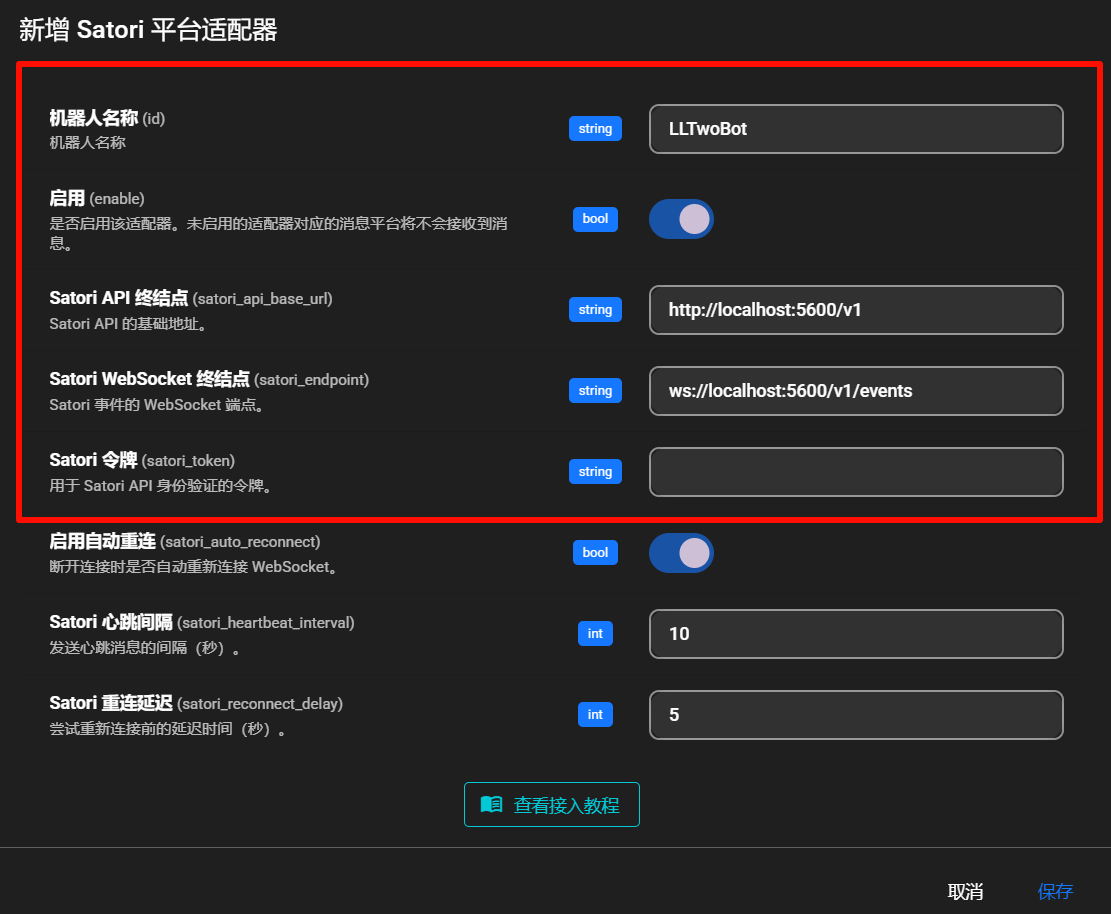
- 机器人名称 (id): `LLTwoBot`
|
||||
- 启用 (enable): 勾选
|
||||
- Satori API 终结点 (satori_api_base_url):`http://localhost:5600/v1`
|
||||
- Satori WebSocket 终结点 (satori_endpoint):`ws://localhost:5600/v1/events`
|
||||
- Satori 令牌 (satori_token):根据 LLTwoBot 配置填写(如有设置)
|
||||
|
||||
> [!NOTE]
|
||||
>
|
||||
> - LLTwoBot 的 satori协议 默认在 `5600` 端口提供服务
|
||||
> - 因此完整的 URL 路径为 `http://localhost:5600/v1`
|
||||
>
|
||||
> 如果你的 satori协议运行在其他端口,请根据实际情况修改对应的配置!
|
||||
|
||||
|
||||
|
||||
点击右下角 `保存` 完成配置。
|
||||
|
||||
## 🎉 大功告成
|
||||
|
||||
此时,你的 AstrBot 应该已经通过 Satori 协议成功连接到 LLTwoBot。
|
||||
|
||||
在 QQ 中发送 `/help` 以检查是否连接成功。
|
||||
|
||||
如果成功回复,则配置成功。
|
||||
|
||||
## 常见问题
|
||||
|
||||
如果遇到连接问题,请检查:
|
||||
|
||||
1. LLTwoBot 是否正常运行
|
||||
2. Satori 服务是否已启用
|
||||
3. 端口配置是否正确
|
||||
4. Token 是否匹配(如设置了 Token)
|
||||
+1
-1
@@ -1,6 +1,6 @@
|
||||
[project]
|
||||
name = "AstrBot"
|
||||
version = "4.20.0"
|
||||
version = "4.20.1"
|
||||
description = "Easy-to-use multi-platform LLM chatbot and development framework"
|
||||
readme = "README.md"
|
||||
requires-python = ">=3.12"
|
||||
|
||||
@@ -1,5 +1,7 @@
|
||||
# user service
|
||||
[Unit]
|
||||
Description=AstrBot Service
|
||||
Documentation=https://github.com/AstrBotDevs/AstrBot
|
||||
After=network-online.target
|
||||
Wants=network-online.target
|
||||
|
||||
@@ -9,6 +11,9 @@ WorkingDirectory=%h/.local/share/astrbot
|
||||
ExecStart=/usr/bin/sh -c '/usr/bin/astrbot run || { /usr/bin/astrbot init && /usr/bin/astrbot run; }'
|
||||
Restart=on-failure
|
||||
RestartSec=5
|
||||
StandardOutput=journal
|
||||
StandardError=journal
|
||||
SyslogIdentifier=astrbot-%u
|
||||
Environment=PYTHONUNBUFFERED=1
|
||||
|
||||
[Install]
|
||||
|
||||
@@ -1,196 +0,0 @@
|
||||
from __future__ import annotations
|
||||
|
||||
import argparse
|
||||
import json
|
||||
import subprocess
|
||||
import sys
|
||||
from collections import defaultdict
|
||||
from dataclasses import dataclass
|
||||
from datetime import datetime
|
||||
|
||||
|
||||
@dataclass(frozen=True)
|
||||
class Issue:
|
||||
number: int
|
||||
title: str
|
||||
created_at: datetime
|
||||
url: str
|
||||
|
||||
|
||||
def parse_args() -> argparse.Namespace:
|
||||
parser = argparse.ArgumentParser(
|
||||
description=(
|
||||
"Close duplicate open plugin-publish issues while keeping the latest one."
|
||||
)
|
||||
)
|
||||
parser.add_argument(
|
||||
"--repo",
|
||||
default="AstrBotDevs/AstrBot",
|
||||
help="GitHub repository in owner/name format.",
|
||||
)
|
||||
parser.add_argument(
|
||||
"--label",
|
||||
default="plugin-publish",
|
||||
help="Issue label to target.",
|
||||
)
|
||||
parser.add_argument(
|
||||
"--limit",
|
||||
type=int,
|
||||
default=1000,
|
||||
help="Maximum number of open issues to inspect.",
|
||||
)
|
||||
parser.add_argument(
|
||||
"--apply",
|
||||
action="store_true",
|
||||
help="Actually close duplicate issues. Defaults to dry-run.",
|
||||
)
|
||||
return parser.parse_args()
|
||||
|
||||
|
||||
def run_gh_command(args: list[str]) -> str:
|
||||
try:
|
||||
completed = subprocess.run(
|
||||
args,
|
||||
check=True,
|
||||
capture_output=True,
|
||||
text=True,
|
||||
)
|
||||
except FileNotFoundError as exc:
|
||||
raise RuntimeError("GitHub CLI `gh` is not installed or not in PATH.") from exc
|
||||
except subprocess.CalledProcessError as exc:
|
||||
stderr = exc.stderr.strip()
|
||||
stdout = exc.stdout.strip()
|
||||
details = stderr or stdout or str(exc)
|
||||
raise RuntimeError(f"`{' '.join(args)}` failed: {details}") from exc
|
||||
return completed.stdout
|
||||
|
||||
|
||||
def load_open_issues(repo: str, label: str, limit: int) -> list[Issue]:
|
||||
output = run_gh_command(
|
||||
[
|
||||
"gh",
|
||||
"issue",
|
||||
"list",
|
||||
"--repo",
|
||||
repo,
|
||||
"--label",
|
||||
label,
|
||||
"--state",
|
||||
"open",
|
||||
"--limit",
|
||||
str(limit),
|
||||
"--json",
|
||||
"number,title,createdAt,url",
|
||||
]
|
||||
)
|
||||
items = json.loads(output)
|
||||
return [
|
||||
Issue(
|
||||
number=item["number"],
|
||||
title=item["title"],
|
||||
created_at=datetime.fromisoformat(item["createdAt"].replace("Z", "+00:00")),
|
||||
url=item["url"],
|
||||
)
|
||||
for item in items
|
||||
]
|
||||
|
||||
|
||||
def normalize_title(title: str) -> str:
|
||||
return " ".join(title.split()).strip()
|
||||
|
||||
|
||||
def find_duplicates(
|
||||
issues: list[Issue],
|
||||
) -> list[tuple[Issue, list[Issue]]]:
|
||||
grouped: dict[str, list[Issue]] = defaultdict(list)
|
||||
for issue in issues:
|
||||
grouped[normalize_title(issue.title)].append(issue)
|
||||
|
||||
duplicate_groups: list[tuple[Issue, list[Issue]]] = []
|
||||
for group in grouped.values():
|
||||
if len(group) < 2:
|
||||
continue
|
||||
ordered = sorted(
|
||||
group,
|
||||
key=lambda issue: (issue.created_at, issue.number),
|
||||
reverse=True,
|
||||
)
|
||||
keep = ordered[0]
|
||||
close_candidates = ordered[1:]
|
||||
duplicate_groups.append((keep, close_candidates))
|
||||
|
||||
duplicate_groups.sort(
|
||||
key=lambda item: (item[0].created_at, item[0].number),
|
||||
reverse=True,
|
||||
)
|
||||
return duplicate_groups
|
||||
|
||||
|
||||
def print_plan(duplicate_groups: list[tuple[Issue, list[Issue]]], apply: bool) -> None:
|
||||
action = "Will close" if apply else "Would close"
|
||||
if not duplicate_groups:
|
||||
print("No duplicate open issues found.")
|
||||
return
|
||||
|
||||
total_to_close = sum(len(close_list) for _, close_list in duplicate_groups)
|
||||
print(f"Found {len(duplicate_groups)} duplicate title groups.")
|
||||
print(
|
||||
f"{action} {total_to_close} issues and keep {len(duplicate_groups)} latest issues."
|
||||
)
|
||||
|
||||
for keep, close_list in duplicate_groups:
|
||||
print()
|
||||
print(f'Keep #{keep.number} [{keep.created_at.isoformat()}] "{keep.title}"')
|
||||
print(f" {keep.url}")
|
||||
for issue in close_list:
|
||||
print(
|
||||
f'Close #{issue.number} [{issue.created_at.isoformat()}] "{issue.title}"'
|
||||
)
|
||||
print(f" {issue.url}")
|
||||
|
||||
|
||||
def close_duplicates(
|
||||
repo: str, duplicate_groups: list[tuple[Issue, list[Issue]]]
|
||||
) -> None:
|
||||
for keep, close_list in duplicate_groups:
|
||||
reason = (
|
||||
f"Closing as duplicate of #{keep.number}. "
|
||||
"Keeping the latest open issue with this title."
|
||||
)
|
||||
for issue in close_list:
|
||||
print(f"Closing #{issue.number} as duplicate of #{keep.number}...")
|
||||
run_gh_command(
|
||||
[
|
||||
"gh",
|
||||
"issue",
|
||||
"close",
|
||||
str(issue.number),
|
||||
"--repo",
|
||||
repo,
|
||||
"--comment",
|
||||
reason,
|
||||
]
|
||||
)
|
||||
|
||||
|
||||
def main() -> int:
|
||||
args = parse_args()
|
||||
try:
|
||||
issues = load_open_issues(args.repo, args.label, args.limit)
|
||||
duplicate_groups = find_duplicates(issues)
|
||||
print_plan(duplicate_groups, apply=args.apply)
|
||||
if args.apply and duplicate_groups:
|
||||
print()
|
||||
close_duplicates(args.repo, duplicate_groups)
|
||||
print("Done.")
|
||||
elif not args.apply:
|
||||
print()
|
||||
print("Dry-run only. Re-run with `--apply` to close the duplicates.")
|
||||
except RuntimeError as exc:
|
||||
print(str(exc), file=sys.stderr)
|
||||
return 1
|
||||
return 0
|
||||
|
||||
|
||||
if __name__ == "__main__":
|
||||
raise SystemExit(main())
|
||||
@@ -1,253 +0,0 @@
|
||||
#!/usr/bin/env python3
|
||||
"""
|
||||
Auto-generate changelog from git commits using LLM.
|
||||
Usage: python scripts/generate_changelog.py [--version VERSION]
|
||||
"""
|
||||
|
||||
import argparse
|
||||
import os
|
||||
import re
|
||||
import subprocess
|
||||
import sys
|
||||
from pathlib import Path
|
||||
|
||||
|
||||
def get_latest_tag():
|
||||
"""Get the latest git tag."""
|
||||
result = subprocess.run(
|
||||
["git", "describe", "--tags", "--abbrev=0"],
|
||||
capture_output=True,
|
||||
text=True,
|
||||
check=True,
|
||||
)
|
||||
return result.stdout.strip()
|
||||
|
||||
|
||||
def get_commits_since_tag(tag):
|
||||
"""Get all commit messages since the specified tag."""
|
||||
result = subprocess.run(
|
||||
["git", "log", f"{tag}..HEAD", "--pretty=format:%H|%s|%b"],
|
||||
capture_output=True,
|
||||
text=True,
|
||||
check=True,
|
||||
)
|
||||
commits = []
|
||||
for line in result.stdout.strip().split("\n"):
|
||||
if not line:
|
||||
continue
|
||||
parts = line.split("|", 2)
|
||||
if len(parts) >= 2:
|
||||
commit_hash = parts[0]
|
||||
subject = parts[1]
|
||||
body = parts[2] if len(parts) > 2 else ""
|
||||
commits.append({"hash": commit_hash[:7], "subject": subject, "body": body})
|
||||
return commits
|
||||
|
||||
|
||||
def extract_issue_number(text):
|
||||
"""Extract issue number from commit message."""
|
||||
# Match #1234 or (#1234)
|
||||
match = re.search(r"#(\d+)", text)
|
||||
return match.group(1) if match else None
|
||||
|
||||
|
||||
def call_llm_for_changelog(commits, version):
|
||||
"""Call LLM to generate changelog from commits."""
|
||||
try:
|
||||
# Try to use OpenAI API or other LLM providers
|
||||
import openai
|
||||
|
||||
# Build prompt
|
||||
commits_text = "\n".join([f"- {c['subject']}" for c in commits])
|
||||
|
||||
prompt = f"""Based on the following git commit messages, generate a changelog document in BOTH Chinese and English.
|
||||
|
||||
Commit messages:
|
||||
{commits_text}
|
||||
|
||||
Please organize the changes into these categories:
|
||||
- 新增 (New Features)
|
||||
- 修复 (Bug Fixes)
|
||||
- 优化 (Improvements)
|
||||
- 其他 (Others)
|
||||
|
||||
Format requirements:
|
||||
1. Start with Chinese version under "## What's Changed"
|
||||
2. Follow with English version under "## What's Changed (EN)"
|
||||
3. Use markdown format with proper bullet points
|
||||
4. Keep descriptions concise and user-friendly
|
||||
5. If a commit mentions an issue number (#1234), include it in the format ([#1234](https://github.com/AstrBotDevs/AstrBot/issues/1234))
|
||||
|
||||
Example format:
|
||||
## What's Changed
|
||||
|
||||
### 新增
|
||||
- 支持某某功能 ([#1234](https://github.com/AstrBotDevs/AstrBot/issues/1234))
|
||||
|
||||
### 修复
|
||||
- 修复某某问题
|
||||
|
||||
## What's Changed (EN)
|
||||
|
||||
### New Features
|
||||
- Add support for something ([#1234](https://github.com/AstrBotDevs/AstrBot/issues/1234))
|
||||
|
||||
### Bug Fixes
|
||||
- Fix something
|
||||
"""
|
||||
|
||||
client = openai.OpenAI(
|
||||
api_key=os.getenv("OPENAI_API_KEY"),
|
||||
base_url=os.getenv("OPENAI_BASE_URL", "https://api.openai.com/v1"),
|
||||
)
|
||||
|
||||
response = client.chat.completions.create(
|
||||
model=os.getenv("OPENAI_MODEL", "gpt-4"),
|
||||
messages=[
|
||||
{
|
||||
"role": "system",
|
||||
"content": "You are a helpful assistant that generates well-structured changelogs.",
|
||||
},
|
||||
{"role": "user", "content": prompt},
|
||||
],
|
||||
temperature=0.3,
|
||||
)
|
||||
|
||||
return response.choices[0].message.content
|
||||
|
||||
except ImportError:
|
||||
print(
|
||||
"Warning: openai package not installed. Install it with: pip install openai"
|
||||
)
|
||||
return generate_simple_changelog(commits)
|
||||
except Exception as e:
|
||||
print(f"Warning: Failed to call LLM API: {e}")
|
||||
print("Falling back to simple changelog generation...")
|
||||
return generate_simple_changelog(commits)
|
||||
|
||||
|
||||
def generate_simple_changelog(commits):
|
||||
"""Generate a simple changelog without LLM."""
|
||||
sections = {
|
||||
"feat": ("新增", "New Features", []),
|
||||
"fix": ("修复", "Bug Fixes", []),
|
||||
"perf": ("优化", "Improvements", []),
|
||||
"docs": ("文档", "Documentation", []),
|
||||
"refactor": ("重构", "Refactoring", []),
|
||||
"test": ("测试", "Tests", []),
|
||||
"chore": ("其他", "Chore", []),
|
||||
"other": ("其他", "Others", []),
|
||||
}
|
||||
|
||||
# Categorize commits by conventional commit type
|
||||
for commit in commits:
|
||||
subject = commit["subject"]
|
||||
issue_num = extract_issue_number(subject)
|
||||
issue_link = (
|
||||
f" ([#{issue_num}](https://github.com/AstrBotDevs/AstrBot/issues/{issue_num}))"
|
||||
if issue_num
|
||||
else ""
|
||||
)
|
||||
|
||||
# Detect conventional commit type
|
||||
matched = False
|
||||
for prefix in ["feat", "fix", "perf", "docs", "refactor", "test", "chore"]:
|
||||
if subject.lower().startswith(f"{prefix}:") or subject.lower().startswith(
|
||||
f"{prefix}("
|
||||
):
|
||||
# Remove prefix for display
|
||||
clean_subject = re.sub(
|
||||
r"^[a-z]+(\([^)]+\))?:\s*", "", subject, flags=re.IGNORECASE
|
||||
)
|
||||
sections[prefix][2].append(f"- {clean_subject}{issue_link}")
|
||||
matched = True
|
||||
break
|
||||
|
||||
if not matched:
|
||||
sections["other"][2].append(f"- {subject}{issue_link}")
|
||||
|
||||
# Build Chinese version
|
||||
changelog_zh = "## What's Changed\n\n"
|
||||
for section_key in ["feat", "fix", "perf", "docs", "refactor", "test", "other"]:
|
||||
zh_title, _, items = sections[section_key]
|
||||
if items:
|
||||
changelog_zh += f"### {zh_title}\n\n"
|
||||
changelog_zh += "\n".join(items) + "\n\n"
|
||||
|
||||
# Build English version
|
||||
changelog_en = "## What's Changed (EN)\n\n"
|
||||
for section_key in ["feat", "fix", "perf", "docs", "refactor", "test", "other"]:
|
||||
_, en_title, items = sections[section_key]
|
||||
if items:
|
||||
changelog_en += f"### {en_title}\n\n"
|
||||
changelog_en += "\n".join(items) + "\n\n"
|
||||
|
||||
return changelog_zh + changelog_en
|
||||
|
||||
|
||||
def main() -> None:
|
||||
parser = argparse.ArgumentParser(description="Generate changelog from git commits")
|
||||
parser.add_argument(
|
||||
"--version", help="Version number for the changelog (e.g., v4.13.3)"
|
||||
)
|
||||
parser.add_argument(
|
||||
"--use-llm",
|
||||
action="store_true",
|
||||
help="Use LLM to generate changelog (requires OpenAI API key)",
|
||||
)
|
||||
args = parser.parse_args()
|
||||
|
||||
# Get latest tag
|
||||
try:
|
||||
latest_tag = get_latest_tag()
|
||||
print(f"Latest tag: {latest_tag}")
|
||||
except subprocess.CalledProcessError:
|
||||
print("Error: No tags found in repository")
|
||||
sys.exit(1)
|
||||
|
||||
# Get commits since tag
|
||||
commits = get_commits_since_tag(latest_tag)
|
||||
if not commits:
|
||||
print(f"No commits found since {latest_tag}")
|
||||
sys.exit(0)
|
||||
|
||||
print(f"Found {len(commits)} commits since {latest_tag}")
|
||||
|
||||
# Determine version
|
||||
if args.version:
|
||||
version = args.version
|
||||
else:
|
||||
# Auto-increment patch version
|
||||
match = re.match(r"v(\d+)\.(\d+)\.(\d+)", latest_tag)
|
||||
if match:
|
||||
major, minor, patch = map(int, match.groups())
|
||||
version = f"v{major}.{minor}.{patch + 1}"
|
||||
else:
|
||||
print(f"Warning: Could not parse version from tag {latest_tag}")
|
||||
version = "vX.X.X"
|
||||
|
||||
print(f"Generating changelog for {version}...")
|
||||
|
||||
# Generate changelog
|
||||
if args.use_llm:
|
||||
changelog_content = call_llm_for_changelog(commits, version)
|
||||
else:
|
||||
changelog_content = generate_simple_changelog(commits)
|
||||
|
||||
# Save to file
|
||||
changelog_dir = Path(__file__).parent.parent / "changelogs"
|
||||
changelog_dir.mkdir(exist_ok=True)
|
||||
changelog_file = changelog_dir / f"{version}.md"
|
||||
|
||||
with open(changelog_file, "w", encoding="utf-8") as f:
|
||||
f.write(changelog_content)
|
||||
|
||||
print(f"\n✓ Changelog generated: {changelog_file}")
|
||||
print("\nPreview:")
|
||||
print("=" * 80)
|
||||
print(changelog_content)
|
||||
print("=" * 80)
|
||||
|
||||
|
||||
if __name__ == "__main__":
|
||||
main()
|
||||
@@ -2,6 +2,7 @@ from types import SimpleNamespace
|
||||
|
||||
import pytest
|
||||
|
||||
from astrbot.core.provider.sources.groq_source import ProviderGroq
|
||||
from astrbot.core.provider.sources.openai_source import ProviderOpenAIOfficial
|
||||
|
||||
|
||||
@@ -32,6 +33,21 @@ def _make_provider(overrides: dict | None = None) -> ProviderOpenAIOfficial:
|
||||
)
|
||||
|
||||
|
||||
def _make_groq_provider(overrides: dict | None = None) -> ProviderGroq:
|
||||
provider_config = {
|
||||
"id": "test-groq",
|
||||
"type": "groq_chat_completion",
|
||||
"model": "qwen/qwen3-32b",
|
||||
"key": ["test-key"],
|
||||
}
|
||||
if overrides:
|
||||
provider_config.update(overrides)
|
||||
return ProviderGroq(
|
||||
provider_config=provider_config,
|
||||
provider_settings={},
|
||||
)
|
||||
|
||||
|
||||
@pytest.mark.asyncio
|
||||
async def test_handle_api_error_content_moderated_removes_images():
|
||||
provider = _make_provider(
|
||||
@@ -198,6 +214,57 @@ def test_extract_error_text_candidates_truncates_long_response_text():
|
||||
)
|
||||
|
||||
|
||||
@pytest.mark.asyncio
|
||||
async def test_openai_payload_keeps_reasoning_content_in_assistant_history():
|
||||
provider = _make_provider()
|
||||
try:
|
||||
payloads = {
|
||||
"messages": [
|
||||
{
|
||||
"role": "assistant",
|
||||
"content": [
|
||||
{"type": "think", "think": "step 1"},
|
||||
{"type": "text", "text": "final answer"},
|
||||
],
|
||||
}
|
||||
]
|
||||
}
|
||||
|
||||
provider._finally_convert_payload(payloads)
|
||||
|
||||
assistant_message = payloads["messages"][0]
|
||||
assert assistant_message["content"] == [{"type": "text", "text": "final answer"}]
|
||||
assert assistant_message["reasoning_content"] == "step 1"
|
||||
finally:
|
||||
await provider.terminate()
|
||||
|
||||
|
||||
@pytest.mark.asyncio
|
||||
async def test_groq_payload_drops_reasoning_content_from_assistant_history():
|
||||
provider = _make_groq_provider()
|
||||
try:
|
||||
payloads = {
|
||||
"messages": [
|
||||
{
|
||||
"role": "assistant",
|
||||
"content": [
|
||||
{"type": "think", "think": "step 1"},
|
||||
{"type": "text", "text": "final answer"},
|
||||
],
|
||||
}
|
||||
]
|
||||
}
|
||||
|
||||
provider._finally_convert_payload(payloads)
|
||||
|
||||
assistant_message = payloads["messages"][0]
|
||||
assert assistant_message["content"] == [{"type": "text", "text": "final answer"}]
|
||||
assert "reasoning_content" not in assistant_message
|
||||
assert "reasoning" not in assistant_message
|
||||
finally:
|
||||
await provider.terminate()
|
||||
|
||||
|
||||
@pytest.mark.asyncio
|
||||
async def test_handle_api_error_content_moderated_without_images_raises():
|
||||
provider = _make_provider(
|
||||
|
||||
Reference in New Issue
Block a user